

This is different from a loyalty sign-up QR code, which shoppers scan themselves to join your loyalty program.
When to use a reusable coupon QR code
Reach for this method for offers tied to a card or membership rather than a shopper’s phone number, such as:- A community give-back card for local schools or nonprofit partners (for example, 50 purchase).
- A senior, military, or first responder discount card.
- A punch card or membership card that isn’t linked to a shopper’s loyalty profile.
Create the campaign
- From Vori Back Office, go to Marketing > Custom Campaigns and click New Message.
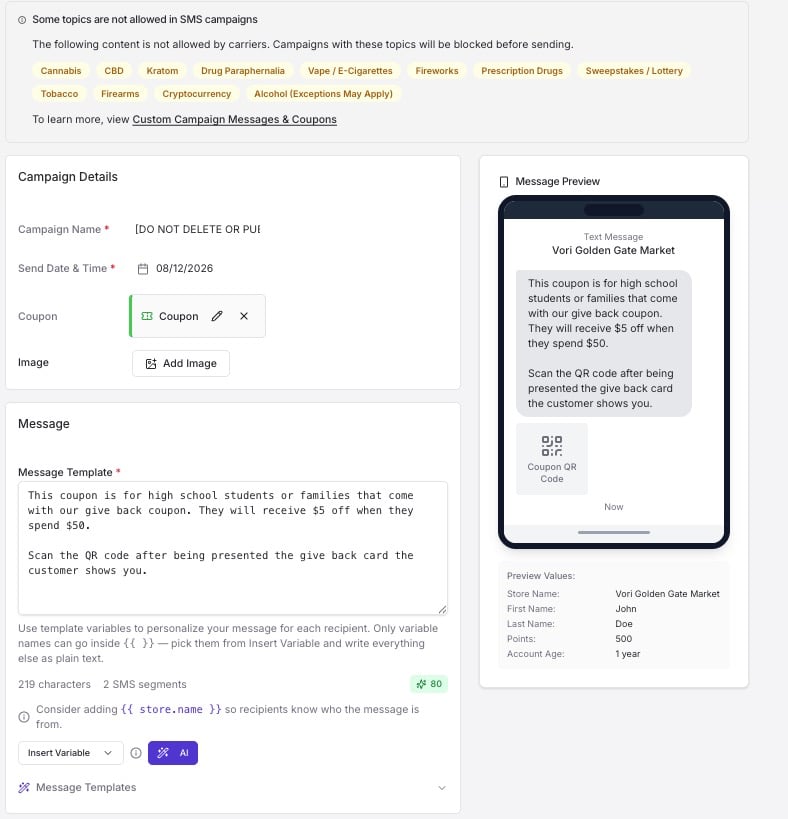
- Name the campaign [DO NOT DELETE OR PUBLISH]. This campaign will never actually send, so the name warns you and your team not to touch it later.
- Add the coupon for your offer. See How to Add a Coupon to a Custom Campaign for the coupon type that matches your discount.
-
In the Message Template, describe the offer and tell the cashier what to check for before scanning. For example: “This coupon is for families with our give back card. They’ll receive 50. Scan the QR code after the shopper shows their give back card.” This text prints alongside the QR code, so write it as an instruction to whoever is standing at the register.
Save the campaign and send yourself a test
- Click Save at the top right to save the campaign as a draft.
-
Enter your own phone number in the test message field and click Send Test.
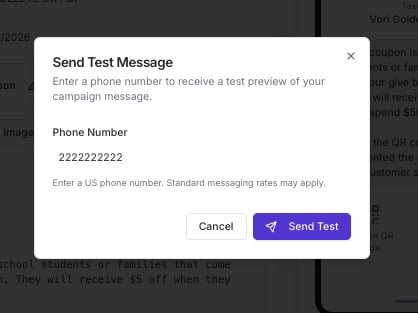
- You’ll receive a text message with the coupon details and a scannable QR code.
Print and place the QR code
- Take a screenshot of the QR code from the text message.
- Print the screenshot.
- Place the printed QR code at checkout so a cashier can scan it any time a qualifying shopper comes in.