

Chip is in open beta and free for every store through December 31, 2026. Usage during the beta will never be billed retroactively.
What you can ask Chip
Chip helps with three kinds of work:
Stores also use Chip to plan a promotion, catch a cost change, design shelf tags, and set up a new employee.
Your team can ask in the language they’re most comfortable with. For example, a team member can ask Chip a question in Chinese.
Where to find Chip
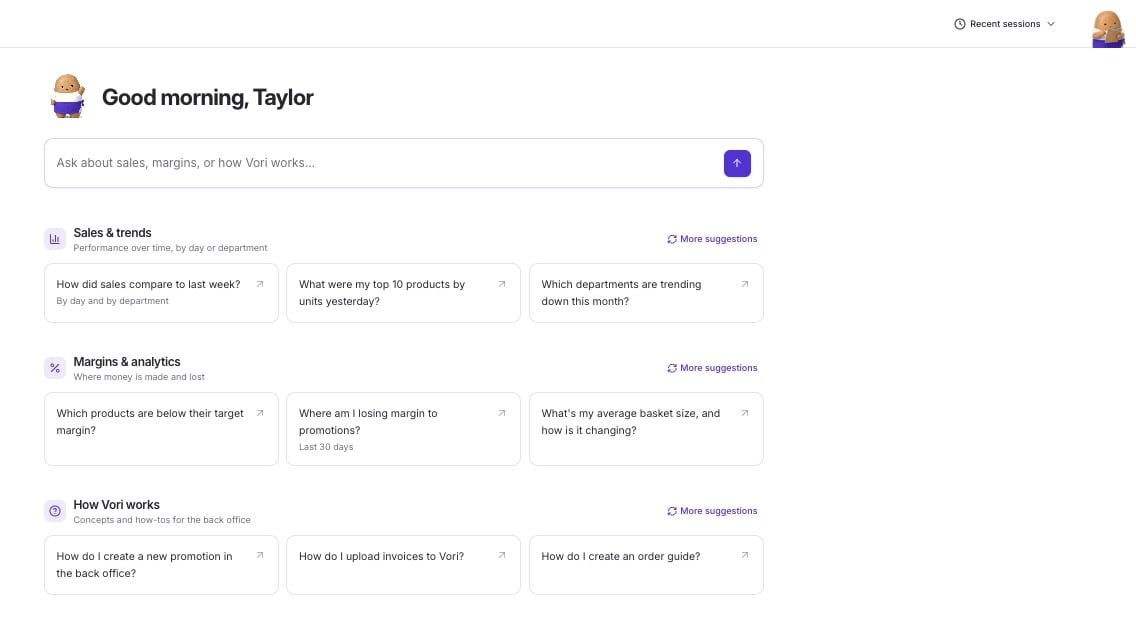
- On the Back Office Home screen: type your question in the box at the top, or pick a suggested question. Suggestions are grouped into Sales & trends, Margins & analytics, and How Vori works. Select More suggestions to see new ones.
- From any Back Office page: select Chip in the top-right corner to open the chat.
- On the handheld: on the Home screen, tap Chip next to Search. Your team can ask from anywhere in the store, not only from the office.
How Chip works with you
- Chip never changes anything without your okay. When Chip prepares a change, you see a card in the chat. Select Approve to make the change or Decline to skip it.
- Every answer shows its source. Numbers match what you see in your own reports. When an answer comes from the help center, Chip lists the articles used under Sources.
- Chip doesn’t guess. When Chip isn’t sure of an answer, Chip says so.
- Charts and tables open full screen on the handheld, so they’re easy to read on the floor.