

Before you start
Your monthly Vori subscription is charged to the payment method on file for your store. You can add a new one or replace the current one at any time from the Back Office.- Accepted methods: credit or debit card, or bank account.
- Have ready: your card details, or your bank account and routing numbers.
You enter your details in a secure form hosted by Zoho Billing, Vori’s billing provider. Vori never sees your full card or account number.
Add or update your payment method
- Sign in to the Back Office at app.vori.com.
- Select Billing in the left-hand navigation.
-
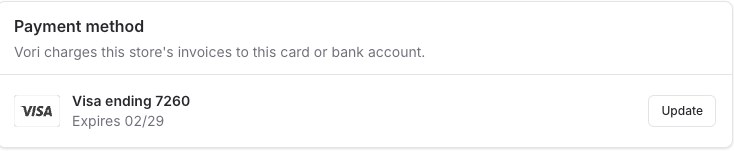
Find the Payment method card.
-
No payment method on file: click Add payment method.

-
Replacing the current one: click Update next to the card or bank account on file.
-
No payment method on file: click Add payment method.
-
In the Payment method window that opens, choose Card or Bank Account.
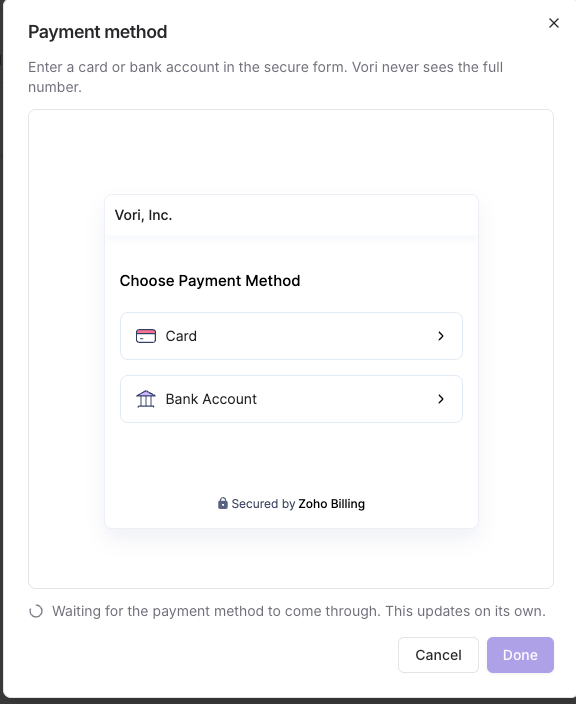
- Enter your card or bank account details and submit the form.
- Wait for the message at the bottom of the window to clear. It reads Waiting for the payment method to come through and updates on its own once the method is saved.
- Click Done.