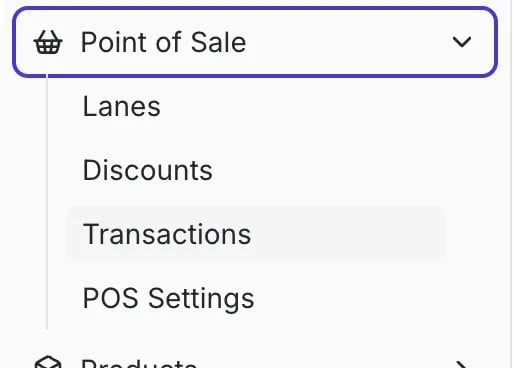
Navigate to POS Settings Page
You can manage all POS settings for tills and manager approvals in one central location.- In the New Back Office, select Point of Sale on the lefthand menu.
- Select POS Settings from the dropdown menu.
Configuring Till Settings
Till settings help you establish consistent and secure POS operations, including starting balances, cashback limits, and end-of-day processes.
- Require Till Counting on Close: Enable this setting to require the cashier to count and enter the opening and closing till amount at the POS when they open and close a till.
- Allow Cashiers to View Till Amounts: Enable this setting to let cashiers see the till’s expected amount at the register. Managers can always see it, regardless of this setting.
- Till Cutoff: Set the time when cashiers must close their tills and count cash. If a till is open past this time, the cashier will be prompted to close it.
The cutoff time will not automatically close an open till.
- Starting Till Amount: This value is the default starting balance that pre-fills when a cashier opens a till. Cashiers can still adjust this amount if needed.
- Max Cashback Amount: This setting establishes the absolute maximum cashback amount a shopper can request. Cashback amounts above this threshold will not be visible on the cashier or shopper displays.
Setting Manager Approvals
Manager approval settings allow you to require a manager’s 6-digit PIN entry for specific POS actions or for transactions that exceed a set threshold.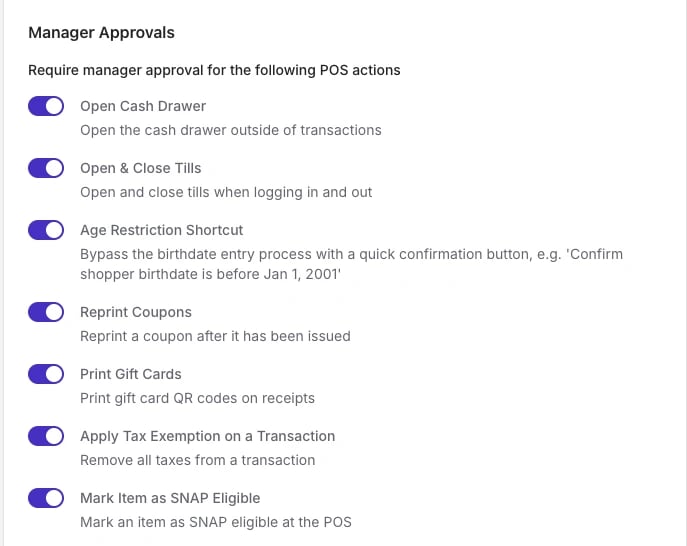
Actions Requiring Manager Approval
You can enable these settings to require manager approval for the following actions, regardless of the amount:- Open Cash Drawer: Opening the cash drawer outside of a standard cash transaction.
- Open & Close Tills: Opening and closing tills when logging in and out of the POS.
- Age Restriction Shortcut: Bypassing the full birthdate entry process with a quick confirmation button (e.g., confirming a shopper is before Jan 1, 2001).
- Reprint Coupons: Reprinting SNAP Incentive coupons.
- Print Gift Cards: Printing gift card QR codes on receipts.
- Apply Tax Exemption on a Transaction: Removing all taxes from a transaction.
- Mark Item as SNAP Eligible: Marking an item as SNAP eligible at the POS.
Thresholds for Manager Approval
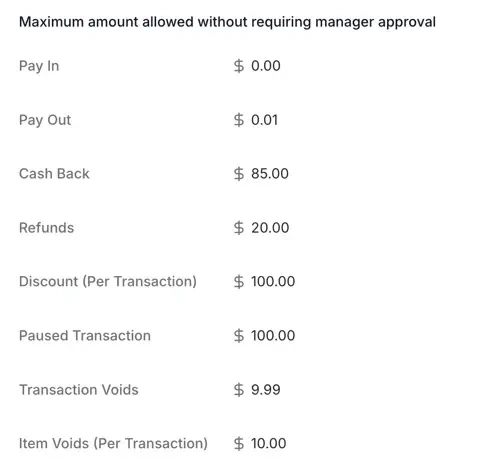
For transactional actions, you can set the Maximum amount allowed without requiring manager approval:- Pay In: Maximum cash amount that can be added to the till without manager approval.
- Pay Out: Maximum cash amount that can be removed from the till without manager approval.
- Cashback: Maximum cashback amount that can be processed without manager approval. This works in conjunction with the Max Cashback Amount setting.
- Refunds: Maximum total refund amount allowed per transaction without manager approval.
- Discount (Per Transaction): Maximum total discount amount allowed per transaction without manager approval.
- Paused Transaction: Maximum value of a paused transaction that can be retrieved and completed without manager approval.
- Transaction Voids: Maximum total value of a transaction that can be voided without manager approval.
-
Item Voids (Per Transaction): Maximum total value of items that can be voided within a single transaction without manager approval.
Receipt Configuration
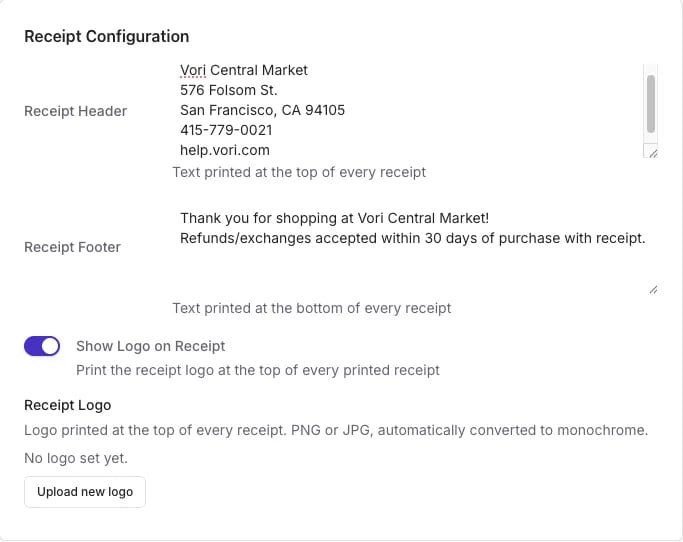
Customize the information that prints on every receipt at your store, including the header, footer, and store logo.-
Receipt Header: Text printed at the top of the receipt. Typically contains your store and business information.
Example:
- Receipt Footer: The section printed at the bottom of the receipt. Typically contains a thank-you message or your return and refund policy.
- Show Logo on Receipt: Toggle on to print your store logo at the top of every receipt. If disabled, the receipt prints your store name instead.
- Receipt Logo: Upload the logo image as a PNG or JPG. Vori automatically converts it to monochrome for thermal printing. This logo can be different from the one shown on the shopper display.