

Before You Start
Vori uses CardConnect to process payments. To change where your funds are deposited, you must submit a request directly through the CardPointe portal.- Required Access: You will need your CardPointe login credentials.
- Documentation: Have your new bank account and routing numbers ready. CardConnect may also require a voided check or a bank letter for verification.
How to Submit a Bank Account Change
Follow these steps to create a support ticket with CardConnect for a bank account update.- Go to cardpointe.com/account and log in to your merchant profile.
-
Navigate to the Support tab in the top menu.
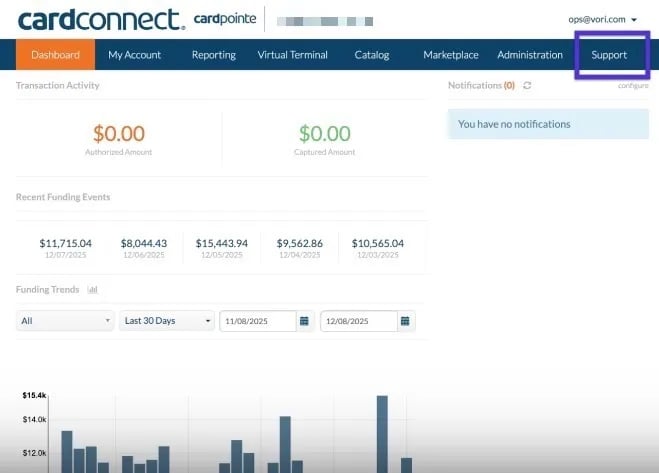
- Click Create New Ticket.
- Select the store location you wish to update from the dropdown menu.
-
In the Reason dropdown, select Bank Account Change.
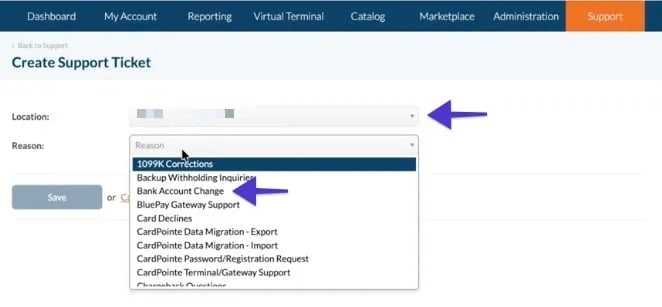
- Fill out the required bank details in the description or form fields provided.
- Click Submit.
Multi-Location Stores
If you manage multiple store locations, please note that bank account updates are handled per merchant ID.- Individual Requests: You must repeat the steps above for each location to ensure all stores are updated to the new account.
- Verification: CardConnect support may reach out via the ticket or email to confirm the change for security purposes.
Once the ticket is submitted, it usually takes 2–3 business days for CardConnect to verify the new account and update your deposits.