This applies only to orders submitted through Vori EDI. Orders sent by email or through TrueCommerce are unchanged.
Why This Happens
Vori would rather deliver your order without one item than miss the vendor’s ordering deadline entirely. Some vendors cut off orders as early as 5 AM, so holding the whole order over one item isn’t worth the delay. A missing barcode has no automatic fix, so Vori removes the line right away. A missing item code gets one more chance: Vori checks, in order:- Whether the item code is already on file elsewhere for that vendor.
- Whether the barcode was scanned as 11 digits instead of 12. If adding the missing digit back matches a code in the vendor’s catalog, Vori uses it.
- Whether other stores that order from the same Vori Network Vendor all agree on the item code for that product.
What Happens to Your Order
- Nothing else is delayed. Every other line on the order submits normally, on schedule, so you don’t miss the vendor’s delivery window over a single item.
- If nothing can be resolved, nothing goes out. Vori won’t submit an order with zero lines. Fix the item codes or barcodes causing the holdup and resubmit before the vendor’s deadline.
- You’ll get an email. The buyer who submitted the order receives an email listing exactly what was removed and why, along with a copy of both the order that was submitted and the original order you built.
The Most Common Cause: An 11-Digit Barcode
The most common reason a barcode doesn’t match anything in your vendor’s catalog is that it’s missing its last digit. This usually happens when someone scans a printed shelf tag instead of the product itself: some shelf tags print the barcode without its final digit, so the scan comes in one digit short. An 11-digit barcode won’t match the 12-digit code in your vendor’s catalog, even though it looks right at a glance. To avoid this, scan the barcode directly off the product or its packaging rather than the shelf tag.What’s in the Email
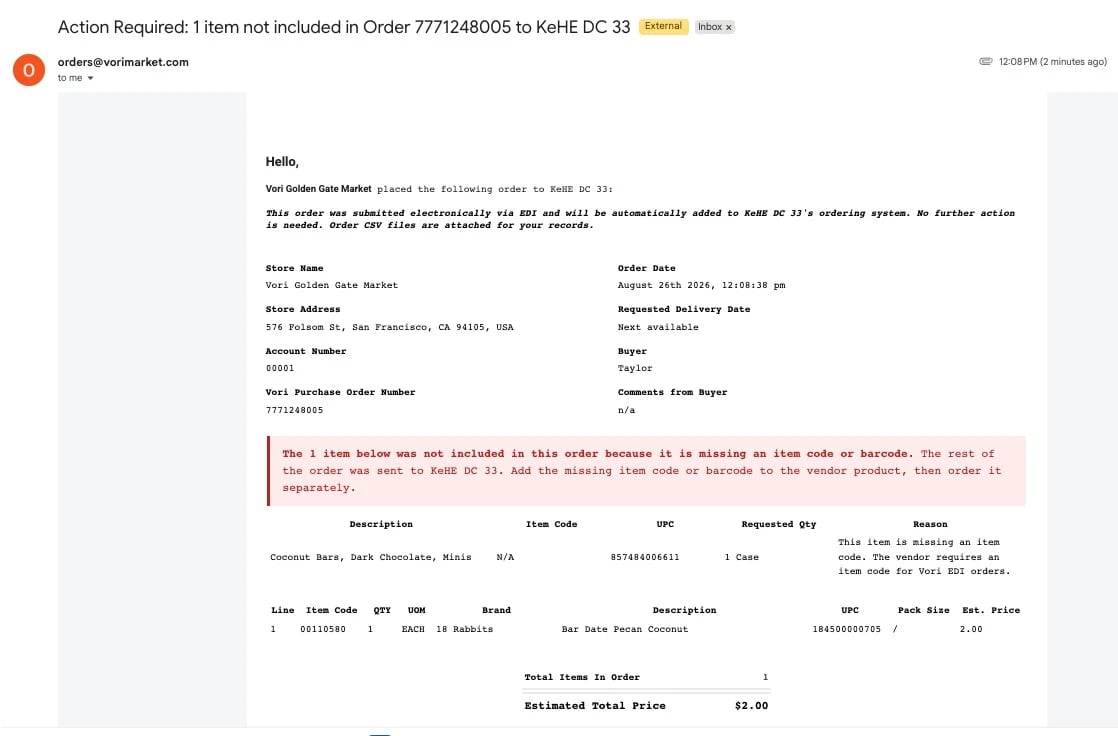
The buyer who submitted the order gets an email fromorders@vorimarket.com with the subject Action Required: [count] item(s) not included in Order [PO number] to [vendor].
The email confirms the rest of the order already went out electronically and needs no further action, then lists exactly which item(s) were removed and why, along with each one’s item code, UPC, and requested quantity, so you know exactly what to fix.