> ## Documentation Index
> Fetch the complete documentation index at: https://help.vori.com/llms.txt
> Use this file to discover all available pages before exploring further.
# Double Up Food Bucks (OR, MS, and CA)
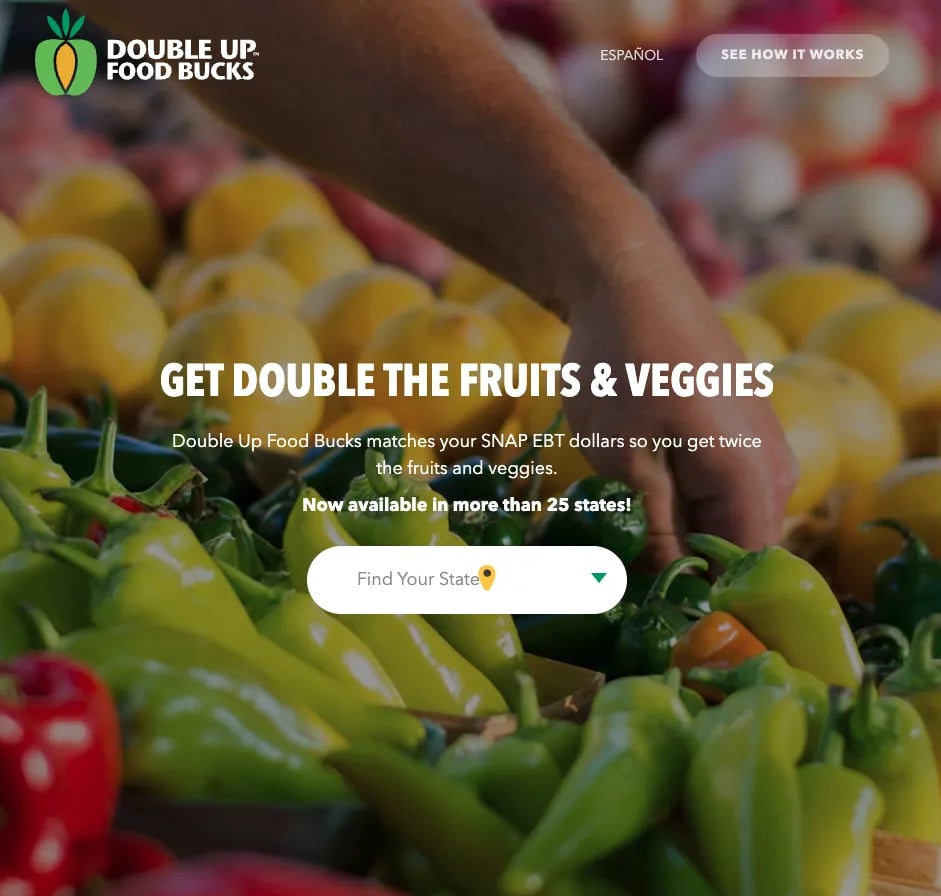
> Vori supports the SNAP Incentives Program — known as Double Up Food Bucks in Oregon and Mississippi, and Food Bucks in California — so your shoppers earn a coupon when they pay for eligible items with SNAP EBT funds.
The [SNAP Incentives Program](https://doubleupamerica.org/) — known as Double Up Food Bucks in Oregon and Mississippi, and Food Bucks in California — lets your shoppers earn a coupon when they pay for eligible items with Supplemental Nutrition Assistance Program (SNAP) Electronic Benefit Transfer (EBT) funds. They can then use that coupon on a future visit to buy more eligible foods.
 **✏️ Note:** This feature is enabled for Oregon, Mississippi, and California programs only.
***
### How the program works
These programs are designed to double a shopper's spending power on fresh foods. The way Vori issues incentives follows the program rules set by each state.
* A shopper pays for eligible items with SNAP EBT.
* After payment, the **Point of Sale (POS)** prints a coupon equal to the SNAP dollars spent on eligible items (up to the program's maximum).
* The shopper uses that coupon on a future transaction to buy more eligible foods.
**✏️ Note:** Incentives are issued as a *dollar amount*, not a percentage discount. A shopper who spends $10 in SNAP on eligible items earns a $10 coupon for their next visit — they receive $20 of value for $10 spent. This is *not* a 50% discount applied to the same transaction.
***
### Setting Up Product Eligibility
You must correctly flag products as eligible for earning or redeeming benefits based on your state’s program rules.
#### Prerequisite: enable EBT
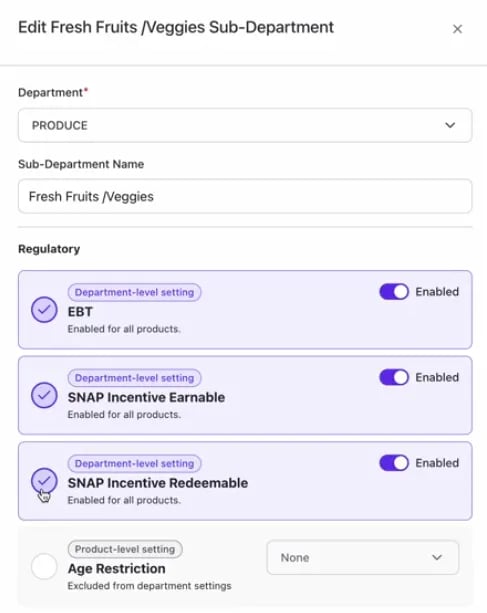
To activate the SNAP Incentive flags, **EBT must be enabled** at the Department or Sub-Department level.
* If **EBT** is **Disabled** for a product or department, the **SNAP Incentive Earnable** and **SNAP Incentive Redeemable** toggles will be **grayed out** and unavailable.
#### Configuring eligibility flags
There are two primary eligibility flags used for SNAP Incentives:
* **SNAP Incentive Earnable:** Products purchased with SNAP that allow the shopper to earn a coupon or benefit (e.g., all fresh produce purchases).
* **SNAP Incentive Redeemable:** Products on which the earned coupon or benefit can be applied for a discount (e.g., local produce only).
#### Methods for marking eligibility
You can mark a product as eligible in three ways:
1. **Department Inheritance:** Set eligibility at the **Department** or sub-department level. All products within that section will inherit the setting.
**✏️ Note:** This feature is enabled for Oregon, Mississippi, and California programs only.
***
### How the program works
These programs are designed to double a shopper's spending power on fresh foods. The way Vori issues incentives follows the program rules set by each state.
* A shopper pays for eligible items with SNAP EBT.
* After payment, the **Point of Sale (POS)** prints a coupon equal to the SNAP dollars spent on eligible items (up to the program's maximum).
* The shopper uses that coupon on a future transaction to buy more eligible foods.
**✏️ Note:** Incentives are issued as a *dollar amount*, not a percentage discount. A shopper who spends $10 in SNAP on eligible items earns a $10 coupon for their next visit — they receive $20 of value for $10 spent. This is *not* a 50% discount applied to the same transaction.
***
### Setting Up Product Eligibility
You must correctly flag products as eligible for earning or redeeming benefits based on your state’s program rules.
#### Prerequisite: enable EBT
To activate the SNAP Incentive flags, **EBT must be enabled** at the Department or Sub-Department level.
* If **EBT** is **Disabled** for a product or department, the **SNAP Incentive Earnable** and **SNAP Incentive Redeemable** toggles will be **grayed out** and unavailable.
#### Configuring eligibility flags
There are two primary eligibility flags used for SNAP Incentives:
* **SNAP Incentive Earnable:** Products purchased with SNAP that allow the shopper to earn a coupon or benefit (e.g., all fresh produce purchases).
* **SNAP Incentive Redeemable:** Products on which the earned coupon or benefit can be applied for a discount (e.g., local produce only).
#### Methods for marking eligibility
You can mark a product as eligible in three ways:
1. **Department Inheritance:** Set eligibility at the **Department** or sub-department level. All products within that section will inherit the setting.
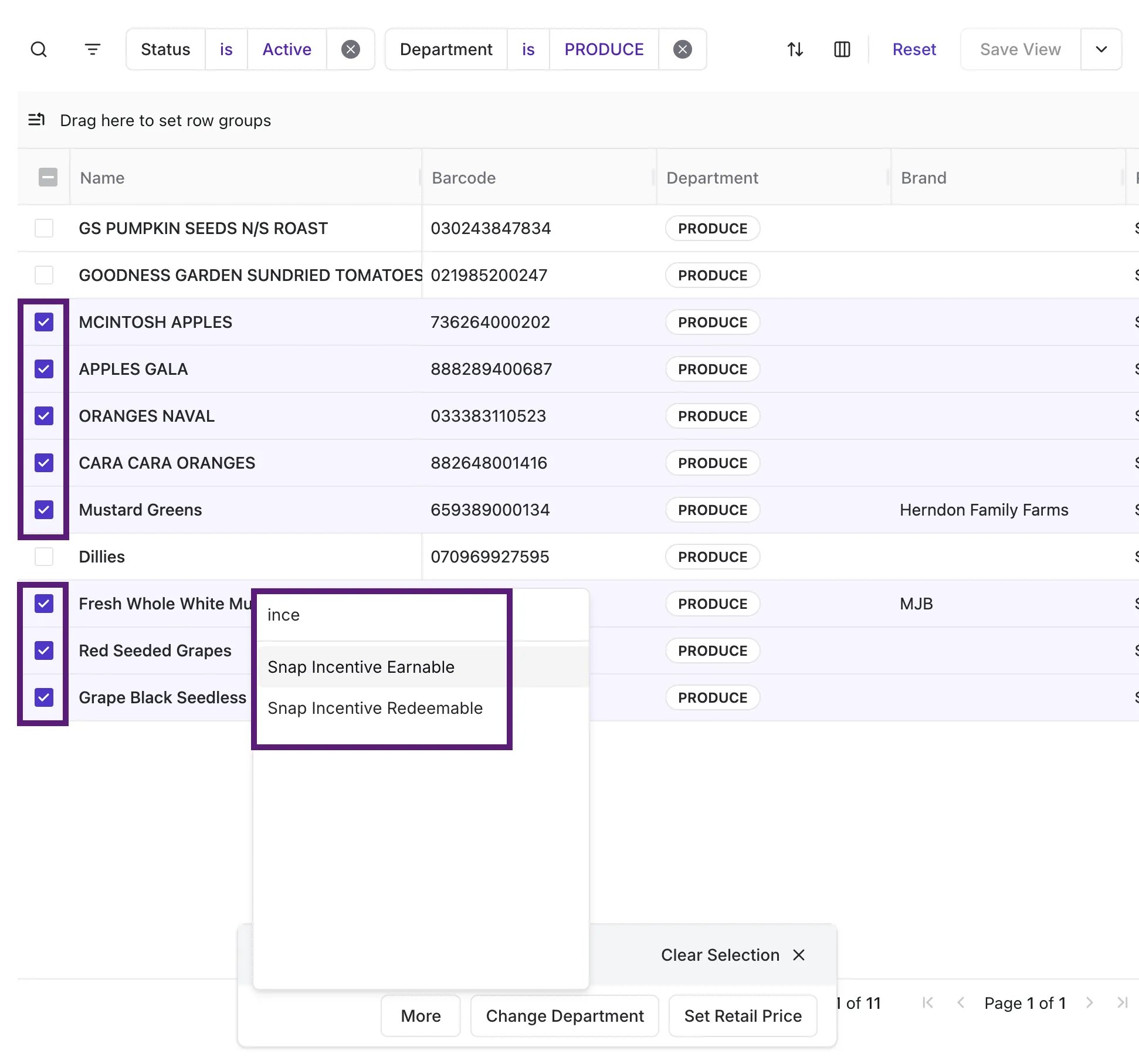
 2. **Bulk Change:** Use **Bulk Actions** in the **Product Catalog** to update eligibility for a selection of products simultaneously.
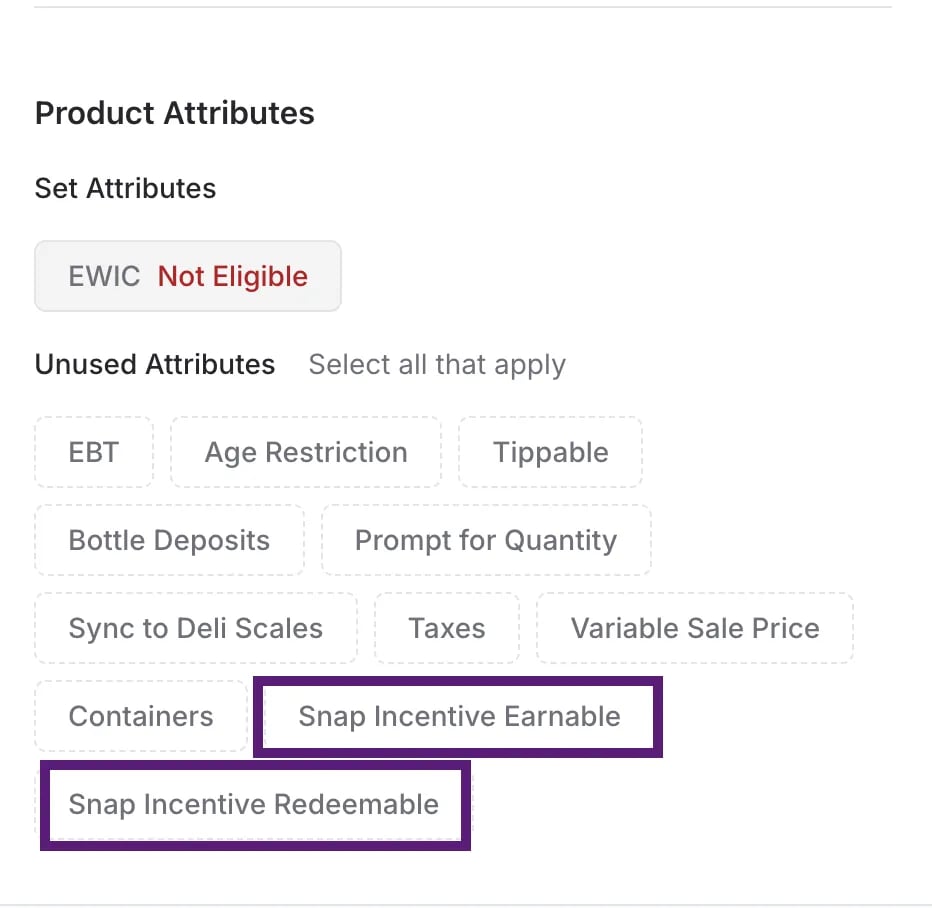
 3. **Individual Product Change:** Open the **Product Detail** page for a specific product in the back office to manually toggle the eligibility flags.
 ***
### Shopper Workflow: Earning Benefits at the POS
The process of earning a coupon is tied directly to the shopper's payment method and the total value of eligible items.
#### How the coupon amount is calculated
The coupon value equals the SNAP dollars spent on **SNAP Incentive Earnable** items in that basket, capped at the program's maximum.
Coupon amount = the lesser of:
* The total SNAP payment applied,
* The total of **SNAP Incentive Earnable** items in the basket, or
* The program's maximum (e.g., \$20 per transaction in Oregon).
**💡 Tip:** A shopper's confusion often comes from expecting a percentage discount. The coupon is always a dollar amount based on what they paid with SNAP on eligible items — it is *never* a percentage applied to the basket.
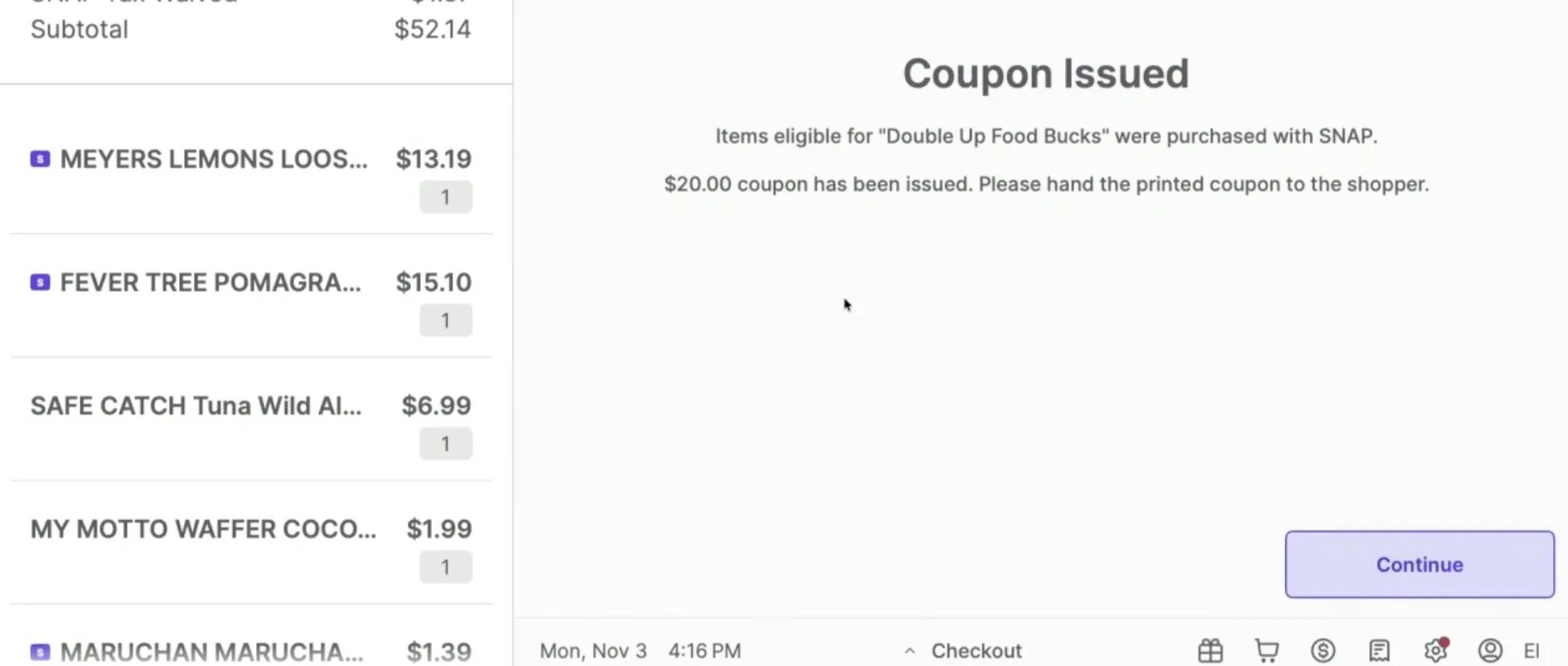
After payment is finalized, a coupon prints automatically at the **POS**.
***
### Shopper Workflow: Earning Benefits at the POS
The process of earning a coupon is tied directly to the shopper's payment method and the total value of eligible items.
#### How the coupon amount is calculated
The coupon value equals the SNAP dollars spent on **SNAP Incentive Earnable** items in that basket, capped at the program's maximum.
Coupon amount = the lesser of:
* The total SNAP payment applied,
* The total of **SNAP Incentive Earnable** items in the basket, or
* The program's maximum (e.g., \$20 per transaction in Oregon).
**💡 Tip:** A shopper's confusion often comes from expecting a percentage discount. The coupon is always a dollar amount based on what they paid with SNAP on eligible items — it is *never* a percentage applied to the basket.
After payment is finalized, a coupon prints automatically at the **POS**.
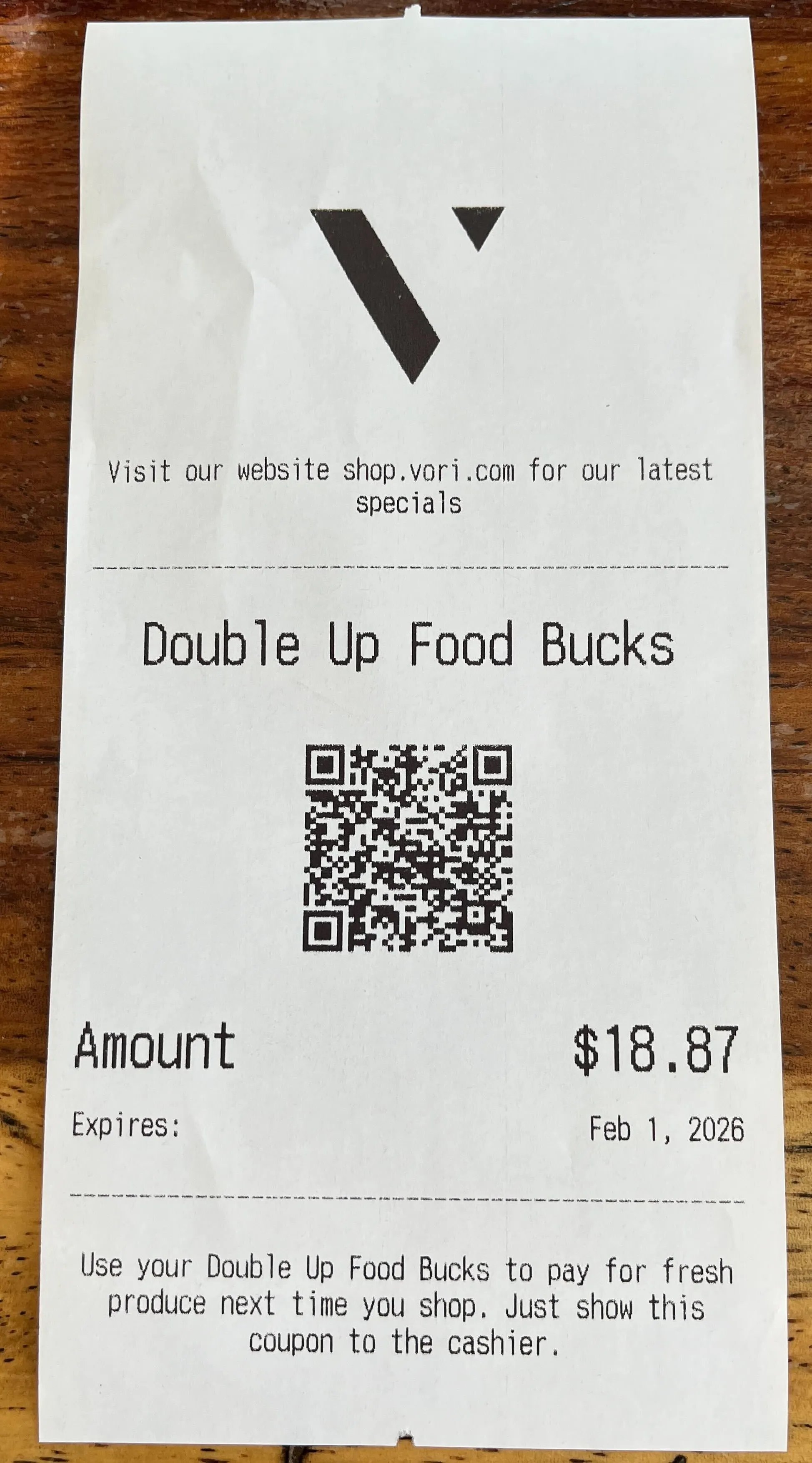
 The printed coupon contains:
* The dollar value of the earned incentive.
* The expiration date based on the program rules (e.g., 90 days).
* A concise description or set of rules for using the coupon (as specified by the program administrator).
The printed coupon contains:
* The dollar value of the earned incentive.
* The expiration date based on the program rules (e.g., 90 days).
* A concise description or set of rules for using the coupon (as specified by the program administrator).
 #### Edge cases to know
* **EBT balance is lower than eligible item total:** If the SNAP-eligible items in the basket cost more than what the shopper has on their EBT card, the coupon is based only on the EBT amount actually spent — not on the full retail price of those items.
* **A coupon was used to lower an item's price:** If a previous coupon reduced the price of a SNAP-eligible item, the next coupon earned is calculated from the reduced price.
* **EBT Cash does not earn coupons:** Only SNAP EBT payments earn incentives. EBT Cash payments do not.
***
### Shopper Workflow: Using Coupons at the POS
Shoppers can use coupons for discounts on future purchases of eligible items.
#### Redeeming coupons
1. **Scan the coupon:** The shopper presents the paper coupon. The store scans the coupon's barcode at the **POS**.
2. **Discount applied:** The coupon value is automatically applied as a discount against products marked **SNAP Incentive Redeemable**.
3. **Use multiple coupons:** Shoppers may use multiple coupons in a single transaction.
4. **Earning and redeeming in the same transaction:** If a shopper redeems a coupon *and* purchases additional eligible foods with SNAP EBT funds in the same transaction, a new coupon is issued for the newly earned amount.
#### Coupon expiration and value
* **Expiration:** Coupons have an expiration date set by the state program.
* **Use it or lose it:** Coupons are for single-use only. Any unused dollar value on the coupon (if the coupon value is greater than the total purchase of redeemable items) does not roll over and is lost.
**⚠️ Caution:** Coupon values are set by the state program. You cannot manually adjust the coupon amount, the expiration date, or the redemption rules in Vori.
***
### Troubleshooting and Best Practices
| **Concern** | **Resolution** |
| ------------------------------------------------ | -------------------------------------------------------------------------------------------------------------------------------------------------------------------------------------------------------------------------------------------------------------------------------------------------------------------------------- |
| **Customer Expects a Same-Transaction Discount** | Some older state programs and other POS vendors ran the incentive as a percentage discount applied at checkout. Across all supported states (OR, MS, and CA), Vori issues a coupon for the *next* transaction instead, per current program rules. The shopper still receives double the spending power — just across two visits. |
| **Coupon Value Looks Wrong** | The coupon equals the SNAP dollars spent on eligible items, capped at the program max. If a coupon reduced an item's price earlier, the next coupon is calculated on the reduced price. Check the [SNAP Incentives report](https://app.vori.com/retail/reporting/finances/snap-incentives) for full coupon history. |
| **Coupon Payment Type** | The incentive is strictly generated only if the shopper uses SNAP EBT benefits to pay for eligible items (not EBT Cash). |
| **Missing Coupon Printout** | Ensure the **POS** has enough paper. The coupon prints immediately after payment and is designed to come out *before* the final receipt. |
| **Customer Lost the Coupon** | If the shopper loses the coupon, the store can look up the original transaction in the **Order Viewer** and reprint the coupon (subject to manager approval). |
| **Incorrect Eligibility Marking** | Review your state's program guidelines. The rules often change, so it's a best practice to regularly check your product flag settings, especially if running a local-only redemption rule. |
| **Transaction Refund** | If you refund a purchase that generated a coupon, the Double Up coupon is still valid for the shopper to use. |
| **Coupon Visibility on Transactions Page** | You cannot filter the **Transactions** page by "SNAP Incentive Coupon" because it is a coupon, not a payment method. However, the [SNAP Incentives report](https://app.vori.com/retail/reporting/finances/snap-incentives) tracks all coupons redeemed, allowing you to view underlying data. |
## Related topics
- [Track Double Up Food Bucks Performance](/reporting/snap-incentive-reports/track-double-up-food-bucks-performance.md)
- [How to report SNAP incentives in Mississippi](/reporting/snap-incentive-reports/how-to-report-snap-incentives-in-mississippi.md)
- [A Better Vori Experience: From Back Office to the POS](/whats-new-in-vori/feature-releases/a-better-vori-experience-from-back-office-to-the-pos.md)
#### Edge cases to know
* **EBT balance is lower than eligible item total:** If the SNAP-eligible items in the basket cost more than what the shopper has on their EBT card, the coupon is based only on the EBT amount actually spent — not on the full retail price of those items.
* **A coupon was used to lower an item's price:** If a previous coupon reduced the price of a SNAP-eligible item, the next coupon earned is calculated from the reduced price.
* **EBT Cash does not earn coupons:** Only SNAP EBT payments earn incentives. EBT Cash payments do not.
***
### Shopper Workflow: Using Coupons at the POS
Shoppers can use coupons for discounts on future purchases of eligible items.
#### Redeeming coupons
1. **Scan the coupon:** The shopper presents the paper coupon. The store scans the coupon's barcode at the **POS**.
2. **Discount applied:** The coupon value is automatically applied as a discount against products marked **SNAP Incentive Redeemable**.
3. **Use multiple coupons:** Shoppers may use multiple coupons in a single transaction.
4. **Earning and redeeming in the same transaction:** If a shopper redeems a coupon *and* purchases additional eligible foods with SNAP EBT funds in the same transaction, a new coupon is issued for the newly earned amount.
#### Coupon expiration and value
* **Expiration:** Coupons have an expiration date set by the state program.
* **Use it or lose it:** Coupons are for single-use only. Any unused dollar value on the coupon (if the coupon value is greater than the total purchase of redeemable items) does not roll over and is lost.
**⚠️ Caution:** Coupon values are set by the state program. You cannot manually adjust the coupon amount, the expiration date, or the redemption rules in Vori.
***
### Troubleshooting and Best Practices
| **Concern** | **Resolution** |
| ------------------------------------------------ | -------------------------------------------------------------------------------------------------------------------------------------------------------------------------------------------------------------------------------------------------------------------------------------------------------------------------------- |
| **Customer Expects a Same-Transaction Discount** | Some older state programs and other POS vendors ran the incentive as a percentage discount applied at checkout. Across all supported states (OR, MS, and CA), Vori issues a coupon for the *next* transaction instead, per current program rules. The shopper still receives double the spending power — just across two visits. |
| **Coupon Value Looks Wrong** | The coupon equals the SNAP dollars spent on eligible items, capped at the program max. If a coupon reduced an item's price earlier, the next coupon is calculated on the reduced price. Check the [SNAP Incentives report](https://app.vori.com/retail/reporting/finances/snap-incentives) for full coupon history. |
| **Coupon Payment Type** | The incentive is strictly generated only if the shopper uses SNAP EBT benefits to pay for eligible items (not EBT Cash). |
| **Missing Coupon Printout** | Ensure the **POS** has enough paper. The coupon prints immediately after payment and is designed to come out *before* the final receipt. |
| **Customer Lost the Coupon** | If the shopper loses the coupon, the store can look up the original transaction in the **Order Viewer** and reprint the coupon (subject to manager approval). |
| **Incorrect Eligibility Marking** | Review your state's program guidelines. The rules often change, so it's a best practice to regularly check your product flag settings, especially if running a local-only redemption rule. |
| **Transaction Refund** | If you refund a purchase that generated a coupon, the Double Up coupon is still valid for the shopper to use. |
| **Coupon Visibility on Transactions Page** | You cannot filter the **Transactions** page by "SNAP Incentive Coupon" because it is a coupon, not a payment method. However, the [SNAP Incentives report](https://app.vori.com/retail/reporting/finances/snap-incentives) tracks all coupons redeemed, allowing you to view underlying data. |
## Related topics
- [Track Double Up Food Bucks Performance](/reporting/snap-incentive-reports/track-double-up-food-bucks-performance.md)
- [How to report SNAP incentives in Mississippi](/reporting/snap-incentive-reports/how-to-report-snap-incentives-in-mississippi.md)
- [A Better Vori Experience: From Back Office to the POS](/whats-new-in-vori/feature-releases/a-better-vori-experience-from-back-office-to-the-pos.md)