> ## Documentation Index
> Fetch the complete documentation index at: https://help.vori.com/llms.txt
> Use this file to discover all available pages before exploring further.
# Access the New Vori Back Office
> Learn how to switch between the Legacy (app.vori.com) and New (app.vori.com) versions of the Back Office.
### Switch to the New Back Office
Toggle from the current Back Office to the new beta version to try out the latest updates.
1. Select your **store name** from the top left of the screen.
2. Use the toggle to switch from **Legacy Dash** to **New App**.
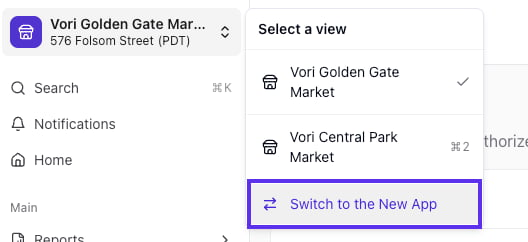 3. You will be directed to the new Back Office login page at **[app.vori.com](http://app.vori.com)**. Enter your **username** and **password** into the new Back Office log in page.
***
### Switch Back to the Legacy Back Office
You can return to the previous version of the Back Office at any time.
1. Select your **store name** from the top left of the screen.
2. Use the toggle to switch from **New App** back to **Legacy Dash**.
3. You will be directed to the new Back Office login page at **[app.vori.com](http://app.vori.com)**. Enter your **username** and **password** into the new Back Office log in page.
***
### Switch Back to the Legacy Back Office
You can return to the previous version of the Back Office at any time.
1. Select your **store name** from the top left of the screen.
2. Use the toggle to switch from **New App** back to **Legacy Dash**.
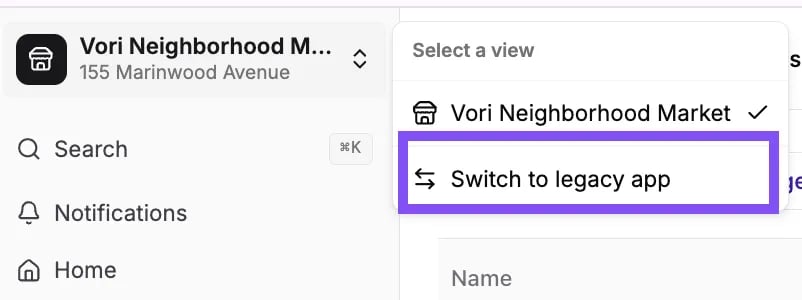 3. You may be prompted to log in again.
## Related topics
- [Reset Your Vori Back Office and VoriOS Password](/vori-setup-and-troubleshooting/reset-your-vori-back-office-and-vori-os-password.md)
- [Setting Up Quick Food Service Counters](/whats-new-in-vori/in-alpha-quick-food-service/setting-up-quick-food-service-counters.md)
- [How to add Vori Back Office to the POS Cashier Screen](/vori-setup-and-troubleshooting/how-to-add-vori-back-office-to-the-pos-cashier-screen.md)
3. You may be prompted to log in again.
## Related topics
- [Reset Your Vori Back Office and VoriOS Password](/vori-setup-and-troubleshooting/reset-your-vori-back-office-and-vori-os-password.md)
- [Setting Up Quick Food Service Counters](/whats-new-in-vori/in-alpha-quick-food-service/setting-up-quick-food-service-counters.md)
- [How to add Vori Back Office to the POS Cashier Screen](/vori-setup-and-troubleshooting/how-to-add-vori-back-office-to-the-pos-cashier-screen.md)