![vori-logo-black-horizontal-01 (1).png]](https://help.vori.com/hs-fs/hubfs/vori-logo-black-horizontal-01%20(1).png?height=42&name=vori-logo-black-horizontal-01%20(1).png)
Blackhawk Network (BHN) is the provider behind the third-party gift cards you see on racks, such as Visa, Amazon, Starbucks, or Roblox.
Through Vori’s integration, you can scan these cards, load funds, and activate them directly at the POS.
Table of Contents
How to Get Started
Selling Blackhawk gift cards is a partnership. You own the commercial relationship with Blackhawk, and Vori provides the technology to make the sale happen at the register.
-
Establish Your Account: You must have an active merchant account directly with Blackhawk Network before we can begin. If you are new to Blackhawk, you will need to set this up first to obtain your Merchant ID (MID).
-
Connect with Vori: Once your Blackhawk account is active, we handle the technical connection.
-
Store Verification: We use your Merchant ID (MID) to link your store to our integration.
-
System Configuration: Our engineering team configures the API so that when you scan a card, Vori talks to Blackhawk’s servers instantly to activate the funds.
-
-
Run a Test Transaction: Before your official go-live date, we will ask you to run one live test transaction on a real Blackhawk gift card. This confirms the connection is active and funds are loading correctly.
Managing Your Gift Card Inventory
Your gift card selection is unique to your store. Because inventory data often varies between your old system and Blackhawk's current list, you play a key role in ensuring your products are ready to scan.
Verify Your Approved Product List (APL): Blackhawk provides an Approved Product List (APL) containing the specific cards authorized for your store.
-
Review your Vori Catalog: You must verify that the items on your Blackhawk APL exist in your Vori product file.
-
Check for Discrepancies: Sometimes, the data from your previous system does not match the current Blackhawk APL. It is your responsibility to confirm the cards you have on the rack match the products in Vori.
-
Review Activation Fees: If you sell "Open Loop" cards (like Visa, Mastercard, or Amex), there is usually an activation fee paid by the shopper (e.g., $4.95).
-
In Vori, we set this up similarly to a bottle deposit fee. This ensures the fee tracks correctly in your reporting.
-
-
Loyalty Settings: By default, shoppers earn loyalty points on purchases. However, because gift cards often have slim margins, many stores prefer to disable point earning for these items.
-
Please confirm with your Vori Onboarding Manager if you want Loyalty Disabled for Blackhawk products.
-
Ongoing Maintenance: As Blackhawk releases new card designs or seasonal items, they will not automatically appear in Vori.
-
Add New Items: When you receive new inventory from Blackhawk, you must add these new UPCs to your Vori product catalog to ensure they scan at the register.
How to Process a Gift Card Sale
Selling a Blackhawk gift card requires real-time communication with the bank. Follow these steps to ensure the card activates successfully.
1. Scan or Search for the Item Scan the barcode on the back of the gift card.
2. Enter the Price (Variable Cards Only) Some cards have a fixed price (e.g., $25). These will add to the cart instantly.
If the card allows variable pricing (e.g., $25–$500), the Manual Price screen will appear.
-
Enter the amount the shopper wants to load (e.g., 50.00).
-
Tap Apply Price.

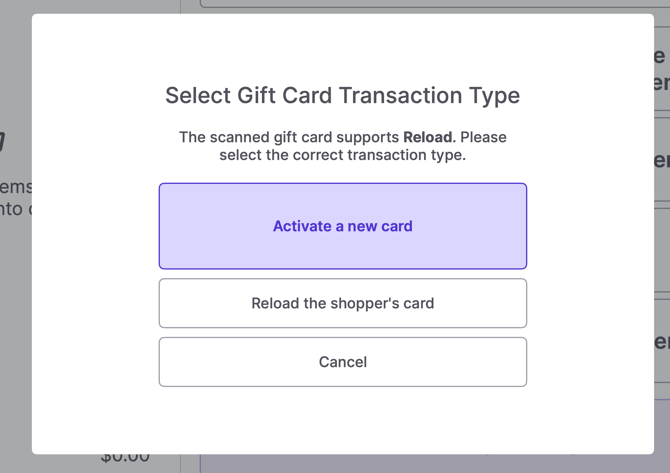
3. Select Transaction Type A pop-up window will appear asking how to handle the specific card. Select the correct option:
-
Activate a new card: Choose this if the shopper is buying a brand-new card off the rack.
-
Reload the shopper's card: Choose this if the shopper already owns the card and wants to add more funds.
4. Complete Payment The item will appear in the cart. Proceed to payment as usual.
-
Select the payment method (e.g., Cash, Card).
-
Tap Confirm Amount.
5. Provide Receipt Once the transaction is complete, the POS sends an activation signal to Blackhawk.
-
Always give the receipt to the shopper. This is their only proof of activation if issues arise later.
✏️ Note: If a card does not support reloading, the Reload the shopper's card option will not be clickable.
Troubleshooting
Can I refund a gift card? No. All third-party gift card sales are final. Because the funds are pushed to the card immediately upon payment, the POS cannot reverse the transaction. Refunds must be handled by the shopper contacting Blackhawk support directly.
What if the card doesn't work for the shopper? If the POS showed a successful transaction but the card is invalid:
-
Verify the shopper has their receipt.
-
Direct the shopper to the support number on the back of their gift card.
Who do I contact for support?
-
For Scan/POS errors: Contact Vori Support.
-
For Card Activation failures: Contact Blackhawk support at askblackhawk@blackhawk-net.com.