> ## Documentation Index
> Fetch the complete documentation index at: https://help.vori.com/llms.txt
> Use this file to discover all available pages before exploring further.
# View Central Reporting for Multi-Store Banners
> See combined sales performance and item movement across all store locations
✏️ **Note:** The New Back Office ([app.vori.com](http://app.vori.com/)) experience is currently in beta testing and launching in select stores. This article describes features in the New Back Office. For instructions on accessing it, view our guide: [Access the New Back Office.](/vori-setup-and-troubleshooting/access-the-new-vori-back-office)
### Overview
If you operate more than one store location, you can use **Central View** in the Vori Back Office to review performance and reporting across your banner.
Central reporting gives you visibility into:
* Combined sales totals and item movement.
* California Redemption Value (**CRV**) totals.
* Store-by-store comparisons.
* Multi-store rollup reports and store-specific reports.
✏️ **Note:** You can view all available reports for each store in Central View. For large reports, use **filter options** and **scrolling** to see data across all stores.
***
### Access Central Reporting
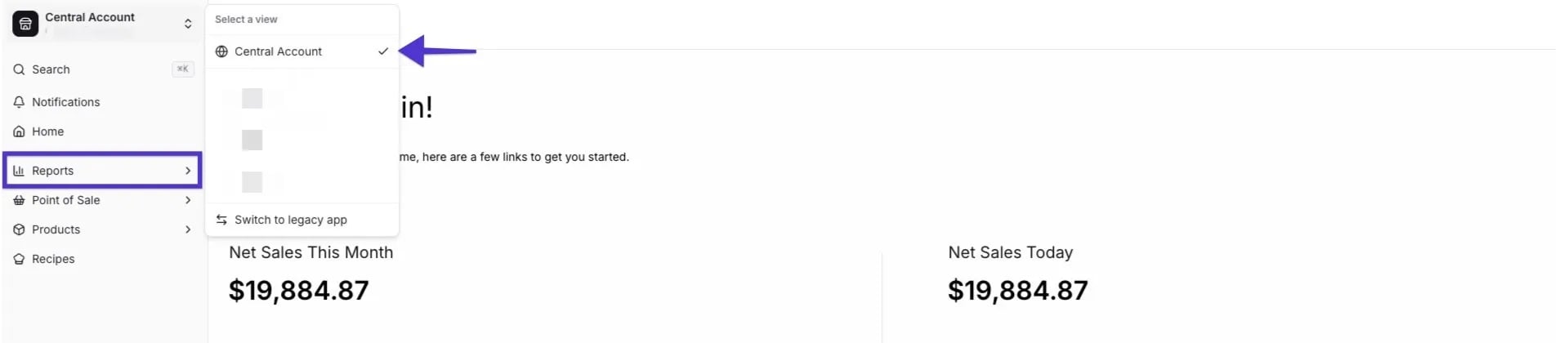
Follow these steps to switch to the **Central View** dashboard:
1. Log in to **app.vori.com**.
2. In the top-left corner, click the **Banner Name** dropdown (it will show the current store you are logged into).
3. Select **Central Account**.
4. From the left menu, select **Reporting**.
5. You are now viewing the consolidated data for all your stores.
 ✏️ **Note:** You must have permission to access Central View. Contact Vori Support if you do not see the option.
***
### Key Multi-Store Reports
#### Sales Overview
* Provides a high-level summary of your total sales.
* Displays **combined sales totals** for the banner.
* Provides **store-to-store comparisons** on a visual graph.
* Each store appears as a separate line for easy trend evaluation.
✏️ **Note:** You must have permission to access Central View. Contact Vori Support if you do not see the option.
***
### Key Multi-Store Reports
#### Sales Overview
* Provides a high-level summary of your total sales.
* Displays **combined sales totals** for the banner.
* Provides **store-to-store comparisons** on a visual graph.
* Each store appears as a separate line for easy trend evaluation.
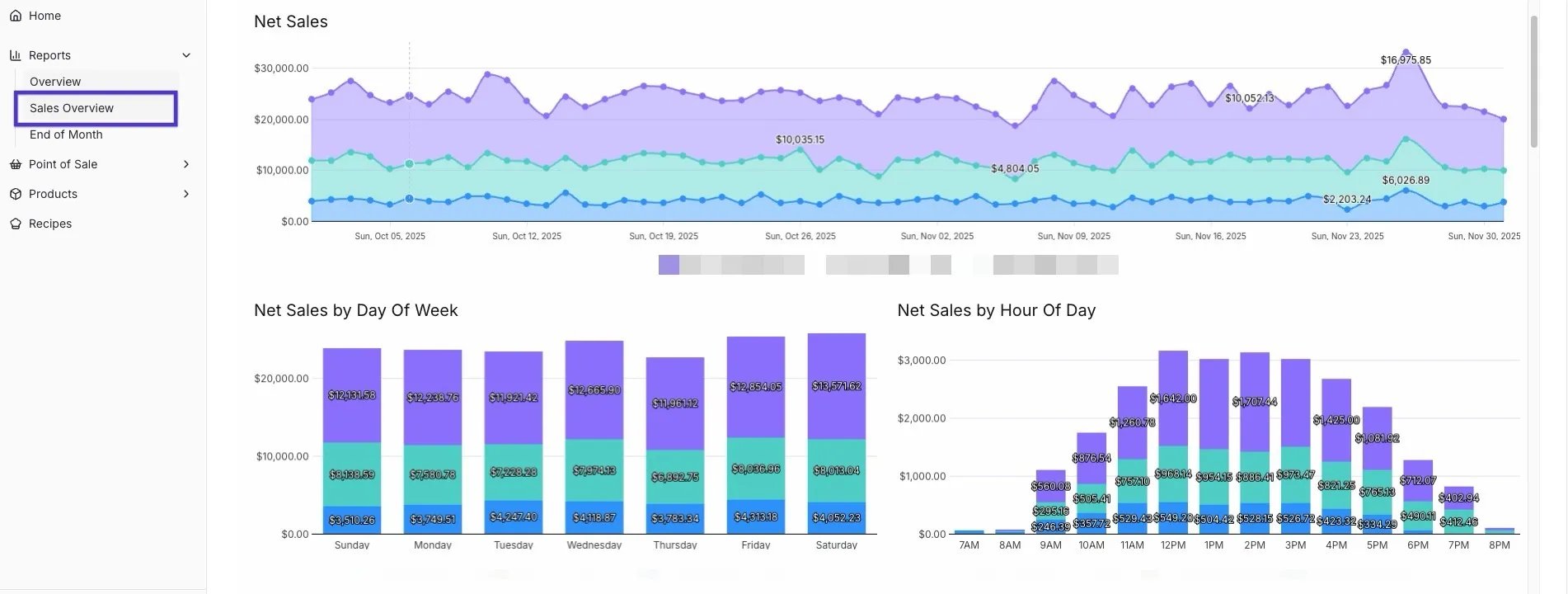 💡 **Tip:** Use the Sales Overview graph to identify **seasonal trends**, **peak days**, and **store-specific opportunities**.
#### End of Month
* Provides a clear financial summary for **accounting and operational review**.
* Includes **rollup of monthly totals** across all stores.
* Displays **CRV values, refunds, voids, and payment type summaries**.
💡 **Tip:** Use the Sales Overview graph to identify **seasonal trends**, **peak days**, and **store-specific opportunities**.
#### End of Month
* Provides a clear financial summary for **accounting and operational review**.
* Includes **rollup of monthly totals** across all stores.
* Displays **CRV values, refunds, voids, and payment type summaries**.
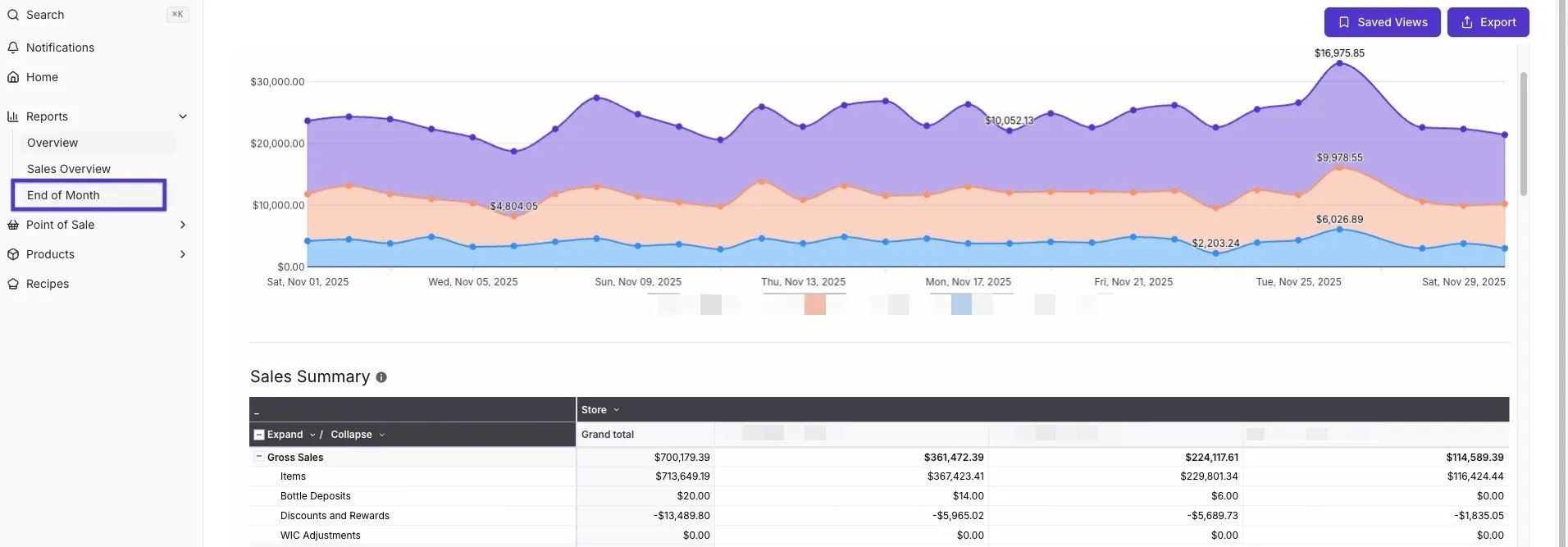 💡 **Tip:** This report is ideal for closing accounting periods and reviewing monthly performance.
***
### Store-Level vs. Combined Data
Most reports offer both **combined summary data** and **store-specific detail views**.
**Examples:**
* **Item Sales Report:** View all locations combined or filter by store.
* **Sales Overview:** Displays each store individually on the graph.
✏️ **Note:** Some reports automatically calculate banner totals, while others provide **separate pages per store**. Use the **filter options** and **scrolling** in large reports to ensure you see all relevant data across each store.
## Related topics
- [Process Refunds on the POS](/point-of-sale-pos/basic-cashier-functions/process-refunds-on-the-pos.md)
- [Understanding user roles](/getting-started-with-vori/meet-vori/understanding-user-roles.md)
- [Managing Product Groups on Mobile](/product-and-product-catalog-management/product-creation-and-set-up/managing-product-groups-on-mobile.md)
💡 **Tip:** This report is ideal for closing accounting periods and reviewing monthly performance.
***
### Store-Level vs. Combined Data
Most reports offer both **combined summary data** and **store-specific detail views**.
**Examples:**
* **Item Sales Report:** View all locations combined or filter by store.
* **Sales Overview:** Displays each store individually on the graph.
✏️ **Note:** Some reports automatically calculate banner totals, while others provide **separate pages per store**. Use the **filter options** and **scrolling** in large reports to ensure you see all relevant data across each store.
## Related topics
- [Process Refunds on the POS](/point-of-sale-pos/basic-cashier-functions/process-refunds-on-the-pos.md)
- [Understanding user roles](/getting-started-with-vori/meet-vori/understanding-user-roles.md)
- [Managing Product Groups on Mobile](/product-and-product-catalog-management/product-creation-and-set-up/managing-product-groups-on-mobile.md)