> ## Documentation Index
> Fetch the complete documentation index at: https://help.vori.com/llms.txt
> Use this file to discover all available pages before exploring further.
# Print Promotion Tags on VoriOS
> Learn how to print promotional tags on VoriOS.
A promotion only drives sales when shoppers see it. Once an item is on sale, print its yellow promotion tag from the Vori operating system and place it on the shelf so the deal stands out. You can do it from the sales floor in a few taps, no trip to the back office required.
Promotion tags are the tall yellow tags that call out a sale price. They are different from the standard retail shelf tags covered in [Print Product Tags on VoriOS](/product-and-product-catalog-management/product-creation-and-set-up/print-product-tags-on-vori-os).
### Before you print
Before you begin, follow these steps to ensure your promotion tags print correctly:
1. **Create the promotion.** A tag is only generated once an item is on an active promotion. To set one up, see [Create and Manage Promotions in Vori OS](/promotions/create-and-manage-promotions-in-vori-os).
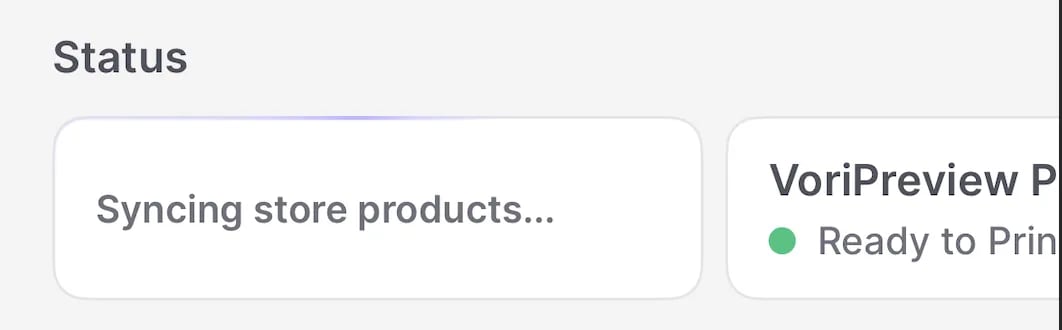
2. **Sync your device.** Tap the sync status card (for example, "**Synced 20 minutes ago**") to pull in the latest promotions and price updates from Back Office.
 3. **Connect your printer.** Make sure your [Zebra printer is connected](/hardware-and-peripherals/tag-printer/connect-the-zebra-printer-to-the-vorios-app).
4. **Load and configure the yellow promotion labels.** Promotion tags print on the tall yellow label roll, which uses different printer settings than retail tags. To swap the roll and configure the Zebra printer, follow [How to load and print promotional label from the VoriOS app](/hardware-and-peripherals/tag-printer/how-to-load-and-print-promotional-label-from-the-vori-os-app).
*✏️ **Note:** After loading the yellow roll, run **Calibrate Media** in the printer settings and select **Black Mark** so your promotion tags align and print correctly.*
***
### Print Promotion Tags
1. Tap the **Tags** module.
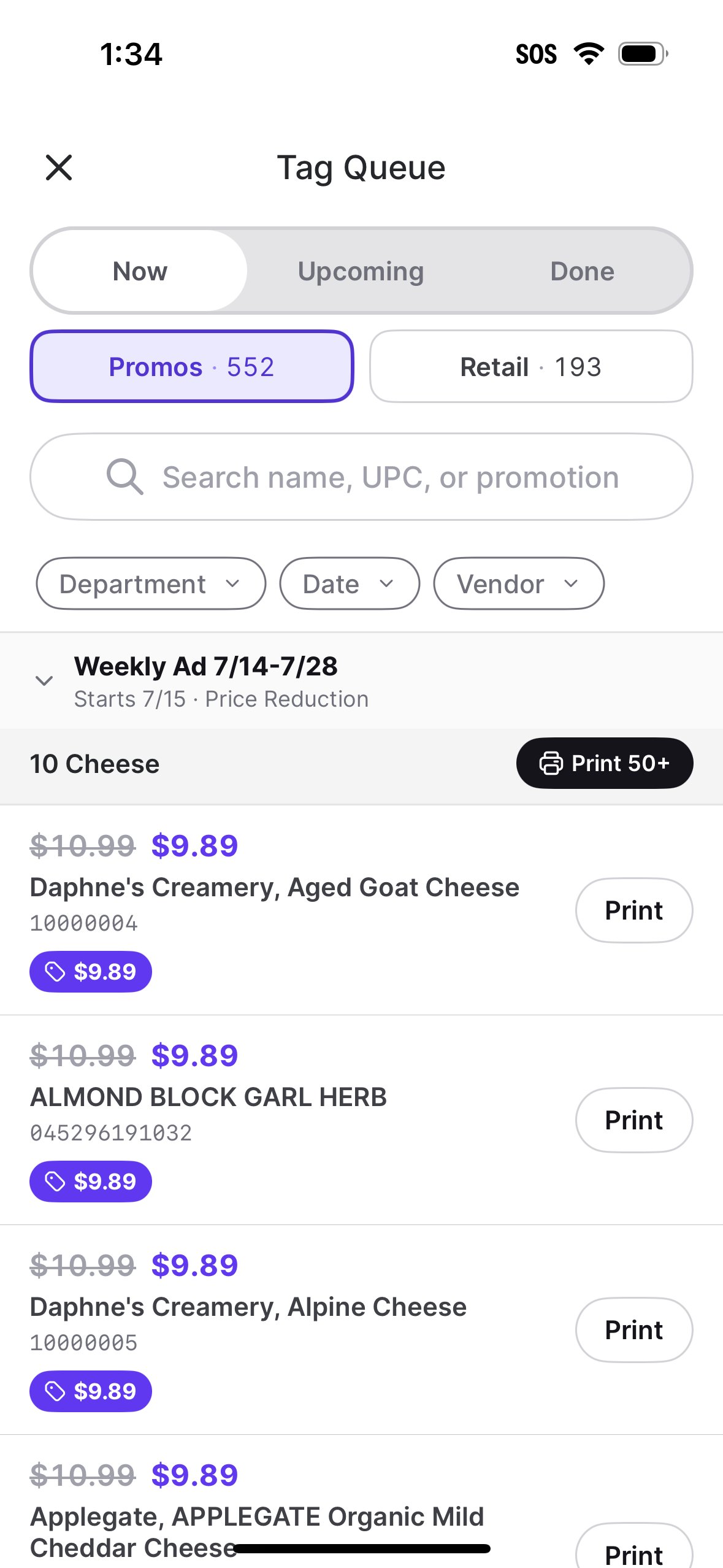
2. Under **Now** > **Promos**, search or filter for the promotion.
3. Expand the promotion name.
1. You can choose to **Print** tags individually or **Print #+** to print the whole group at once.
3. **Connect your printer.** Make sure your [Zebra printer is connected](/hardware-and-peripherals/tag-printer/connect-the-zebra-printer-to-the-vorios-app).
4. **Load and configure the yellow promotion labels.** Promotion tags print on the tall yellow label roll, which uses different printer settings than retail tags. To swap the roll and configure the Zebra printer, follow [How to load and print promotional label from the VoriOS app](/hardware-and-peripherals/tag-printer/how-to-load-and-print-promotional-label-from-the-vori-os-app).
*✏️ **Note:** After loading the yellow roll, run **Calibrate Media** in the printer settings and select **Black Mark** so your promotion tags align and print correctly.*
***
### Print Promotion Tags
1. Tap the **Tags** module.
2. Under **Now** > **Promos**, search or filter for the promotion.
3. Expand the promotion name.
1. You can choose to **Print** tags individually or **Print #+** to print the whole group at once.
 *✏️ **Note:** To reprint a promo tag, go to the **Done** section, find the item, and tap **Reprint**.*
***
### Print a promo tag from the product page
When you are already walking the floor, print a single tag straight from the product.
1. Search for or scan the product.
2. Tap the product to open its details page.
3. Tap the active promotion tile under the **Pricing** tab.
4. Tap **Print Promo Tag**.
*💡 **Tip:** Keep the yellow promotion roll loaded while you walk the floor so you can print sale tags without stopping to swap labels.*
***
### Related articles
* [Create and Manage Promotions in Vori OS](/promotions/create-and-manage-promotions-in-vori-os)
* [How to load and print promotional label from the VoriOS app](/hardware-and-peripherals/tag-printer/how-to-load-and-print-promotional-label-from-the-vori-os-app)
* [How to reprint a product's promotional label](/hardware-and-peripherals/tag-printer/how-to-reprint-a-products-promotional-label)
* [Print Product Tags on VoriOS](/product-and-product-catalog-management/product-creation-and-set-up/print-product-tags-on-vori-os)
## Related topics
- [How to load and print promotional label from the VoriOS app](/hardware-and-peripherals/tag-printer/how-to-load-and-print-promotional-label-from-the-vori-os-app.md)
- [Print Product Tags on VoriOS](/product-and-product-catalog-management/product-creation-and-set-up/print-product-tags-on-vori-os.md)
- [Create and Manage Promotions in VoriOS](/promotions/create-and-manage-promotions-in-vori-os.md)
*✏️ **Note:** To reprint a promo tag, go to the **Done** section, find the item, and tap **Reprint**.*
***
### Print a promo tag from the product page
When you are already walking the floor, print a single tag straight from the product.
1. Search for or scan the product.
2. Tap the product to open its details page.
3. Tap the active promotion tile under the **Pricing** tab.
4. Tap **Print Promo Tag**.
*💡 **Tip:** Keep the yellow promotion roll loaded while you walk the floor so you can print sale tags without stopping to swap labels.*
***
### Related articles
* [Create and Manage Promotions in Vori OS](/promotions/create-and-manage-promotions-in-vori-os)
* [How to load and print promotional label from the VoriOS app](/hardware-and-peripherals/tag-printer/how-to-load-and-print-promotional-label-from-the-vori-os-app)
* [How to reprint a product's promotional label](/hardware-and-peripherals/tag-printer/how-to-reprint-a-products-promotional-label)
* [Print Product Tags on VoriOS](/product-and-product-catalog-management/product-creation-and-set-up/print-product-tags-on-vori-os)
## Related topics
- [How to load and print promotional label from the VoriOS app](/hardware-and-peripherals/tag-printer/how-to-load-and-print-promotional-label-from-the-vori-os-app.md)
- [Print Product Tags on VoriOS](/product-and-product-catalog-management/product-creation-and-set-up/print-product-tags-on-vori-os.md)
- [Create and Manage Promotions in VoriOS](/promotions/create-and-manage-promotions-in-vori-os.md)