> ## Documentation Index
> Fetch the complete documentation index at: https://help.vori.com/llms.txt
> Use this file to discover all available pages before exploring further.
# Defining Offer Types
> Learn the specific logic and math of each offer type to drive sales and move inventory.
Offers live inside a Promotion container and allow you to set precise discount rules and qualifying conditions.
✏️ **Note:** This article describes features and is launching with select stores (in beta testing). For instructions on accessing New Back Office, view our guide: [Access New Back Office.](/vori-setup-and-troubleshooting/access-the-new-vori-back-office)
### Price Reduction (TPR)
The most common deal type. It communicates a specific, **lower price to the Shopper.**
* **Example:** "All Lay's Chips are \$1.69."
* **Department or Brand Discount:** Use "Percent Off" to apply the same discount across many SKUs in the same department or brand at once (e.g., "20% off all Chobani items").
* **Important Note for Variable-Weight Items:** > Variable-weight items support specific promotion types:
* **Standard Promotions**: Use the standard **Promotions** module to run a **percentage-off** promotion. Other promotion types are not supported for these items.
* **Manual Price Updates**: If you are not running a percentage-off promotion, you must update the price either manually or through **Cost Changes**.
***
### Buy X Get Y Free
This offer type allows for flexible configurations beyond "buy one, get one". Use this when the Shopper **receives a free quantity from your selected range of qualifying products.**
* **Example:** "Buy 2, Get 2 Free."
* **Range Logic:** The deal works across the entire selected range of products, not just individual items.
#### Visualizing A Buy X Get Y Free Deal:
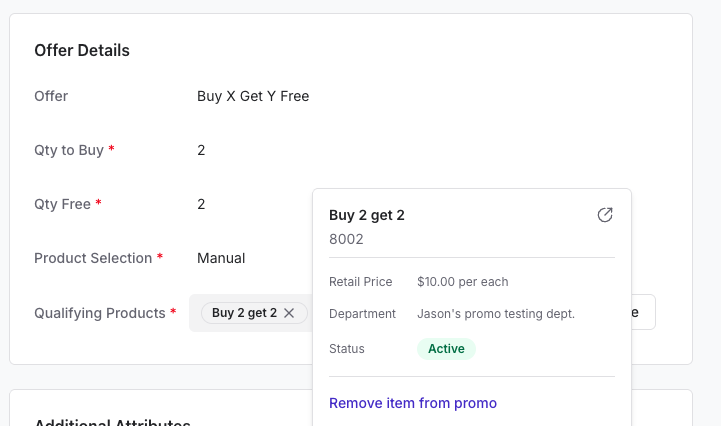
##### **Back Office**
* Shoppers can buy any 2 qualifying products to get 2 items free.
 ##### **Point of Sale**
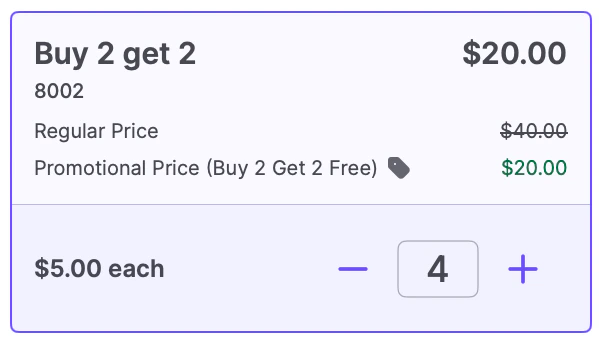
* In a **Buy 2 Get 2 Free** deal on a $10.00 item, the POS displays all items at **$5.00 each\*\*.
##### **Point of Sale**
* In a **Buy 2 Get 2 Free** deal on a $10.00 item, the POS displays all items at **$5.00 each\*\*.
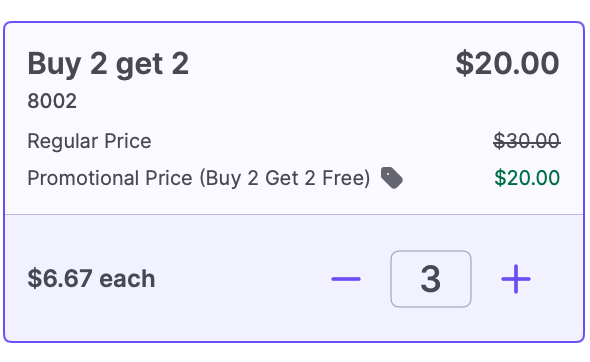 * If a shopper buys **3 items**, they still qualify for the deal, and the savings are spread evenly across those items to ensure accurate taxes and refunds.
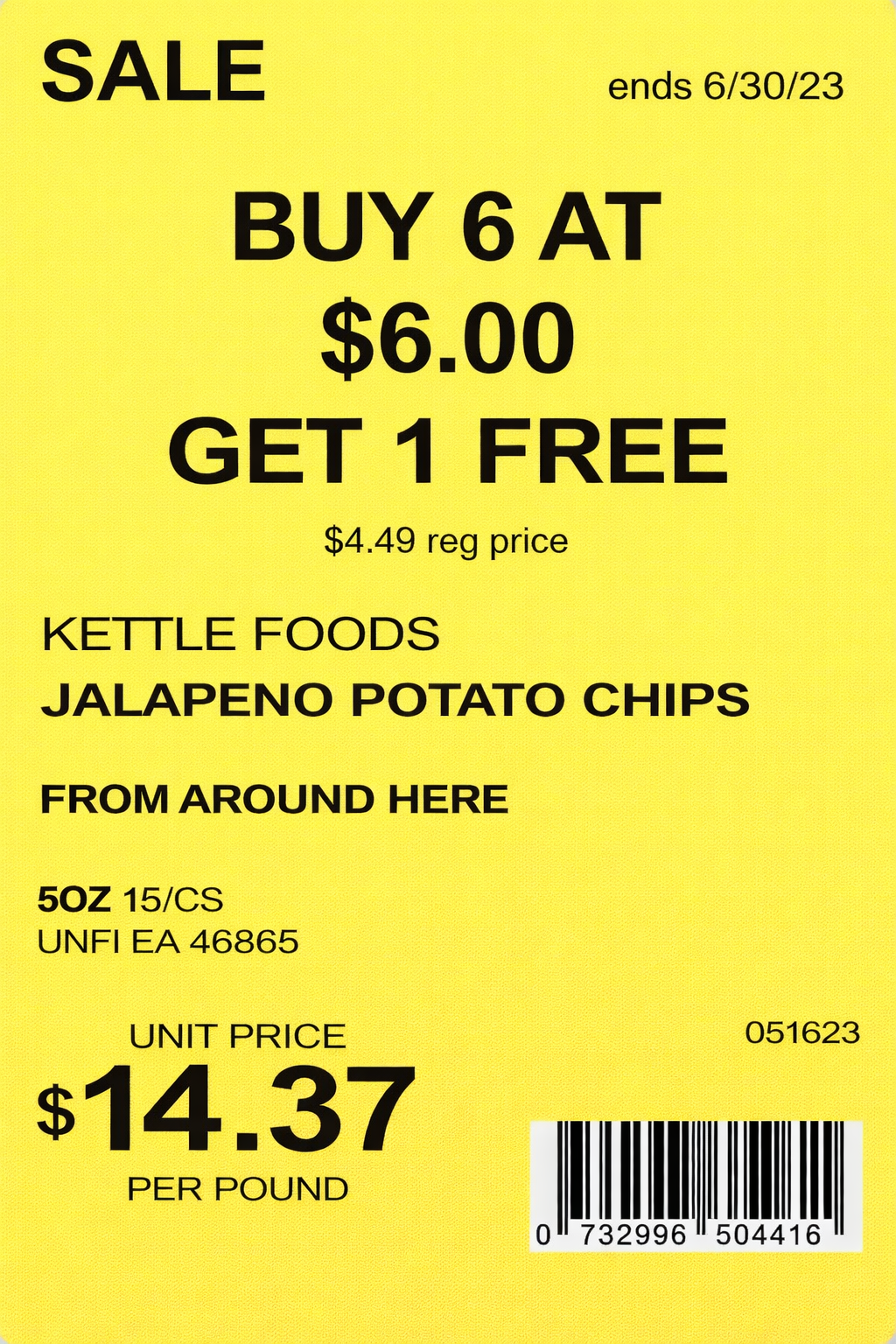
 ##### **Shelf Tags**
 **✏️Note:** Vori splits the discount evenly **across all items in the basket**, based on each item’s share of the total. That way, if a shopper returns just one item from a deal, the system can **refund only the portion of the discount and taxes that applied to that specific item.**
***
### Mix Match
Mix Match allows Shoppers to **combine different products from a group to unlock a discount.**
* **Example:** "2 for \$5.00" on various individual snacks or beverages.
**Discount Methods:**
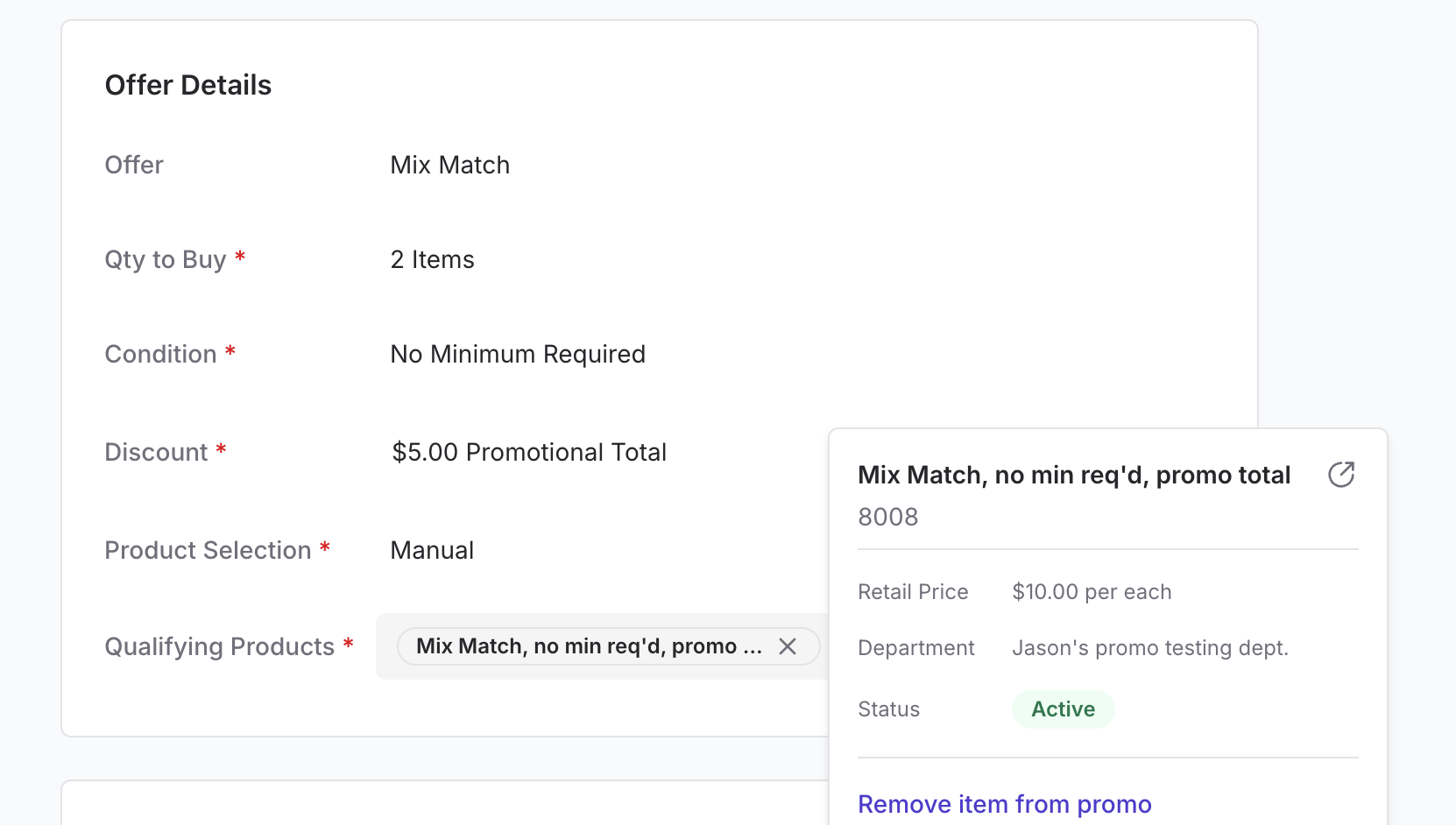
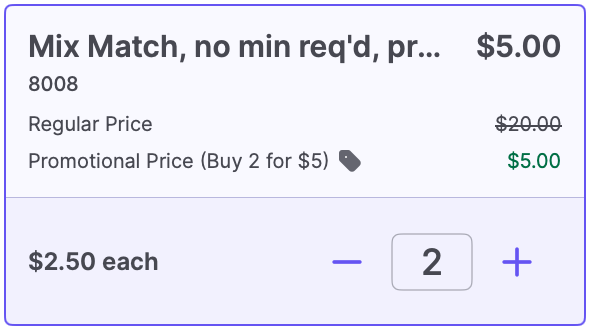
1. **Promotional Total:** Set a specific price for a group of items (e.g., "2 for \$5.00").
2. \*\*Fixed $Off:** Give a specific dollar amount off the total (e.g., "Buy 2, save$2.00").
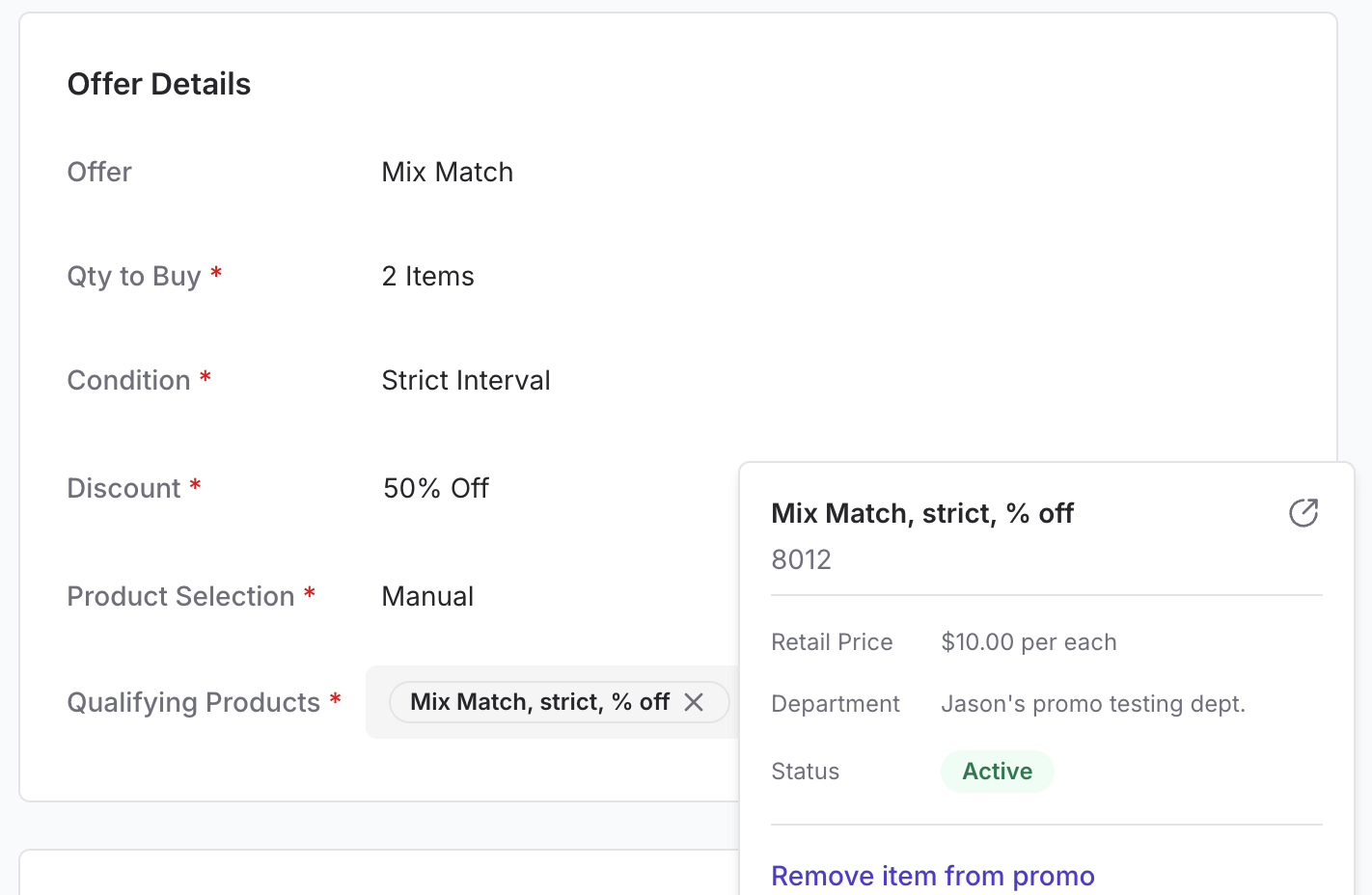
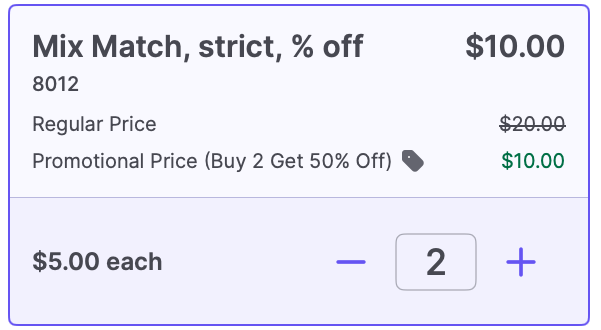
3. **Percentage Off:** Apply a percentage discount (e.g., "Buy 2, save 10%").
**Conditions:**
* **No Minimum Required:** Acts like a standard Price Reduction but uses "Buy X" language for psychological encouragement.
* **Strict Interval:** The deal applies only to exact multiples. For a "2 for \$9" deal, the 1st item is full price, the 2nd triggers the deal, but the 3rd item is full price again.
* **Minimum Required:** Shoppers must buy at least the specified quantity to earn the discount on every qualifying item in the basket.
#### Visualizing a Mix Match Deal:
##### **Back Office**
**✏️Note:** Vori splits the discount evenly **across all items in the basket**, based on each item’s share of the total. That way, if a shopper returns just one item from a deal, the system can **refund only the portion of the discount and taxes that applied to that specific item.**
***
### Mix Match
Mix Match allows Shoppers to **combine different products from a group to unlock a discount.**
* **Example:** "2 for \$5.00" on various individual snacks or beverages.
**Discount Methods:**
1. **Promotional Total:** Set a specific price for a group of items (e.g., "2 for \$5.00").
2. \*\*Fixed $Off:** Give a specific dollar amount off the total (e.g., "Buy 2, save$2.00").
3. **Percentage Off:** Apply a percentage discount (e.g., "Buy 2, save 10%").
**Conditions:**
* **No Minimum Required:** Acts like a standard Price Reduction but uses "Buy X" language for psychological encouragement.
* **Strict Interval:** The deal applies only to exact multiples. For a "2 for \$9" deal, the 1st item is full price, the 2nd triggers the deal, but the 3rd item is full price again.
* **Minimum Required:** Shoppers must buy at least the specified quantity to earn the discount on every qualifying item in the basket.
#### Visualizing a Mix Match Deal:
##### **Back Office**
 ##### **Point of Sale**
 ##### **Shelf Tags**
#### MnMStrict
***
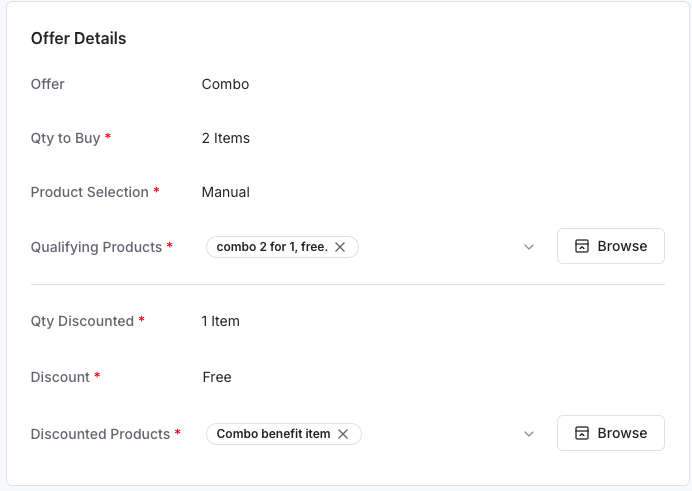
### Combo Offers
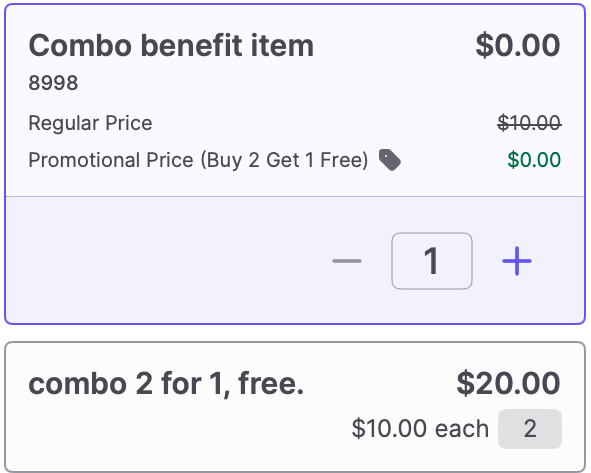
Use Combo offers when the **qualifying item and the discounted item** are **distinctly different groups**.
* **Example:** "Buy a sandwich, get a free drink."
* **Configuration:** You define a "Qualifying" group (what they must buy) and a "Discounted" group (what they get a deal on).
* **Discount Types:** You can offer the second item for free, a dollar amount off, or a percentage off.
#### Visualizing a Combo Deal:
##### **Back Office**
##### **Shelf Tags**
#### MnMStrict
***
### Combo Offers
Use Combo offers when the **qualifying item and the discounted item** are **distinctly different groups**.
* **Example:** "Buy a sandwich, get a free drink."
* **Configuration:** You define a "Qualifying" group (what they must buy) and a "Discounted" group (what they get a deal on).
* **Discount Types:** You can offer the second item for free, a dollar amount off, or a percentage off.
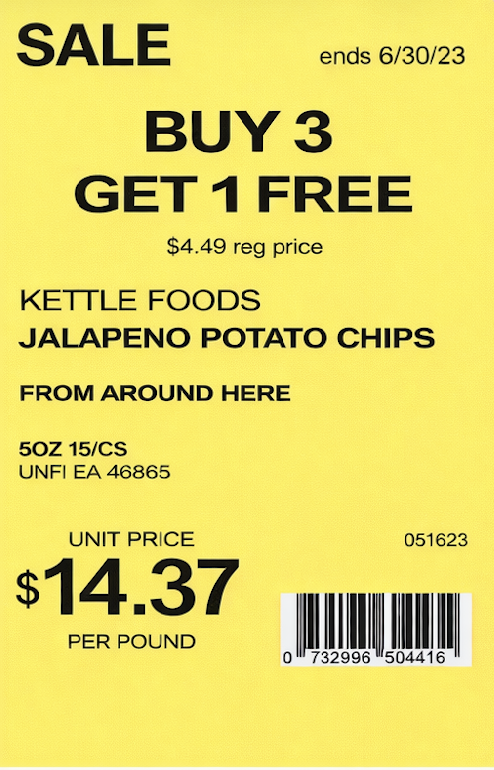
#### Visualizing a Combo Deal:
##### **Back Office**
 ##### **Point of Sale**
 ##### **Shelf Tags**
 **✏️Note:** If you are discounting the same item being bought, use Buy X Get Y instead.
***
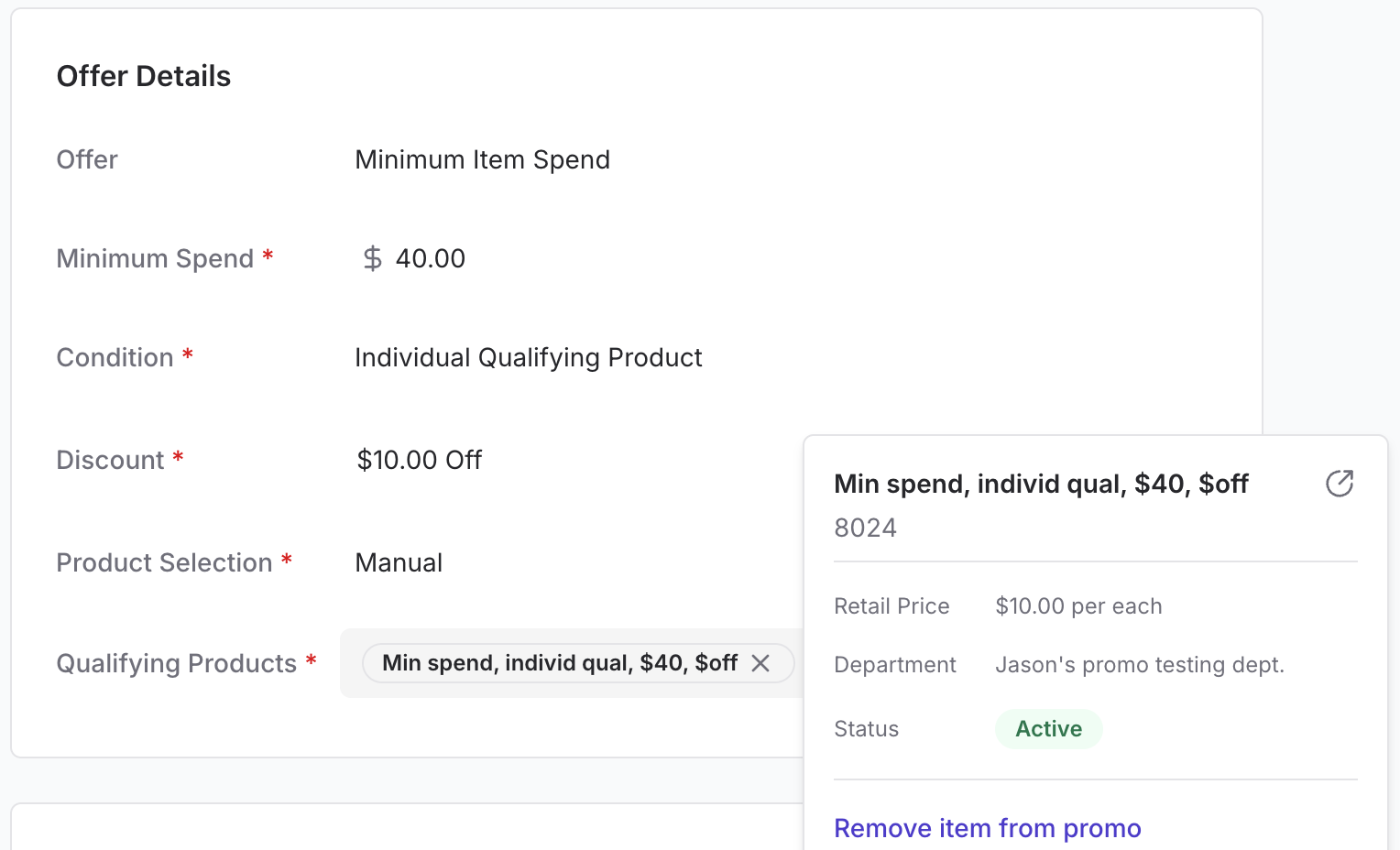
### Minimum Item Spend
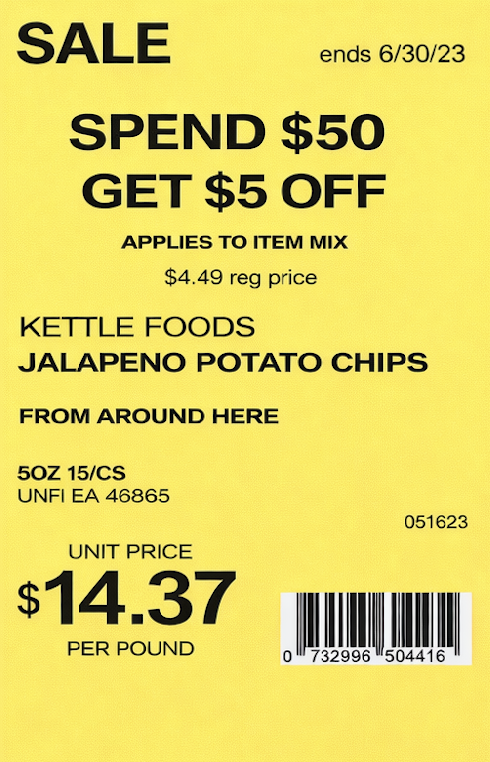
Encourage volume by **rewarding Shoppers who reach a specific spending threshold** on selected items.
* **Example:** "Spend $25.00 on cereal and get $5.00 off".
**Modes:**
1. **Total Qualifying Products:** The discount triggers when the total spent across all items in a specific group (e.g., the cereal aisle) reaches the threshold.
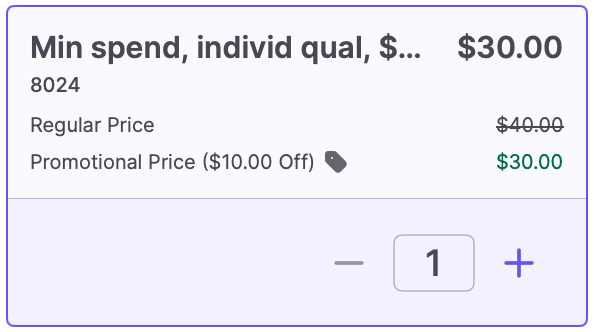
2. **Individual Qualifying Product:** The price of a **single item** must exceed the threshold.
#### Visualizing a Minimum Item Spend Deal:
##### **Back Office**
**✏️Note:** If you are discounting the same item being bought, use Buy X Get Y instead.
***
### Minimum Item Spend
Encourage volume by **rewarding Shoppers who reach a specific spending threshold** on selected items.
* **Example:** "Spend $25.00 on cereal and get $5.00 off".
**Modes:**
1. **Total Qualifying Products:** The discount triggers when the total spent across all items in a specific group (e.g., the cereal aisle) reaches the threshold.
2. **Individual Qualifying Product:** The price of a **single item** must exceed the threshold.
#### Visualizing a Minimum Item Spend Deal:
##### **Back Office**
 ##### **Point of Sale**
 ##### **Shelf Tags**
 ***
### Extra Loyalty Points
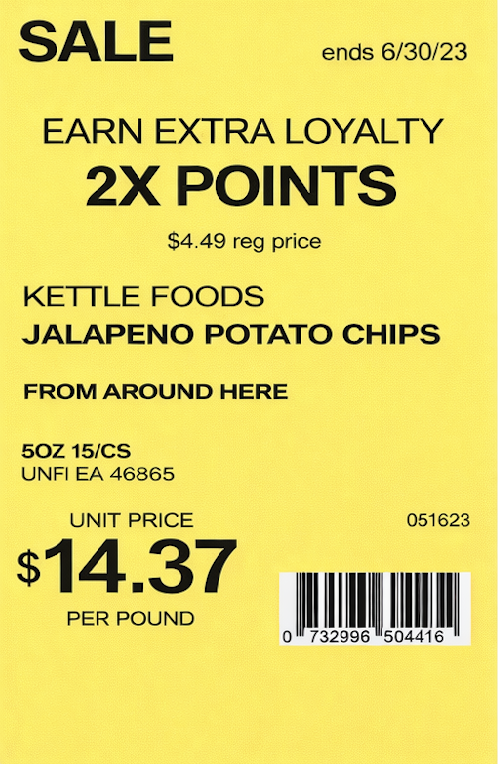
Offer modifiers on how **Loyalty Members earn points**. This is perfect for driving traffic on slow days or launching new products.
* **Example:** "Double Point Tuesdays" or "Triple Point Wine Happy Hours".
* **Logic:** Use a **Points Multiplier** to increase points earned on specific products or departments.
* **Configuration:** The multiplier uses a decimal format. For example, entering **2** adds double extra loyalty points to the transaction.
**💡 Tip:** Driving Traffic: Use Sales Overview Reporting to identify "slow days" (e.g., Tuesdays from 12 PM – 9 PM) and schedule point multipliers during those specific windows to encourage shoppers to visit.
#### Visualizing an Extra Loyalty Points Deal:
##### **Back Office Screenshot 2026-01-21 at 8.17.39 AM**
##### **Point of Sale**
##### **Shelf Tags**
***
### Extra Loyalty Points
Offer modifiers on how **Loyalty Members earn points**. This is perfect for driving traffic on slow days or launching new products.
* **Example:** "Double Point Tuesdays" or "Triple Point Wine Happy Hours".
* **Logic:** Use a **Points Multiplier** to increase points earned on specific products or departments.
* **Configuration:** The multiplier uses a decimal format. For example, entering **2** adds double extra loyalty points to the transaction.
**💡 Tip:** Driving Traffic: Use Sales Overview Reporting to identify "slow days" (e.g., Tuesdays from 12 PM – 9 PM) and schedule point multipliers during those specific windows to encourage shoppers to visit.
#### Visualizing an Extra Loyalty Points Deal:
##### **Back Office Screenshot 2026-01-21 at 8.17.39 AM**
##### **Point of Sale**
##### **Shelf Tags**
 ✏️ **Note:** You **cannot** use the "Limit Per Basket" condition for this offer type because the calculation is based on the line-item subtotal.
***
### Troubleshooting & Tips
* **Deleted vs. Canceled:** You can only **Delete** a **Draft** promotion. Once a promotion has been **Active**, it can only be **Canceled** to preserve your reporting data.
* **ROI Strategy:** Remember that while a 10% discount on a 10% higher basket size may "break even" on that specific transaction, it helps form long-term shopping habits that keep Shoppers coming back to your store.
***
**➡️ Next Step:** Learn **[How to use Product Selection (Manual vs. Dynamic)](/promotions/choosing-products-manual-vs-dynamic-selection)** to finish building your offer.
✏️ **Note:** You **cannot** use the "Limit Per Basket" condition for this offer type because the calculation is based on the line-item subtotal.
***
### Troubleshooting & Tips
* **Deleted vs. Canceled:** You can only **Delete** a **Draft** promotion. Once a promotion has been **Active**, it can only be **Canceled** to preserve your reporting data.
* **ROI Strategy:** Remember that while a 10% discount on a 10% higher basket size may "break even" on that specific transaction, it helps form long-term shopping habits that keep Shoppers coming back to your store.
***
**➡️ Next Step:** Learn **[How to use Product Selection (Manual vs. Dynamic)](/promotions/choosing-products-manual-vs-dynamic-selection)** to finish building your offer.