> ## Documentation Index
> Fetch the complete documentation index at: https://help.vori.com/llms.txt
> Use this file to discover all available pages before exploring further.
# Product History
> See every change to a product in the History panel.
Every product now has a complete change history. You can see what changed, when, and where the change came from — whether a person made the change, a Product Rule applied it, a bulk edit ran, or a Product Group propagated a value to siblings.
### Before you begin
* Log in to the **New Back Office** as an Owner or Manager.
* Navigate to **Products → [Product Catalog](https://app.vori.com/retail/products)** and open any product to follow along.
* The History panel is available on every product. There's nothing to enable.
History captures changes to scalar fields like Retail Price and Target Margin. Linked-relationship changes (Department, Modifiers, Taxes) are not currently included.
***
### Open the History panel
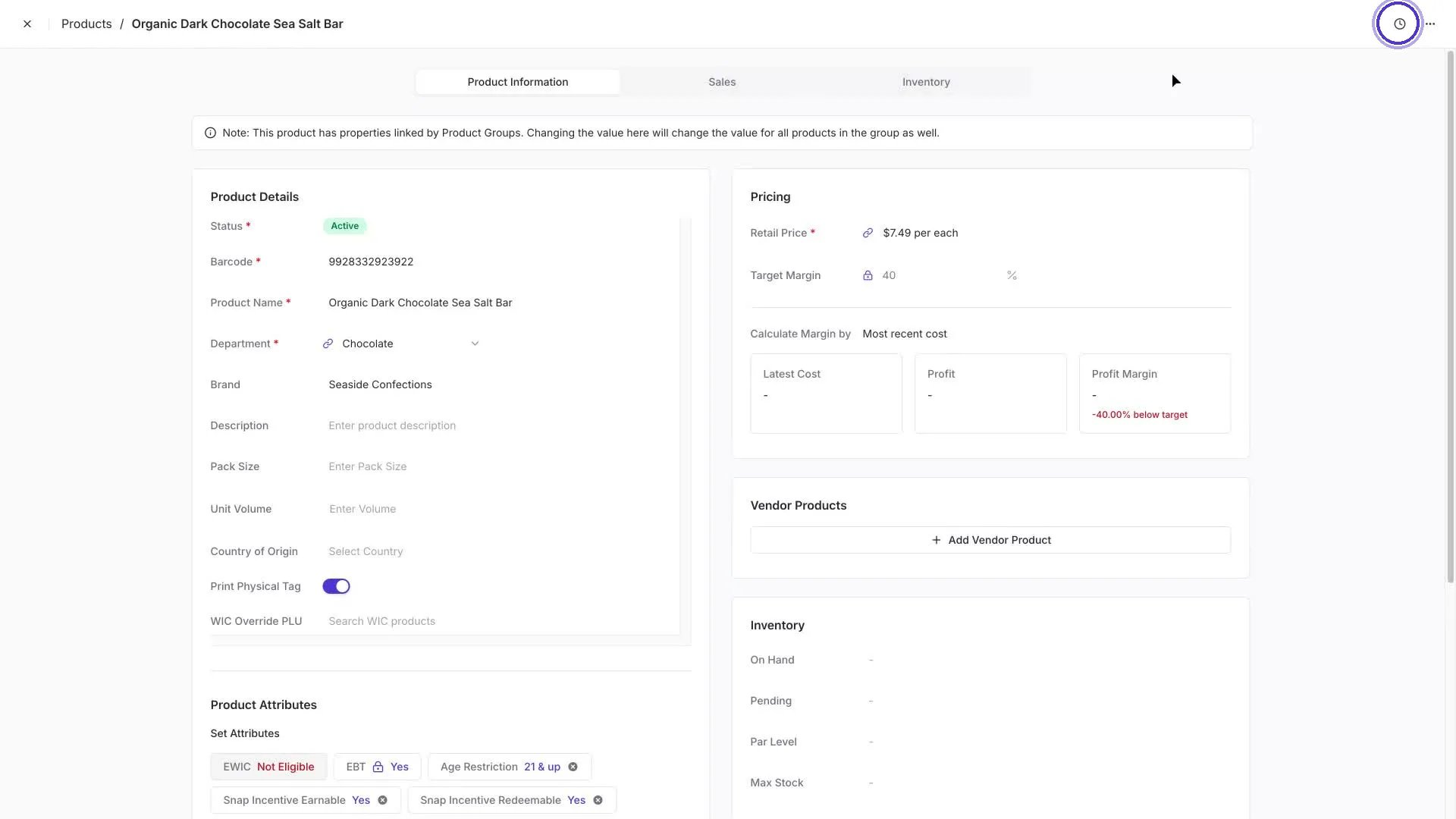
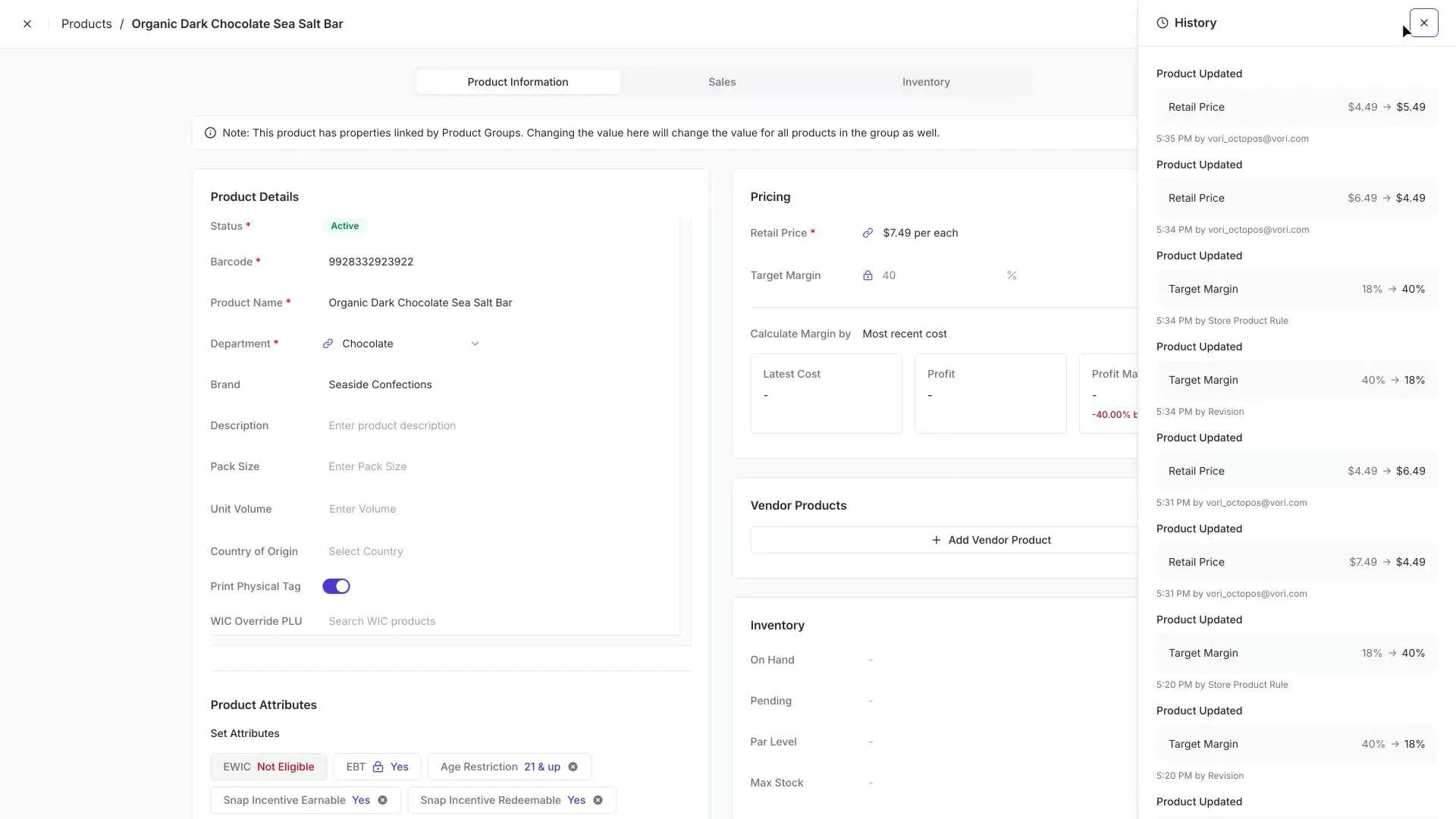
On any product detail page, find the **clock icon** in the top-right of the page header. Click it to slide the History panel out from the right.
Each entry shows:
* **What field changed** — for example, Retail Price or Target Margin.
* **The before and after values** — `$4.49 → $5.49`.
* **Timestamp** — grouped by date, with a precise time on each entry.
* **Source** — the user, Product Rule, or Revision that made the change.
Close the panel with the **×** in the top-right of the panel.
***
### What gets captured
Every common path you'd use to update a product produces a History entry. Today, three sources can appear on an entry:
* **Direct edits** — when you change a field on the product detail page, the entry shows your email address.
* **Product Rules** — when a rule sets a value on a matching product, the entry is attributed to **Product Rule**. Group-link propagation is currently recorded under this source too.
* **Bulk edits** — when you bulk-edit from the Product Catalog, the entry shows up as a **Revision**. If a Product Rule controls the same field, the rule re-fires immediately afterward and pulls the value back to its rule-set target — both events are logged so you can see exactly what happened.
### Quick reference
| Source label | Triggered by |
| --------------------------------------------- | ---------------------------------------------------------------------------------------------------------------------------------------------------------------------------------------------------------- |
| Your email address (e.g. `you@yourstore.com`) | A direct edit you made on the product detail page. |
| **Product Rule** | A rule firing — when the rule was created, when its conditions started matching the product, or when it re-fires after another change. Product Group propagation is also recorded under this source today. |
| **Revision** | A bulk edit applied from the Product Catalog. |
Use the History panel to debug "why did this product's price change?" questions. The source on each entry tells you whether it came from a person, a rule, or an automated propagation — so you know exactly where to make a correction.
## Related topics
- [Store product history](/api/models/store-product-history.md)
- [List store product history](/api-reference/store-products/list-store-product-history.md)
- [Monitor and Edit Inventory on the Product Details Page](/inventory-and-ordering/inventory/monitor-and-edit-inventory-on-the-product-details-page.md)
 Each entry shows:
* **What field changed** — for example, Retail Price or Target Margin.
* **The before and after values** — `$4.49 → $5.49`.
* **Timestamp** — grouped by date, with a precise time on each entry.
* **Source** — the user, Product Rule, or Revision that made the change.
Close the panel with the **×** in the top-right of the panel.
***
### What gets captured
Every common path you'd use to update a product produces a History entry. Today, three sources can appear on an entry:
* **Direct edits** — when you change a field on the product detail page, the entry shows your email address.
* **Product Rules** — when a rule sets a value on a matching product, the entry is attributed to **Product Rule**. Group-link propagation is currently recorded under this source too.
* **Bulk edits** — when you bulk-edit from the Product Catalog, the entry shows up as a **Revision**. If a Product Rule controls the same field, the rule re-fires immediately afterward and pulls the value back to its rule-set target — both events are logged so you can see exactly what happened.
### Quick reference
| Source label | Triggered by |
| --------------------------------------------- | ---------------------------------------------------------------------------------------------------------------------------------------------------------------------------------------------------------- |
| Your email address (e.g. `you@yourstore.com`) | A direct edit you made on the product detail page. |
| **Product Rule** | A rule firing — when the rule was created, when its conditions started matching the product, or when it re-fires after another change. Product Group propagation is also recorded under this source today. |
| **Revision** | A bulk edit applied from the Product Catalog. |
Each entry shows:
* **What field changed** — for example, Retail Price or Target Margin.
* **The before and after values** — `$4.49 → $5.49`.
* **Timestamp** — grouped by date, with a precise time on each entry.
* **Source** — the user, Product Rule, or Revision that made the change.
Close the panel with the **×** in the top-right of the panel.
***
### What gets captured
Every common path you'd use to update a product produces a History entry. Today, three sources can appear on an entry:
* **Direct edits** — when you change a field on the product detail page, the entry shows your email address.
* **Product Rules** — when a rule sets a value on a matching product, the entry is attributed to **Product Rule**. Group-link propagation is currently recorded under this source too.
* **Bulk edits** — when you bulk-edit from the Product Catalog, the entry shows up as a **Revision**. If a Product Rule controls the same field, the rule re-fires immediately afterward and pulls the value back to its rule-set target — both events are logged so you can see exactly what happened.
### Quick reference
| Source label | Triggered by |
| --------------------------------------------- | ---------------------------------------------------------------------------------------------------------------------------------------------------------------------------------------------------------- |
| Your email address (e.g. `you@yourstore.com`) | A direct edit you made on the product detail page. |
| **Product Rule** | A rule firing — when the rule was created, when its conditions started matching the product, or when it re-fires after another change. Product Group propagation is also recorded under this source today. |
| **Revision** | A bulk edit applied from the Product Catalog. |