> ## Documentation Index
> Fetch the complete documentation index at: https://help.vori.com/llms.txt
> Use this file to discover all available pages before exploring further.
# Product Attributes Reference
> Definitions for every setting in the Product Attributes section of a product, the same attributes you can set with Product Rules and Product Groups.
Every product in the Back Office has a **Product Attributes** section. These settings control how the item behaves at the Point of Sale (POS): whether it's EBT-eligible, needs an ID check, earns loyalty points, gets taxed, and more.
You'll see the same attributes when you build a [Product Rule](/product-and-product-catalog-management/product-catalog-and-bulk-management/product-rules) or link properties in a [Product Group](/product-and-product-catalog-management/product-creation-and-set-up/create-and-manage-product-groups). Use this article as a reference for what each one does.
### Where to find Product Attributes
1. Go to **Products** > **[Product Catalog](https://app.vori.com/retail/products)**.
2. Click a product to open its details page.
3. Scroll to the **Product Attributes** section, below **Product Details**.
Attributes already set on the product appear under **Set Attributes**. Attributes you haven't set yet appear under **Suggested**. Click one to add it to the product.
 #### Locked and linked attributes
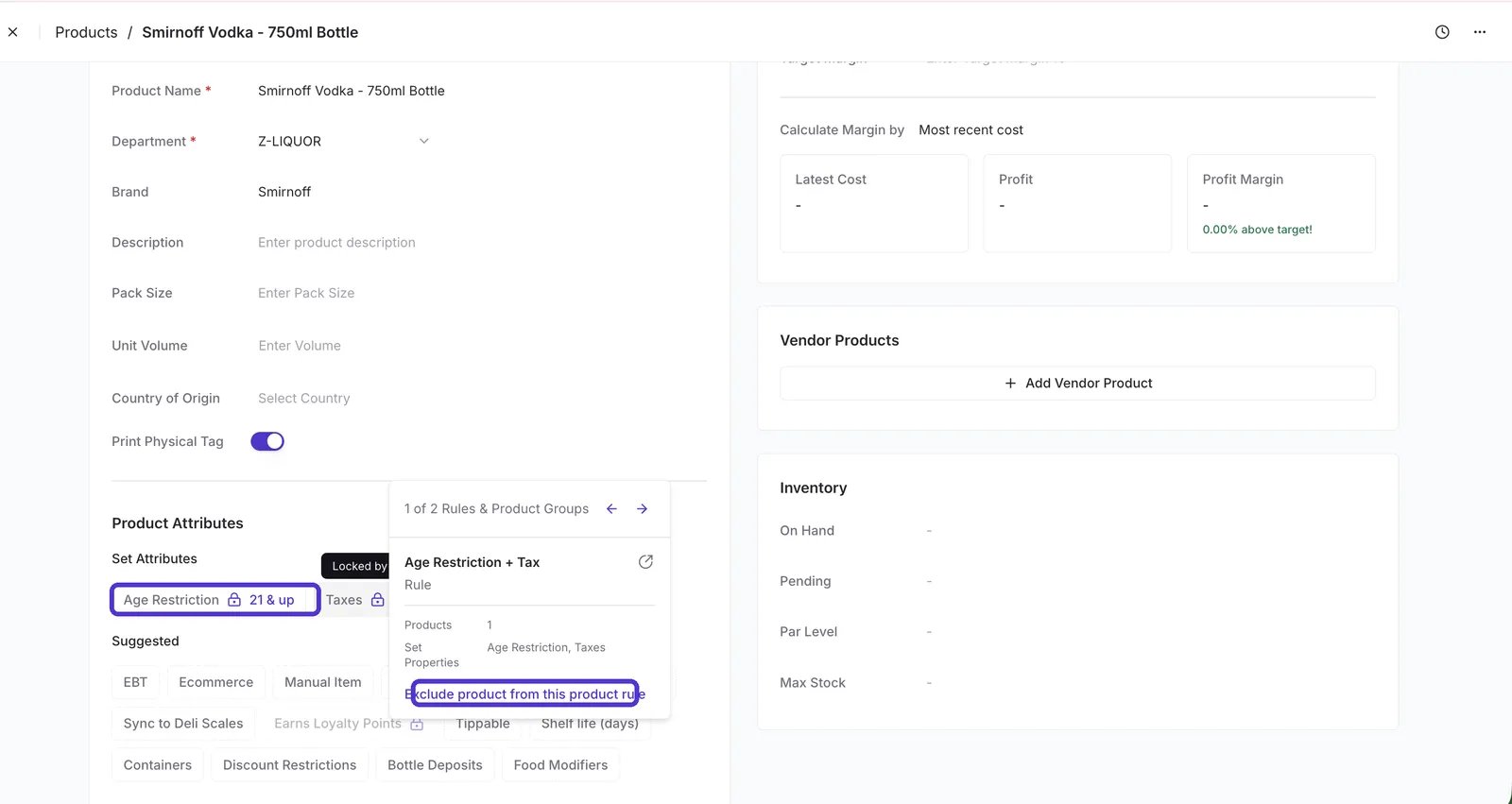
* 🔒 **Lock icon** — a Product Rule sets this attribute, so you can't change it on the product. Hover over the lock to see which rule controls it. To make a one-off exception, select **Exclude product from this product rule**.
#### Locked and linked attributes
* 🔒 **Lock icon** — a Product Rule sets this attribute, so you can't change it on the product. Hover over the lock to see which rule controls it. To make a one-off exception, select **Exclude product from this product rule**.
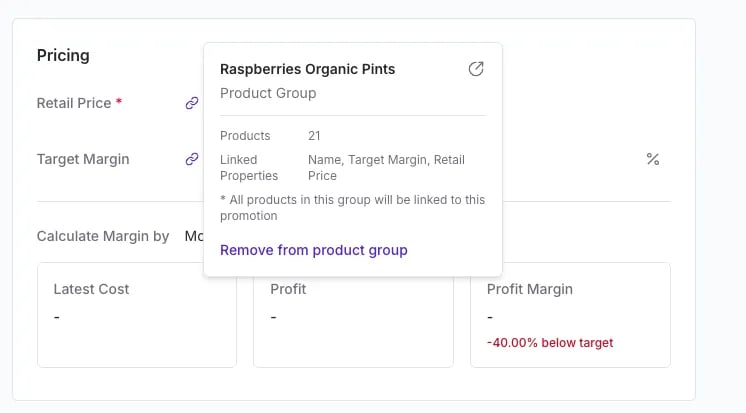
 * 🔗 **Link icon** — a Product Group keeps this attribute in sync across every product in the group. Changing it here changes it for the whole group. Hover over the link to see the group and its linked properties, or to remove the product from the group.
 ***
### On/off attributes
Each of these attributes is either on or off for the product.
| Attribute | What it does |
| - | - |
| **EBT** | Marks the product as eligible for Electronic Benefit Transfer (EBT), so shoppers can pay for it with SNAP benefits. See [Manage EBT eligibility](/point-of-sale-pos/ebt-electronic-benefit-transfer/manage-ebt-eligibility-in-the-back-office-vori-os-and-the-pos). |
| **Ecommerce** | Makes the product visible and available for purchase on your ecommerce storefront. |
| **Manual Item** | Flags the product as a manual item that the cashier rings up without scanning a barcode. Manual items power quick action buttons at the POS, like an open-price deli item or a custom charge. |
| **Prompt for Quantity** | Asks the cashier to enter a quantity when the item is scanned, instead of scanning each unit. Useful for loose-pack items. |
| **Variable Sale Price** | Lets the price vary at the time of sale instead of using a fixed price. |
| **Sync to Deli Scales** | Sends the product to your connected deli scales so it's available for weighing and label printing at the deli counter. Applies only to stores with a deli scale integration. |
| **Prepackaged** | Marks the product as sold in a fixed, pre-packaged unit rather than weighed or portioned at the time of sale. |
| **Earns Loyalty Points** | Controls whether purchases of the product earn loyalty points. Many stores turn this off for tobacco, alcohol, or lottery. |
| **Tippable** | Includes the product in the tip prompt at the POS. The tip is calculated only on tippable items in the basket. See [Understand tipping and tippable items](/point-of-sale-pos/pos-customization-and-setup/understand-tipping-and-tippable-items-on-the-pos). |
| **Blackhawk Gift Card** | Marks the product as a Blackhawk gift card, so the POS activates the card when it's sold. Appears only for stores set up to sell Blackhawk gift cards. See [Sell and manage Blackhawk gift cards](/point-of-sale-pos/blackhawk-gift-cards-checks-lottery-and-payouts/sell-and-manage-blackhawk-gift-cards-in-vori-pos). |
| **Reloadable Blackhawk Gift Card** | Marks a Blackhawk gift card as reloadable, so shoppers can add more value to it later. Appears only for stores set up to sell Blackhawk gift cards. |
| **Snap Incentive Earnable** | Lets shoppers earn a SNAP Incentive coupon (such as Double Up Food Bucks) when they buy this product with SNAP EBT funds. Requires **EBT** to be on. Appears only for stores in the SNAP Incentives Program. See [Double Up Food Bucks](/double-up-bucks/in-beta-double-up-food-bucks-or-and-ms-only). |
| **Snap Incentive Redeemable** | Lets shoppers apply an earned SNAP Incentive coupon to this product. Requires **EBT** to be on. Appears only for stores in the SNAP Incentives Program. |
***
### Attributes with values
These attributes take a specific value or a list of values.
| Attribute | What it does |
| - | - |
| **Age Restriction** | Prompts the cashier to verify the shopper's age when the item is scanned. Choose **18 & up** (for example, tobacco) or **21 & up** (for example, alcohol). |
| **Shelf life (days)** | The number of days the product stays sellable after it's received or produced. Used on deli labels for stores with a deli scale integration. |
| **Taxes** | The tax rates that apply to the product, such as sales tax or alcohol tax. You can assign more than one. |
| **Containers** | The tare containers available for this product. When a shopper uses a container, the container's weight is subtracted at the POS so the shopper pays only for the product. See [Manage tare containers at the POS](/bottle-deposits-tares-and-taxes/manage-tare-containers-at-the-pos). |
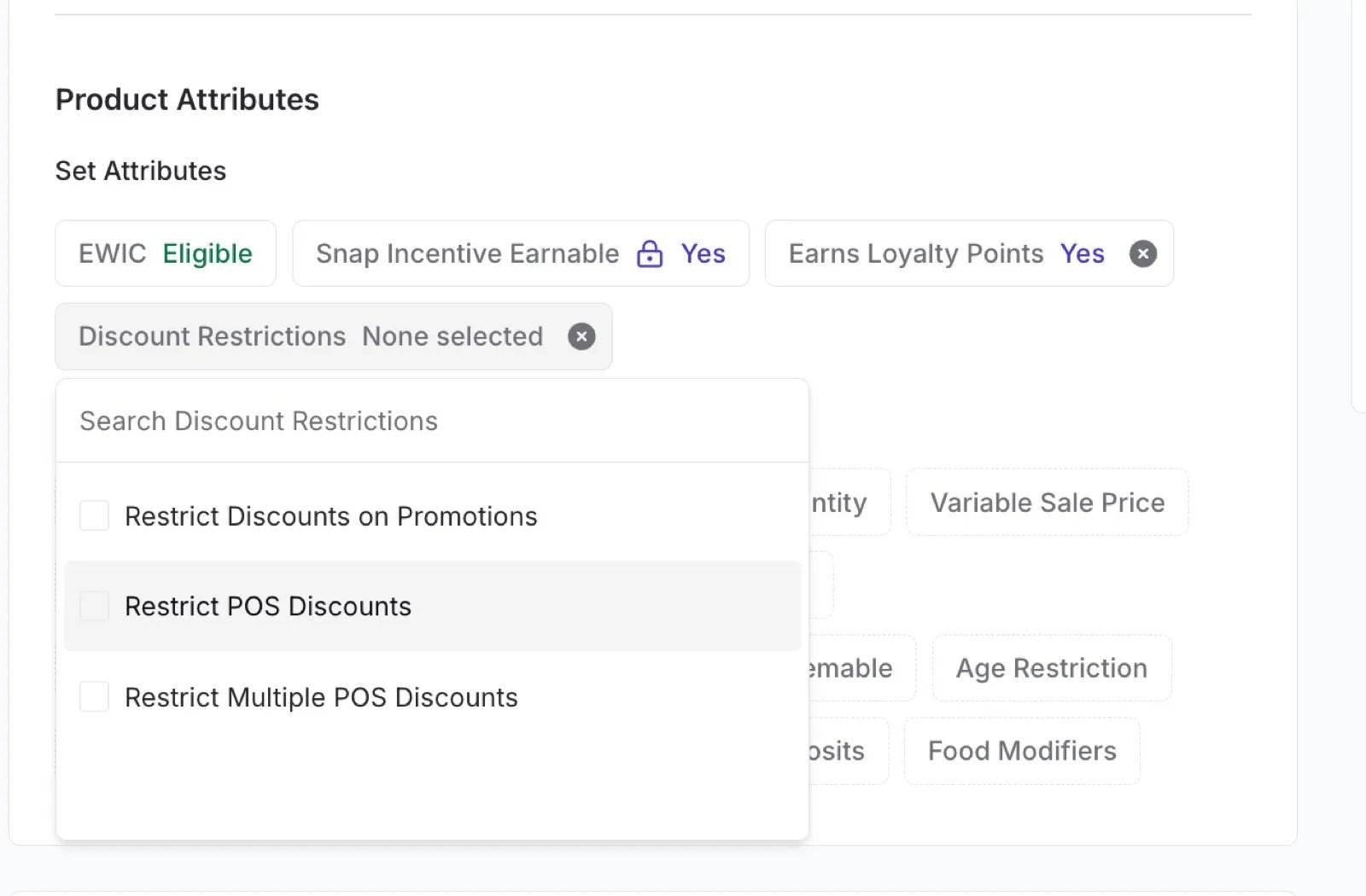
| **Discount Restrictions** | Limits which discounts the product can take at checkout. See the options below. |
| **Bottle Deposits** | Adds a bottle deposit or California Redemption Value (CRV) fee to the product at checkout. See [Create and manage item modifiers](/bottle-deposits-tares-and-taxes/create-and-manage-item-modifiers). |
| **Food Modifiers** | The modifier categories (like toppings, sides, or cook temperature) a cashier can choose from when ringing up a quick food service item. See [Set up quick food service counters](/product-and-product-catalog-management/quick-food-service/setting-up-quick-food-service-counters). |
| **EWIC** | Shows whether the product is eligible for electronic Women, Infants, and Children (eWIC) benefits. Eligibility updates daily from your state's approved product list and cannot be edited. Appears only for stores approved for eWIC. |
#### Discount Restrictions options
* **Restrict Discounts on Promotions** — if the item is already on promotion, the cashier can't add another discount on top of it.
* **Restrict POS Discounts** — blocks all POS discounts on the item.
* **Restrict Multiple POS Discounts** — allows one POS discount on the item, but not two stacked together.
***
### On/off attributes
Each of these attributes is either on or off for the product.
| Attribute | What it does |
| - | - |
| **EBT** | Marks the product as eligible for Electronic Benefit Transfer (EBT), so shoppers can pay for it with SNAP benefits. See [Manage EBT eligibility](/point-of-sale-pos/ebt-electronic-benefit-transfer/manage-ebt-eligibility-in-the-back-office-vori-os-and-the-pos). |
| **Ecommerce** | Makes the product visible and available for purchase on your ecommerce storefront. |
| **Manual Item** | Flags the product as a manual item that the cashier rings up without scanning a barcode. Manual items power quick action buttons at the POS, like an open-price deli item or a custom charge. |
| **Prompt for Quantity** | Asks the cashier to enter a quantity when the item is scanned, instead of scanning each unit. Useful for loose-pack items. |
| **Variable Sale Price** | Lets the price vary at the time of sale instead of using a fixed price. |
| **Sync to Deli Scales** | Sends the product to your connected deli scales so it's available for weighing and label printing at the deli counter. Applies only to stores with a deli scale integration. |
| **Prepackaged** | Marks the product as sold in a fixed, pre-packaged unit rather than weighed or portioned at the time of sale. |
| **Earns Loyalty Points** | Controls whether purchases of the product earn loyalty points. Many stores turn this off for tobacco, alcohol, or lottery. |
| **Tippable** | Includes the product in the tip prompt at the POS. The tip is calculated only on tippable items in the basket. See [Understand tipping and tippable items](/point-of-sale-pos/pos-customization-and-setup/understand-tipping-and-tippable-items-on-the-pos). |
| **Blackhawk Gift Card** | Marks the product as a Blackhawk gift card, so the POS activates the card when it's sold. Appears only for stores set up to sell Blackhawk gift cards. See [Sell and manage Blackhawk gift cards](/point-of-sale-pos/blackhawk-gift-cards-checks-lottery-and-payouts/sell-and-manage-blackhawk-gift-cards-in-vori-pos). |
| **Reloadable Blackhawk Gift Card** | Marks a Blackhawk gift card as reloadable, so shoppers can add more value to it later. Appears only for stores set up to sell Blackhawk gift cards. |
| **Snap Incentive Earnable** | Lets shoppers earn a SNAP Incentive coupon (such as Double Up Food Bucks) when they buy this product with SNAP EBT funds. Requires **EBT** to be on. Appears only for stores in the SNAP Incentives Program. See [Double Up Food Bucks](/double-up-bucks/in-beta-double-up-food-bucks-or-and-ms-only). |
| **Snap Incentive Redeemable** | Lets shoppers apply an earned SNAP Incentive coupon to this product. Requires **EBT** to be on. Appears only for stores in the SNAP Incentives Program. |
***
### Attributes with values
These attributes take a specific value or a list of values.
| Attribute | What it does |
| - | - |
| **Age Restriction** | Prompts the cashier to verify the shopper's age when the item is scanned. Choose **18 & up** (for example, tobacco) or **21 & up** (for example, alcohol). |
| **Shelf life (days)** | The number of days the product stays sellable after it's received or produced. Used on deli labels for stores with a deli scale integration. |
| **Taxes** | The tax rates that apply to the product, such as sales tax or alcohol tax. You can assign more than one. |
| **Containers** | The tare containers available for this product. When a shopper uses a container, the container's weight is subtracted at the POS so the shopper pays only for the product. See [Manage tare containers at the POS](/bottle-deposits-tares-and-taxes/manage-tare-containers-at-the-pos). |
| **Discount Restrictions** | Limits which discounts the product can take at checkout. See the options below. |
| **Bottle Deposits** | Adds a bottle deposit or California Redemption Value (CRV) fee to the product at checkout. See [Create and manage item modifiers](/bottle-deposits-tares-and-taxes/create-and-manage-item-modifiers). |
| **Food Modifiers** | The modifier categories (like toppings, sides, or cook temperature) a cashier can choose from when ringing up a quick food service item. See [Set up quick food service counters](/product-and-product-catalog-management/quick-food-service/setting-up-quick-food-service-counters). |
| **EWIC** | Shows whether the product is eligible for electronic Women, Infants, and Children (eWIC) benefits. Eligibility updates daily from your state's approved product list and cannot be edited. Appears only for stores approved for eWIC. |
#### Discount Restrictions options
* **Restrict Discounts on Promotions** — if the item is already on promotion, the cashier can't add another discount on top of it.
* **Restrict POS Discounts** — blocks all POS discounts on the item.
* **Restrict Multiple POS Discounts** — allows one POS discount on the item, but not two stacked together.
 When a restriction blocks a discount, the POS shows a warning on the item in the cart so the cashier knows why. For more, see [Manage discounts at the POS](/point-of-sale-pos/basic-cashier-functions/manage-discounts-at-the-pos).
***
### Set attributes for many products at once
Editing attributes one product at a time works for exceptions. For whole departments or product lines, use:
* **[Product Rules](/product-and-product-catalog-management/product-catalog-and-bulk-management/product-rules)** — apply attributes automatically to every product that matches a condition, like *Department is Beer*. Best for taxes, EBT, age restrictions, and loyalty exclusions.
* **[Product Groups](/product-and-product-catalog-management/product-creation-and-set-up/create-and-manage-product-groups)** — keep attributes identical across a set of products you pick, like every flavor in a yogurt line.
✏️ **Note:** Product Rules and Product Groups can also set product fields outside this section, like **Retail Price**, **Target Margin**, **Brand**, and **Department**. See the [Product properties glossary](/product-and-product-catalog-management/product-catalog-and-bulk-management/product-rules#product-properties-glossary) for the full list.
## Related topics
- [Set Up Departments](/departments/set-up-departments.md)
- [Product History](/product-and-product-catalog-management/product-editing-and-activation/product-history.md)
- [Managing Product Groups on Mobile](/product-and-product-catalog-management/product-creation-and-set-up/managing-product-groups-on-mobile.md)
When a restriction blocks a discount, the POS shows a warning on the item in the cart so the cashier knows why. For more, see [Manage discounts at the POS](/point-of-sale-pos/basic-cashier-functions/manage-discounts-at-the-pos).
***
### Set attributes for many products at once
Editing attributes one product at a time works for exceptions. For whole departments or product lines, use:
* **[Product Rules](/product-and-product-catalog-management/product-catalog-and-bulk-management/product-rules)** — apply attributes automatically to every product that matches a condition, like *Department is Beer*. Best for taxes, EBT, age restrictions, and loyalty exclusions.
* **[Product Groups](/product-and-product-catalog-management/product-creation-and-set-up/create-and-manage-product-groups)** — keep attributes identical across a set of products you pick, like every flavor in a yogurt line.
✏️ **Note:** Product Rules and Product Groups can also set product fields outside this section, like **Retail Price**, **Target Margin**, **Brand**, and **Department**. See the [Product properties glossary](/product-and-product-catalog-management/product-catalog-and-bulk-management/product-rules#product-properties-glossary) for the full list.
## Related topics
- [Set Up Departments](/departments/set-up-departments.md)
- [Product History](/product-and-product-catalog-management/product-editing-and-activation/product-history.md)
- [Managing Product Groups on Mobile](/product-and-product-catalog-management/product-creation-and-set-up/managing-product-groups-on-mobile.md)