> ## Documentation Index
> Fetch the complete documentation index at: https://help.vori.com/llms.txt
> Use this file to discover all available pages before exploring further.
# Manage Gift Cards
> Learn how to issue, edit, reissue, and deactivate digital and physical gift cards outside of POS transactions using the Back Office
In addition to issuing **[digital and physical gift cards at the POS](/point-of-sale-pos/vori-store-gift-cards/sell-redeem-and-top-up-gift-cards-on-the-pos)**, you can also issue gift cards directly from **New Back Office**, outside of a transaction. This is ideal for store credit, shopper appreciation, marketing, or promotional giveaways.
### Issue a Gift Card in the Back Office
Need to create a gift card without ringing it through the register? You can do it in seconds.
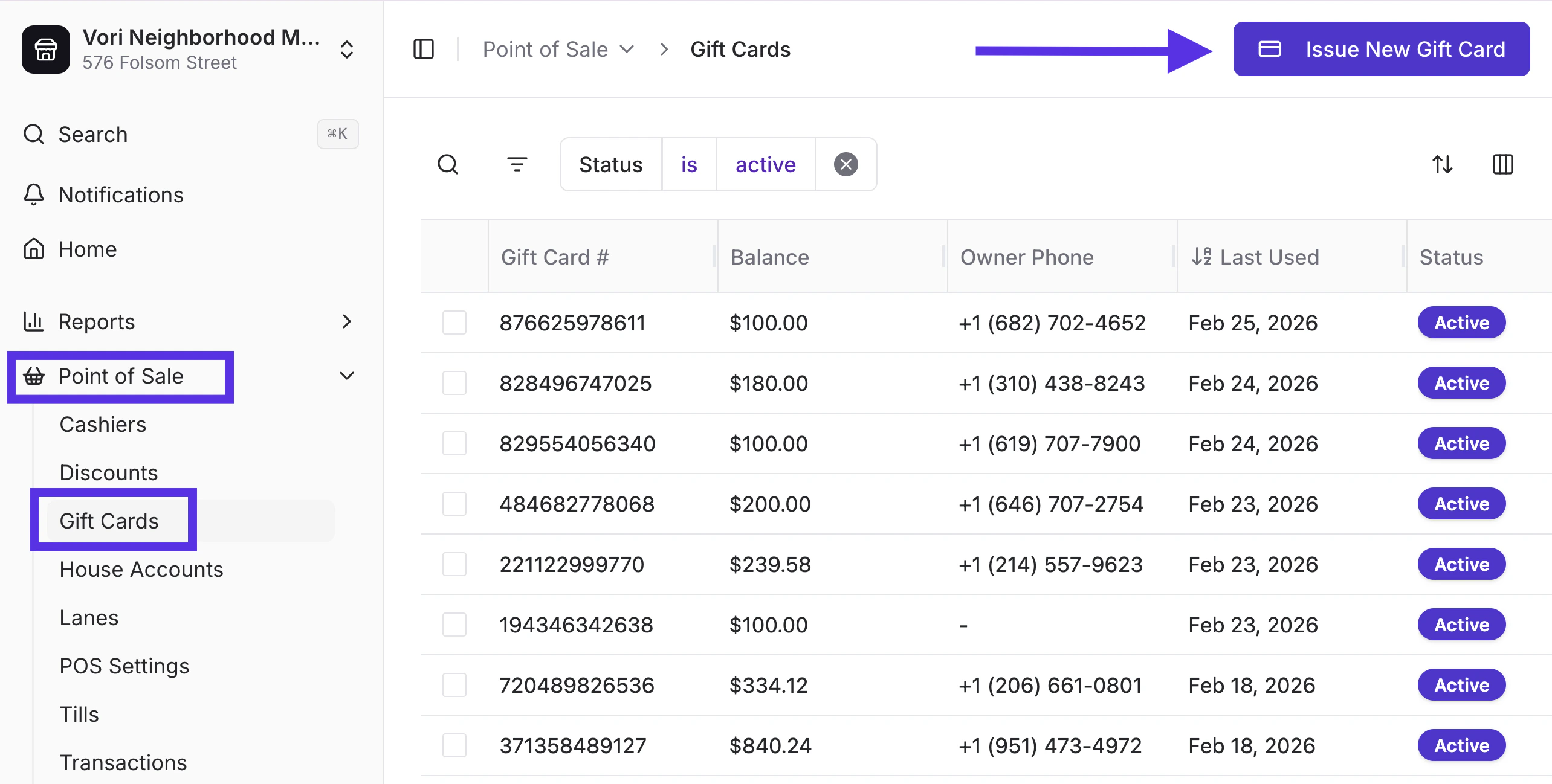
1. In **New** **Back Office**, select **Point of Sale** on the left-hand navigation menu.
2. Choose **Gift Cards** from the dropdown menu.
3. Tap I\*\*ssue New Gift Card.
 \*\*
4. Enter a **phone number** and/or a **barcode** and starting balance.
* If both are entered, the QR code and physical card will be linked.
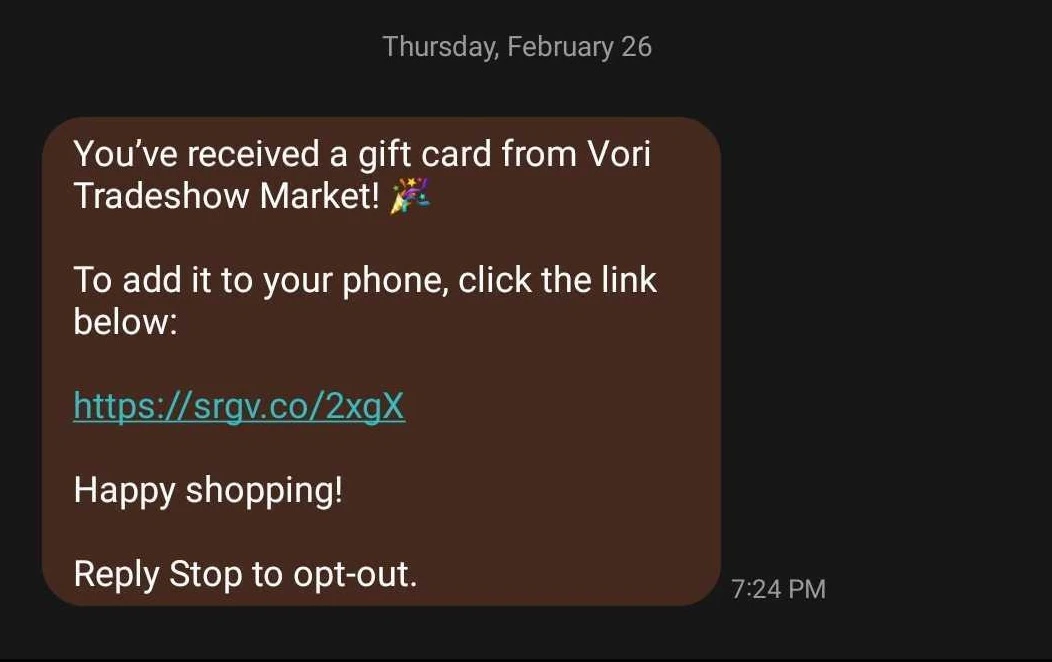
* If only a phone number is entered, the recipient will receive a digital card link via SMS.
\*\*
4. Enter a **phone number** and/or a **barcode** and starting balance.
* If both are entered, the QR code and physical card will be linked.
* If only a phone number is entered, the recipient will receive a digital card link via SMS.
 * If only a barcode is entered, the card balance will update immediately.
5. Enter the **starting balance** of the gift card.
6. Tap **Create & Issue.**
⚠️ **Caution:** Digital gift card links **expire 24 hours** after they are sent. If the recipient tries to open an expired link, they’ll see a **“Gift Card Not Found”** message.
* If only a barcode is entered, the card balance will update immediately.
5. Enter the **starting balance** of the gift card.
6. Tap **Create & Issue.**
⚠️ **Caution:** Digital gift card links **expire 24 hours** after they are sent. If the recipient tries to open an expired link, they’ll see a **“Gift Card Not Found”** message.
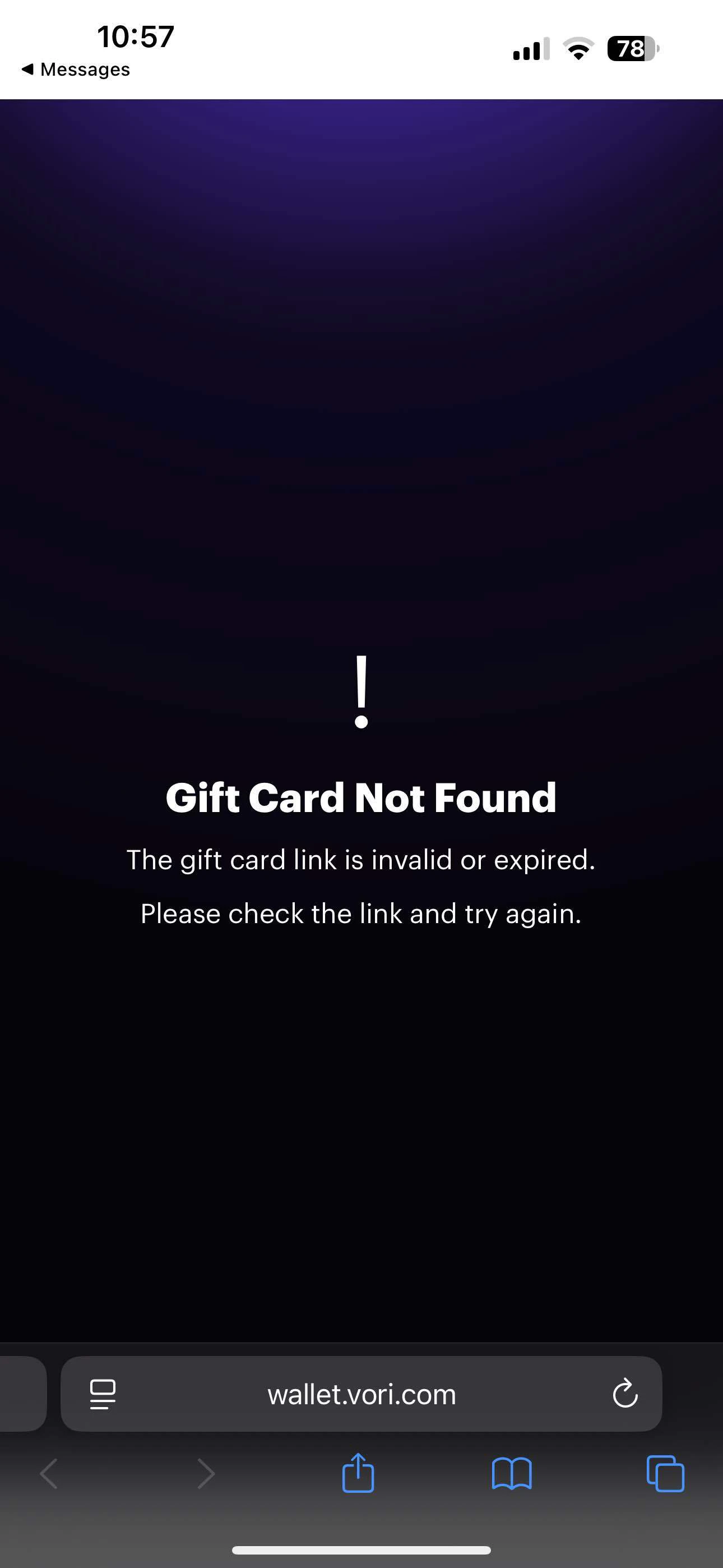 Customers can reply **RESEND** to the original text, or store staff can **[reissue the gift card](#Reissue-a-Gift-Card)** from New Back Office.
***
### Modify a Gift Card Balance
Mistakes happen. Promotions change. Store credit needs adjusting.
To correct an error or apply a manual balance adjustment:
1. Search by **Phone Number** or **Barcode**.
2. Hover over the gift card number and select **Open**.
3. Tap **Modify Balance**.
4. Add or subtract the amount, and enter a reason.
5. Tap **Update Balance**.
**✏️ Note:** If a phone number is linked, the shopper will receive a text with the updated balance and any information entered in the Reason field.
Customers can reply **RESEND** to the original text, or store staff can **[reissue the gift card](#Reissue-a-Gift-Card)** from New Back Office.
***
### Modify a Gift Card Balance
Mistakes happen. Promotions change. Store credit needs adjusting.
To correct an error or apply a manual balance adjustment:
1. Search by **Phone Number** or **Barcode**.
2. Hover over the gift card number and select **Open**.
3. Tap **Modify Balance**.
4. Add or subtract the amount, and enter a reason.
5. Tap **Update Balance**.
**✏️ Note:** If a phone number is linked, the shopper will receive a text with the updated balance and any information entered in the Reason field.
 ***
### [Edit, Reissue, and Deactivate a Gift Card](#Edit-a-Gift-Card)
#### Edit a Gift Card
Need to link a card to a shopper or fix a barcode?
1. Search by **Phone Number** or **Barcode**.
2. Hover over the gift card number and select **Open**.
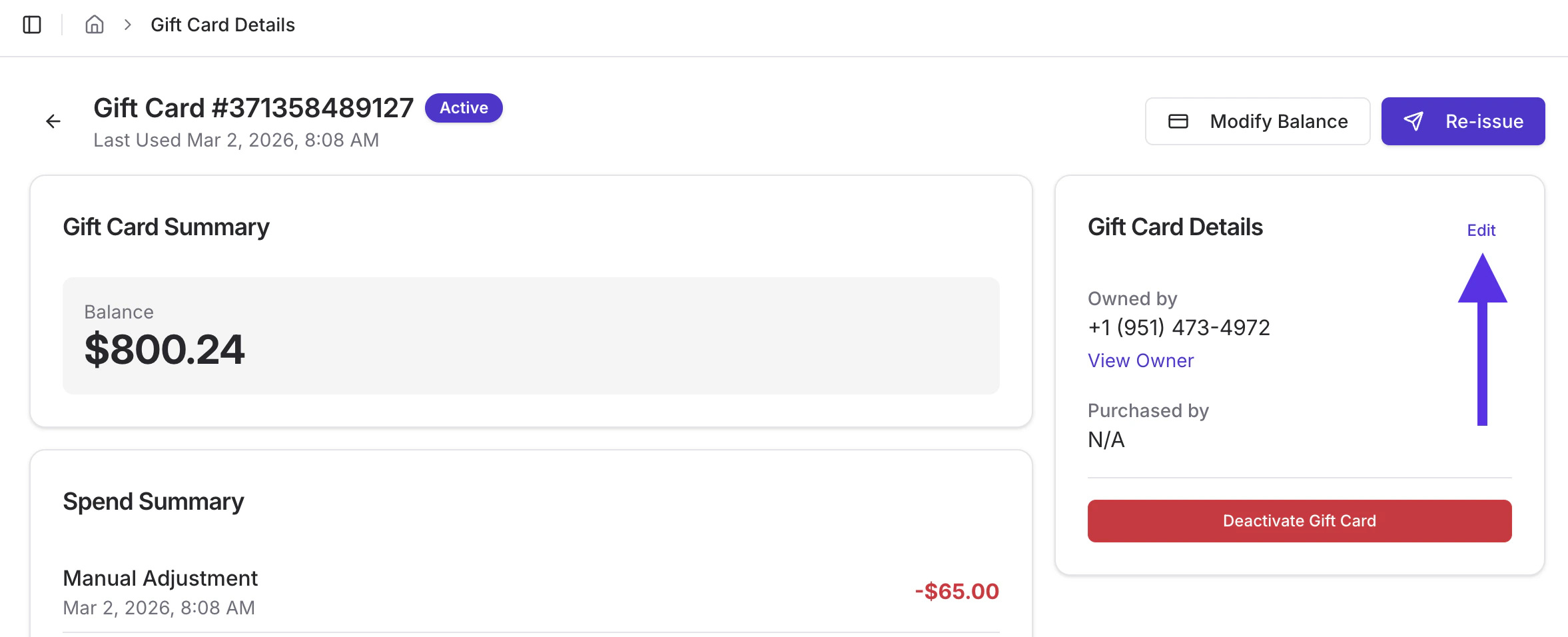
3. Tap **Edit**
1. Edit or remove a barcode.
2. Add an owner phone number (*you cannot remove a phone number once it’s assigned*).
3. Select **Update Details** to save changes.
***
### [Edit, Reissue, and Deactivate a Gift Card](#Edit-a-Gift-Card)
#### Edit a Gift Card
Need to link a card to a shopper or fix a barcode?
1. Search by **Phone Number** or **Barcode**.
2. Hover over the gift card number and select **Open**.
3. Tap **Edit**
1. Edit or remove a barcode.
2. Add an owner phone number (*you cannot remove a phone number once it’s assigned*).
3. Select **Update Details** to save changes.
 #### Reissue a Gift Card
If a shopper accidentally deletes their digital card text or the link expires, you can send them a new one.
1. Search by **Phone Number** or **Barcode**.
2. Hover over the gift card number and select **Open**.
3. Tap **Reissue**.
#### Reissue a Gift Card
If a shopper accidentally deletes their digital card text or the link expires, you can send them a new one.
1. Search by **Phone Number** or **Barcode**.
2. Hover over the gift card number and select **Open**.
3. Tap **Reissue**.
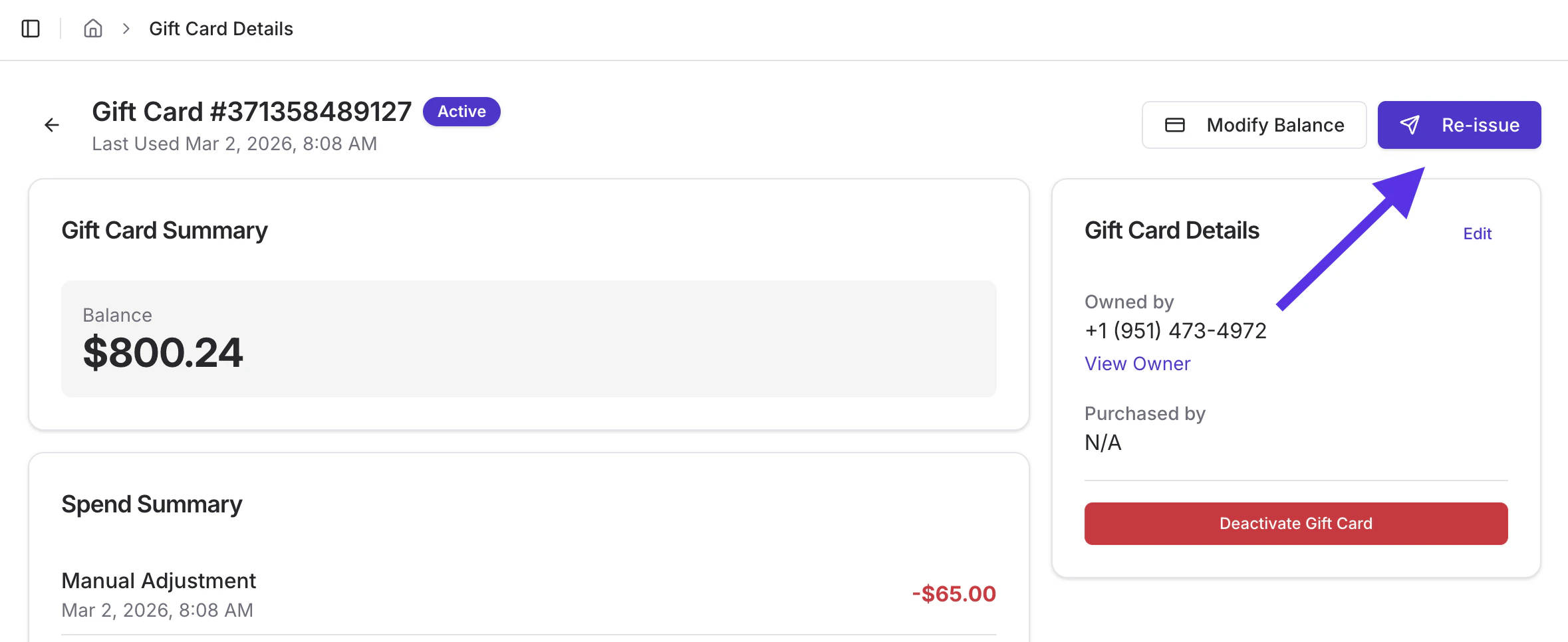 **✏️ Note:** Physical gift cards that aren’t linked to a phone number can’t be reissued. Linking cards gives you more flexibility down the line.
#### Deactivate a Gift Card
If a card is lost or no longer valid, you can deactivate it to prevent further use.
1. Search by **Phone Number** or **Barcode**.
2. Select the gift card.
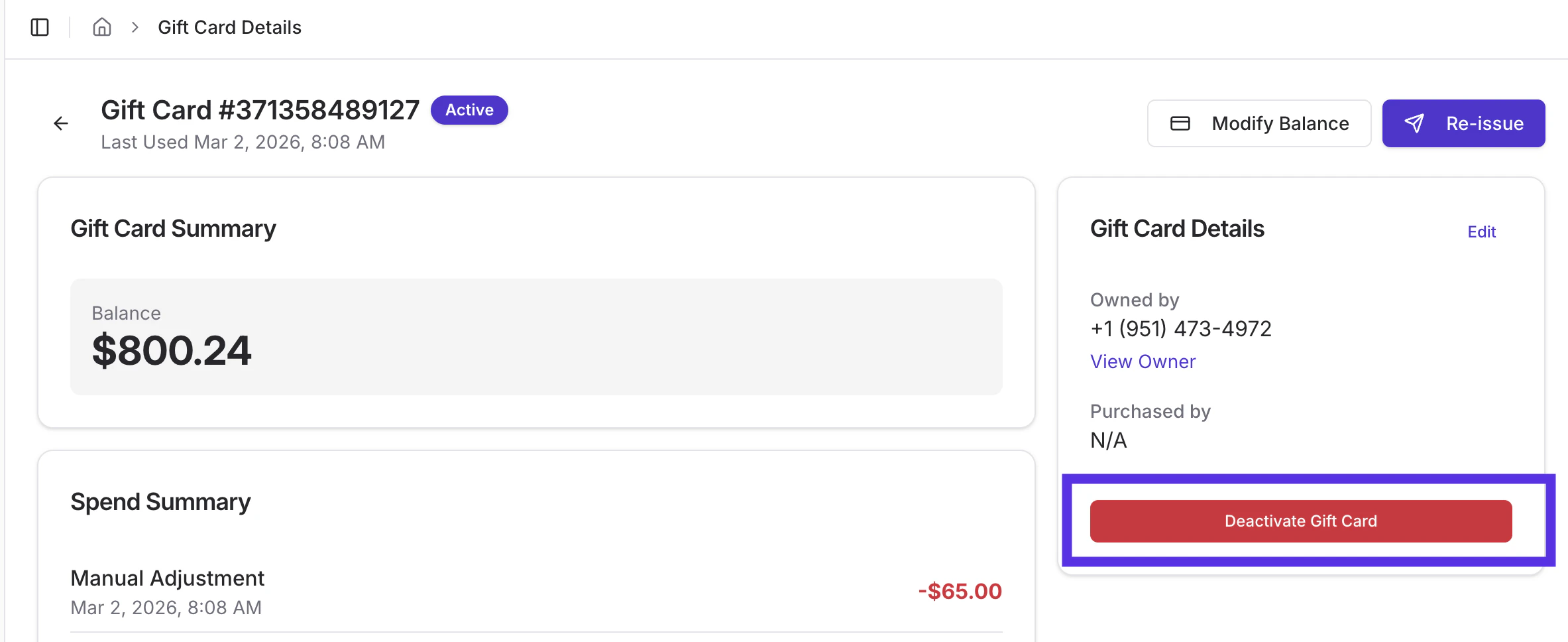
3. Tap the red **Deactivate Gift Card** button.
**✏️ Note:** Physical gift cards that aren’t linked to a phone number can’t be reissued. Linking cards gives you more flexibility down the line.
#### Deactivate a Gift Card
If a card is lost or no longer valid, you can deactivate it to prevent further use.
1. Search by **Phone Number** or **Barcode**.
2. Select the gift card.
3. Tap the red **Deactivate Gift Card** button.
 4. Enter a reason, then tap **Deactivate Gift Card.**
5. The receipient will receive a SMS message with details on the deactivation.
4. Enter a reason, then tap **Deactivate Gift Card.**
5. The receipient will receive a SMS message with details on the deactivation.
 **✏️ Note:** Deactivating a card does not block the phone number. New gift cards can still be issued to it.
***
➡️ **Next Up:** Want visibility into gift card performance? You can review gift card activity in your **End of Day Report** to track balances, usage, and impact on sales. Learn how in the **[Gift Card Activity in the End of Day Report article.](/reporting/daily-and-shift-reports/review-and-print-the-end-of-day-report)**
**✏️ Note:** Deactivating a card does not block the phone number. New gift cards can still be issued to it.
***
➡️ **Next Up:** Want visibility into gift card performance? You can review gift card activity in your **End of Day Report** to track balances, usage, and impact on sales. Learn how in the **[Gift Card Activity in the End of Day Report article.](/reporting/daily-and-shift-reports/review-and-print-the-end-of-day-report)**