> ## Documentation Index
> Fetch the complete documentation index at: https://help.vori.com/llms.txt
> Use this file to discover all available pages before exploring further.
# Redeem Campaign Coupons on the POS
> Learn how to scan, manually enter, and remove campaign coupons at the point of sale.
### Tracking the Required Loyalty Member Sign-In
* Campaign coupons can be set up for one-time use only, meaning they can be applied to a transaction just once.
* To prevent these coupons from being reused, members must sign in to their accounts before the coupons can be applied to their transaction.
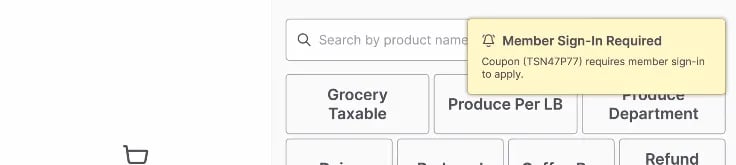
* **Sign-In Notification** If a one-time-use coupon is applied to a transaction and the member has not signed in, the cashier will be notified with a prompt on the cashier screen.\\
 * **Tracking a Coupon's Status** To view the status of any coupons being applied to the transaction, click the Shopper icon, 🛒, on the bottom of the cashier screen and select **Manage Coupons**.
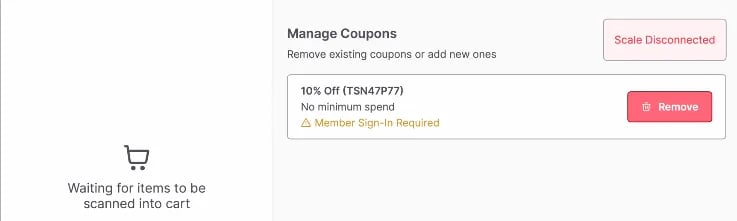
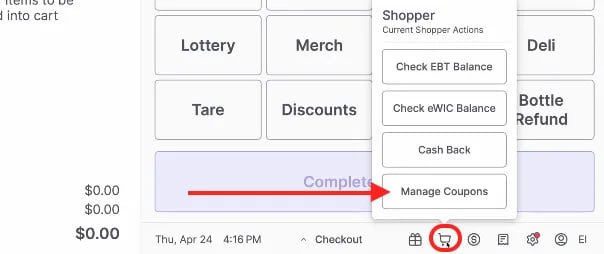 * In the **Manage Coupons** menu on the cashier screen, cashiers can view the status of each coupon and determine whether the member has signed in to apply the coupon successfully.\\
 ***
### Scanning Coupons with the Handheld Scanner
⚠️ **Caution:** Scanning coupons is only available on the handheld scanner. The scanner scale does not read coupons.
**Steps**
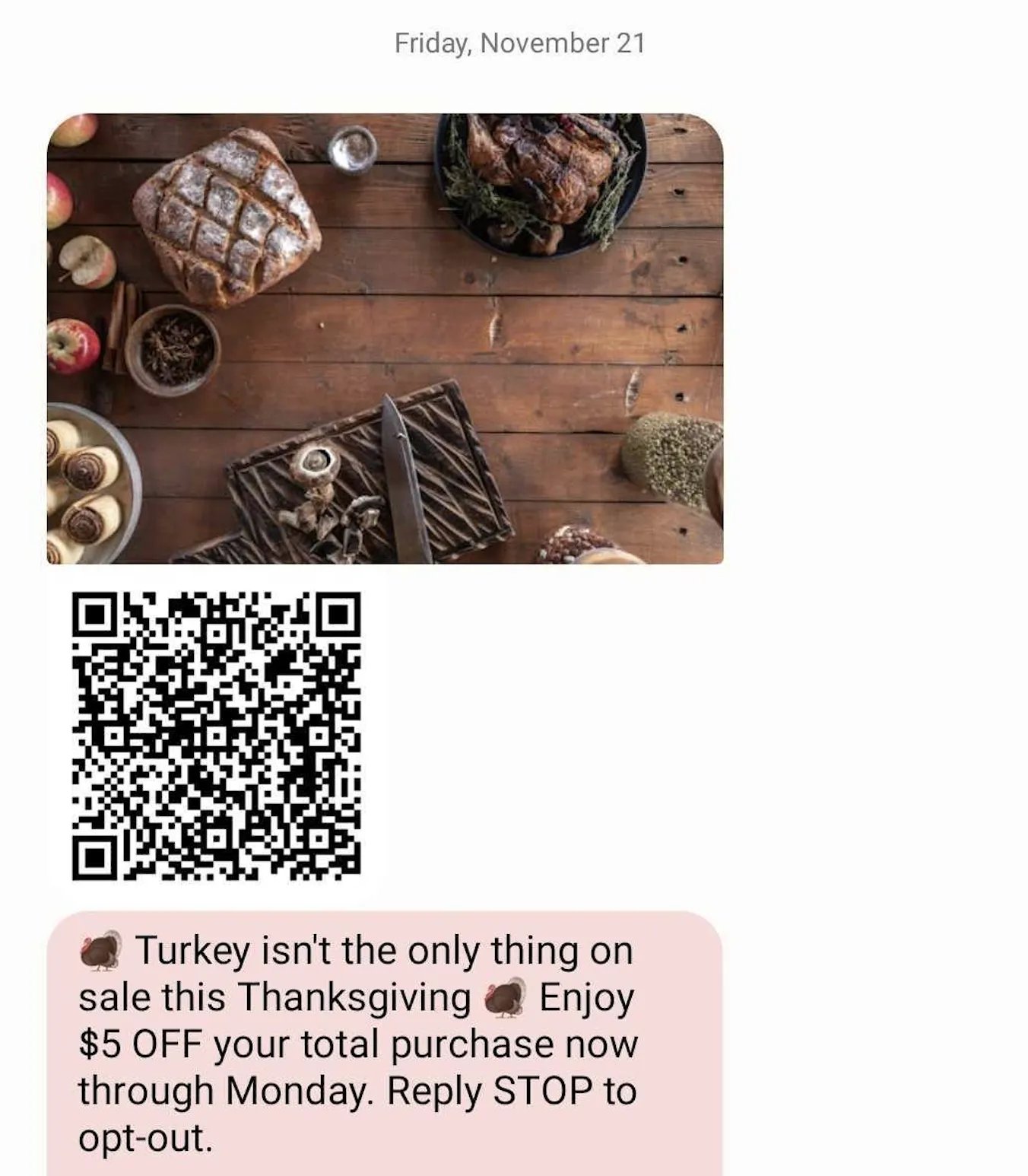
1. Use the handheld scanner to scan the QR code from the SMS text message presented by the shopper.
***
### Scanning Coupons with the Handheld Scanner
⚠️ **Caution:** Scanning coupons is only available on the handheld scanner. The scanner scale does not read coupons.
**Steps**
1. Use the handheld scanner to scan the QR code from the SMS text message presented by the shopper.
 2. A pop-up in the bottom-right corner of the screen will indicate whether the coupon was **Added** or **Invalid**.\\
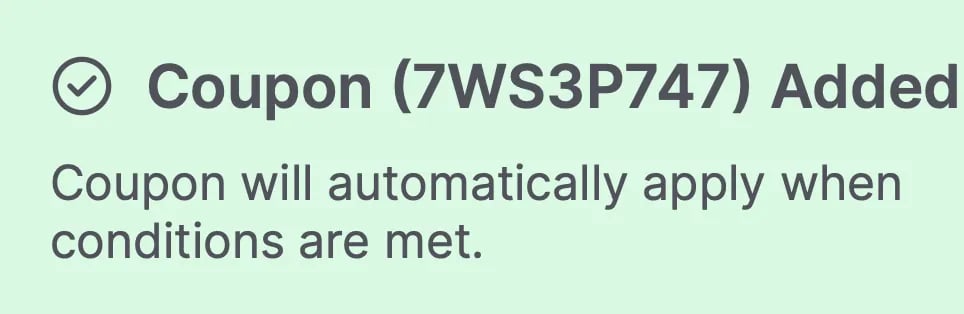
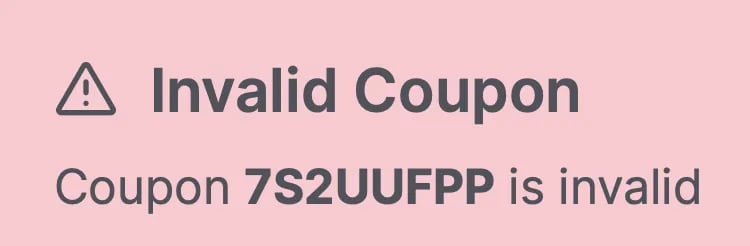 3. If successfully added, the coupon will be applied to eligible items.
4. If it is invalid, the coupon will not be applied.
***
### Manual Coupon Entry
Manual entry can be used when scanning the QR code is unsuccessful.
**Steps**
1. Tap **Shopper Actions**.
2. Select **Enter Coupon Code**.
3. Enter the coupon code from the campaign text message (not case-sensitive) and then tap **Enter**.\\
3. If successfully added, the coupon will be applied to eligible items.
4. If it is invalid, the coupon will not be applied.
***
### Manual Coupon Entry
Manual entry can be used when scanning the QR code is unsuccessful.
**Steps**
1. Tap **Shopper Actions**.
2. Select **Enter Coupon Code**.
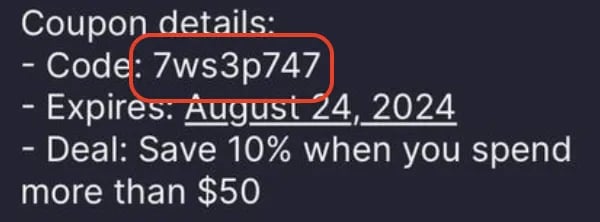
3. Enter the coupon code from the campaign text message (not case-sensitive) and then tap **Enter**.\\
 ***
### Removing Coupons
Follow these steps to remove a coupon that has been applied.
**Steps**
1. Tap **Shopper Actions**.
2. Select **Manage Coupons**.
3. Tap **Remove**.
4. Coupons should be removed. Select **Return to Cart** to navigate back to Checkout mode.
***
### Troubleshooting Unapplied Offers
To prevent confusion at checkout, the POS checks for reward eligibility before payment processing. If a shopper attempts to redeem a reward they have not qualified for, the system will display a window titled **"Unapplied Offers."\
***
### Removing Coupons
Follow these steps to remove a coupon that has been applied.
**Steps**
1. Tap **Shopper Actions**.
2. Select **Manage Coupons**.
3. Tap **Remove**.
4. Coupons should be removed. Select **Return to Cart** to navigate back to Checkout mode.
***
### Troubleshooting Unapplied Offers
To prevent confusion at checkout, the POS checks for reward eligibility before payment processing. If a shopper attempts to redeem a reward they have not qualified for, the system will display a window titled **"Unapplied Offers."\
 **
This screen explains why the reward cannot be applied so you can advise the shopper.
* **"Add eligible items to basket"**: The shopper is trying to use an item-specific reward but does not have the correct item in their cart.
* **"Spend \$XX.XX more"**: The shopper has not met the minimum purchase amount required for the reward.
**How to Resolve**
* Tap **Cancel** to return to the cart and add the necessary items to meet the reward requirements.
* Tap **Continue** to proceed with payment without applying those specific rewards.
***
### Additional Notes
* Only one basket-level coupon or loyalty reward can be redeemed per transaction.
* Basket-level rewards can be combined with multiple item-level coupons or rewards.
* Third-party coupons are not currently supported.
* Coupons can be scanned or manually entered at any point during the transaction.
## Related topics
- [Automated Campaign Messages & Coupons](/customer-marketing/campaigns-and-coupons/automated-campaign-messages-and-coupons.md)
- [Double Up Food Bucks (OR, MS, and CA)](/whats-new-in-vori/in-beta-double-up-bucks/in-beta-double-up-food-bucks-or-and-ms-only.md)
- [Custom Campaign Messages & Coupons](/customer-marketing/campaigns-and-coupons/custom-campaign-messages-and-coupons.md)
**
This screen explains why the reward cannot be applied so you can advise the shopper.
* **"Add eligible items to basket"**: The shopper is trying to use an item-specific reward but does not have the correct item in their cart.
* **"Spend \$XX.XX more"**: The shopper has not met the minimum purchase amount required for the reward.
**How to Resolve**
* Tap **Cancel** to return to the cart and add the necessary items to meet the reward requirements.
* Tap **Continue** to proceed with payment without applying those specific rewards.
***
### Additional Notes
* Only one basket-level coupon or loyalty reward can be redeemed per transaction.
* Basket-level rewards can be combined with multiple item-level coupons or rewards.
* Third-party coupons are not currently supported.
* Coupons can be scanned or manually entered at any point during the transaction.
## Related topics
- [Automated Campaign Messages & Coupons](/customer-marketing/campaigns-and-coupons/automated-campaign-messages-and-coupons.md)
- [Double Up Food Bucks (OR, MS, and CA)](/whats-new-in-vori/in-beta-double-up-bucks/in-beta-double-up-food-bucks-or-and-ms-only.md)
- [Custom Campaign Messages & Coupons](/customer-marketing/campaigns-and-coupons/custom-campaign-messages-and-coupons.md)