> ## Documentation Index
> Fetch the complete documentation index at: https://help.vori.com/llms.txt
> Use this file to discover all available pages before exploring further.
# Record Venmo, Zelle, and Other Third-Party Payments at the POS
> Learn how third-party payment methods work on the POS, how to record them at checkout, and how to reconcile them.
### How Third-Party Payments Work
Some shoppers pay with an app or service outside of Vori, like Venmo, Zelle, or Cash App. The POS lets you record these payments so the sale closes and your reports show how the shopper paid.
Here's how it works:
1. The shopper sends the money straight to your store's account on the third-party app or service.
2. You confirm the payment arrived in that account.
3. The cashier selects the matching payment method on the POS to close the sale.
Vori and your card processor don't handle this money. It lands in your store's third-party account, not in your card deposit.
Confirm the payment has arrived in your store's account **before** you record it on the POS. Selecting a payment method on the POS records the sale. It doesn't collect or verify the funds.
***
### Payment Methods You Can Turn On
Vori Support turns these payment methods on for your store. Contact **Vori Support** and tell us which ones you'd like, and we'll add them to your POS payment screen.
| Type | Payment methods |
| - | - |
| **Peer-to-peer and digital wallets** | Venmo, Zelle, Cash App, PayPal |
| **Delivery and online orders** | E-Commerce, Instacart, DoorDash, Uber Eats, Grubhub |
| **Money transfer services** | Money Transfer, Western Union, MoneyGram, Ria Money Transfer |
| **Other tenders** | Check, State Voucher, Donation, Lottery Payout |
House Account, Gift Certificate, Manufacturer's Coupon, and QR Pay are turned on the same way but have their own checkout steps. See [Accept and Redeem Gift Certificates on the POS](/customer-marketing/gift-cards/accept-and-redeem-gift-certificates-on-the-pos) and [Apply a Manufacturer or Third-Party Coupon to an Order](/point-of-sale-pos/basic-cashier-functions/apply-a-manufacturer-or-third-party-coupon-to-an-order).
***
### Record a Third-Party Payment at Checkout
1. Ring up the shopper's items as usual.
2. Select **Complete Payment**.
3. Choose **Other** as the payment type.
4. On the **Select Other Payment Method** screen, select the payment method the shopper used, like **PayPal** or **Venmo**. Only the methods turned on for your store appear here.
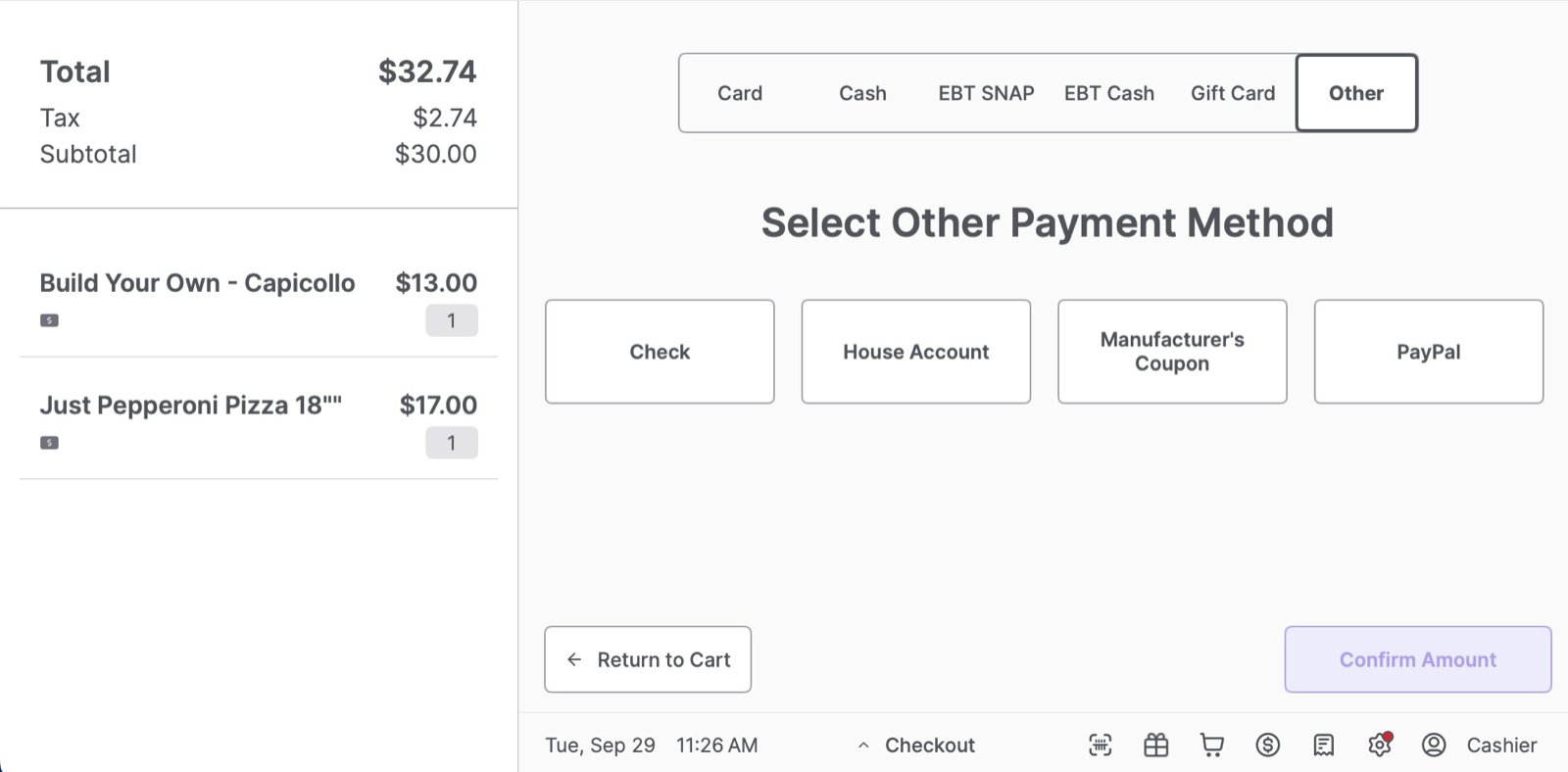 5. Check that the amount matches what the shopper sent, then select **Confirm Amount**.
6. Select **Print Receipt** or **No Receipt**.
A shopper can split a payment. For example, they can pay part with Venmo and the rest with card or cash. Record each portion with its own payment method.
***
### Refund a Third-Party Payment
The POS can't send money back through a third-party app. To refund a sale paid with one of these methods, refund the shopper as **Cash**, or send the refund yourself through the same app outside of Vori.
To learn more, see [Process Refunds on the POS](/point-of-sale-pos/basic-cashier-functions/process-refunds-on-the-pos).
***
### Reconcile Third-Party Payments
Because this money doesn't go through your card processor, it won't show up in your card deposit. Match these payments against your store's account on each app or service instead.
* Each payment method shows up by name in your POS reporting, separate from card and cash. Compare those totals to what landed in each third-party account.
* If you use an accounting integration, map each payment method to a General Ledger (GL) account. See [GL Account Mapping](/accounting-integrations/gl-account-mapping).
## Related topics
- [Apply a Manufacturer or Third-Party Coupon to an Order](/point-of-sale-pos/basic-cashier-functions/apply-a-manufacturer-or-third-party-coupon-to-an-order.md)
- [Export Regular or Promotion Items for Third-Party Tag Printing](/product-and-product-catalog-management/product-catalog-and-bulk-management/export-items-for-third-party-tag-printing.md)
- [Custom Tag Printing and Design](/tag-printing-and-design/tag-printing-and-design-overview.md)
5. Check that the amount matches what the shopper sent, then select **Confirm Amount**.
6. Select **Print Receipt** or **No Receipt**.
A shopper can split a payment. For example, they can pay part with Venmo and the rest with card or cash. Record each portion with its own payment method.
***
### Refund a Third-Party Payment
The POS can't send money back through a third-party app. To refund a sale paid with one of these methods, refund the shopper as **Cash**, or send the refund yourself through the same app outside of Vori.
To learn more, see [Process Refunds on the POS](/point-of-sale-pos/basic-cashier-functions/process-refunds-on-the-pos).
***
### Reconcile Third-Party Payments
Because this money doesn't go through your card processor, it won't show up in your card deposit. Match these payments against your store's account on each app or service instead.
* Each payment method shows up by name in your POS reporting, separate from card and cash. Compare those totals to what landed in each third-party account.
* If you use an accounting integration, map each payment method to a General Ledger (GL) account. See [GL Account Mapping](/accounting-integrations/gl-account-mapping).
## Related topics
- [Apply a Manufacturer or Third-Party Coupon to an Order](/point-of-sale-pos/basic-cashier-functions/apply-a-manufacturer-or-third-party-coupon-to-an-order.md)
- [Export Regular or Promotion Items for Third-Party Tag Printing](/product-and-product-catalog-management/product-catalog-and-bulk-management/export-items-for-third-party-tag-printing.md)
- [Custom Tag Printing and Design](/tag-printing-and-design/tag-printing-and-design-overview.md)