> ## Documentation Index
> Fetch the complete documentation index at: https://help.vori.com/llms.txt
> Use this file to discover all available pages before exploring further.
# Enable Local Network Access on the POS App
> Make sure your POS can process payments after an app update. Learn what the Local Network Access does and how to enable it so your POS works as expected.
⚠️ **Heads Up:** If Local Network access isn’t enabled, payments won’t work. You’ll need to update your settings before continuing.
### Why You're Seeing This Local Network Prompt
After the **VoriPOS** app is updated, you may see a system message when opening the POS app:
>  **To process payments, Local Network access must be enabled for VoriPOS.**\
> Once enabled, VoriPOS will launch automatically. If it’s already enabled, try disabling and re-enabling it.
You may also see a one-time permission prompt that looks like this:
>
**To process payments, Local Network access must be enabled for VoriPOS.**\
> Once enabled, VoriPOS will launch automatically. If it’s already enabled, try disabling and re-enabling it.
You may also see a one-time permission prompt that looks like this:
> 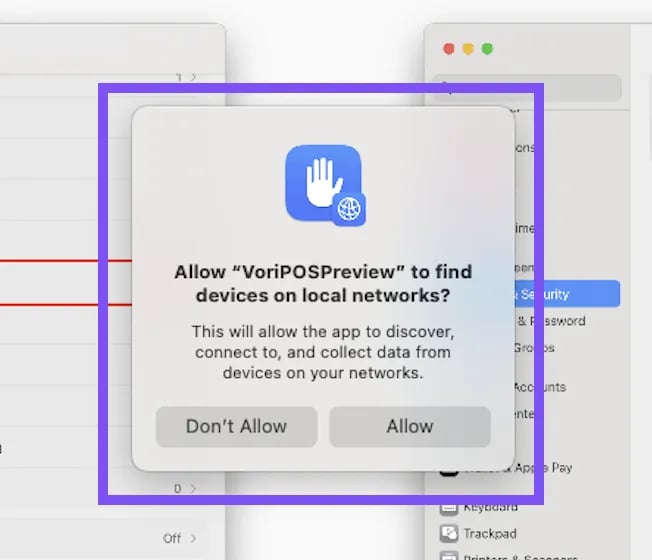 >
> That pop-up will only appear once. If you don’t see it again and are still stuck on this screen, it may be a macOS issue. You'll need to manually toggle the **Local Network** permission off and back on.
***
### How to Enable Local Network Access
Follow these steps on the POS iPad:
1. Select the **Open Privacy & Security** button.
1. The **Settings** app should come up with **Privacy & Security** selected in blue on the left-hand navigation.
2. Find and select **Local Network** on the right side.
3. Next to **VoriPOS**, select the **toggle to turn on**.
4. Once enabled, the VoriPOS app will launch automatically.
✏️ **Note:** If Local Network access was already on, try toggling it **off**, then **on** again.
## Related topics
- [How to access the VoriOS app if the VoriOS download failed](/vori-setup-and-troubleshooting/how-to-access-the-vori-os-app-if-the-vori-os-download-failed.md)
- [Map Store Vendors to Vori Global Vendors](/vendors-and-vendor-products/vendor-management/map-store-vendors-to-vori-global-vendors.md)
- [Troubleshoot Network Connectivity Issues with the POS](/hardware-and-peripherals/cashier-screen-and-shopper-display/troubleshoot-network-connectivity-issues-with-the-pos.md)
>
> That pop-up will only appear once. If you don’t see it again and are still stuck on this screen, it may be a macOS issue. You'll need to manually toggle the **Local Network** permission off and back on.
***
### How to Enable Local Network Access
Follow these steps on the POS iPad:
1. Select the **Open Privacy & Security** button.
1. The **Settings** app should come up with **Privacy & Security** selected in blue on the left-hand navigation.
2. Find and select **Local Network** on the right side.
3. Next to **VoriPOS**, select the **toggle to turn on**.
4. Once enabled, the VoriPOS app will launch automatically.
✏️ **Note:** If Local Network access was already on, try toggling it **off**, then **on** again.
## Related topics
- [How to access the VoriOS app if the VoriOS download failed](/vori-setup-and-troubleshooting/how-to-access-the-vori-os-app-if-the-vori-os-download-failed.md)
- [Map Store Vendors to Vori Global Vendors](/vendors-and-vendor-products/vendor-management/map-store-vendors-to-vori-global-vendors.md)
- [Troubleshoot Network Connectivity Issues with the POS](/hardware-and-peripherals/cashier-screen-and-shopper-display/troubleshoot-network-connectivity-issues-with-the-pos.md)