> ## Documentation Index
> Fetch the complete documentation index at: https://help.vori.com/llms.txt
> Use this file to discover all available pages before exploring further.
# Update Your Bank Account on CardConnect
> Learn how to update your bank account information on CardConnect
### Before You Start
Vori uses CardConnect to process payments. To change where your funds are deposited, you must submit a request directly through the **CardPointe** portal.
* **Required Access:** You will need your CardPointe login credentials.
* **Documentation:** Have your new bank account and routing numbers ready. CardConnect may also require a voided check or a bank letter for verification.
***
### How to Submit a Bank Account Change
Follow these steps to create a support ticket with CardConnect for a bank account update.
1. Go to [cardpointe.com/account](https://cardpointe.com/account) and log in to your merchant profile.
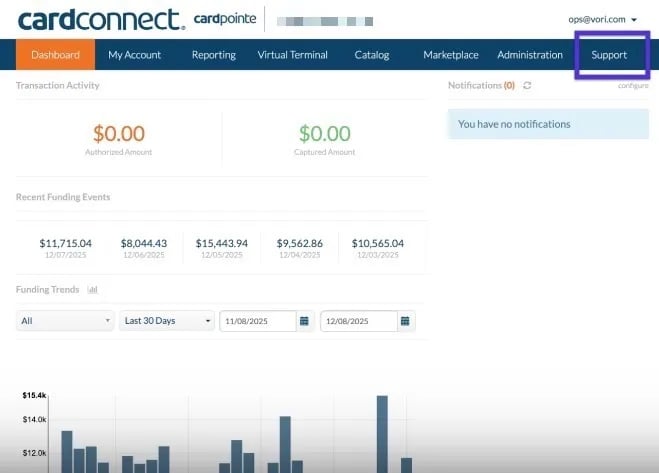
2. Navigate to the **Support** tab in the top menu.
 3. Click **Create New Ticket**.
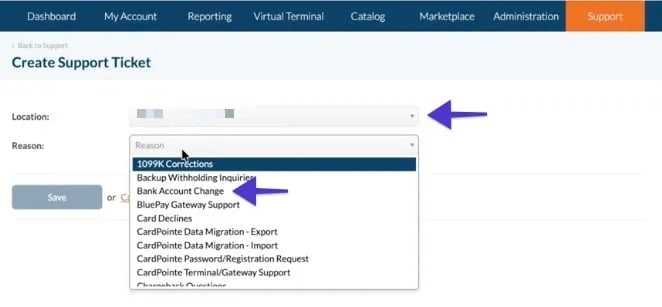
4. Select the store location you wish to update from the dropdown menu.
5. In the **Reason** dropdown, select **Bank Account Change**.
3. Click **Create New Ticket**.
4. Select the store location you wish to update from the dropdown menu.
5. In the **Reason** dropdown, select **Bank Account Change**.
 6. Fill out the required bank details in the description or form fields provided.
7. Click **Submit**.
***
### Multi-Location Stores
If you manage multiple store locations, please note that bank account updates are handled per merchant ID.
* **Individual Requests:** You must repeat the steps above for **each location** to ensure all stores are updated to the new account.
* **Verification:** CardConnect support may reach out via the ticket or email to confirm the change for security purposes.
**✏️ Note:** Once the ticket is submitted, it usually takes 2–3 business days for CardConnect to verify the new account and update your deposits.
## Related topics
- [Reconcile CardConnect Deposits with your Payments Report](/payments-and-financials/cardconnect/reconcile-cardconnect-deposits-with-your-payments-report.md)
- [How to access and download CardConnect monthly statements](/payments-and-financials/cardconnect/how-to-access-and-download-cardconnect-monthly-statements.md)
- [How to set up your CardPointe account](/payments-and-financials/cardconnect/how-to-set-up-your-cardpointe-account.md)
6. Fill out the required bank details in the description or form fields provided.
7. Click **Submit**.
***
### Multi-Location Stores
If you manage multiple store locations, please note that bank account updates are handled per merchant ID.
* **Individual Requests:** You must repeat the steps above for **each location** to ensure all stores are updated to the new account.
* **Verification:** CardConnect support may reach out via the ticket or email to confirm the change for security purposes.
**✏️ Note:** Once the ticket is submitted, it usually takes 2–3 business days for CardConnect to verify the new account and update your deposits.
## Related topics
- [Reconcile CardConnect Deposits with your Payments Report](/payments-and-financials/cardconnect/reconcile-cardconnect-deposits-with-your-payments-report.md)
- [How to access and download CardConnect monthly statements](/payments-and-financials/cardconnect/how-to-access-and-download-cardconnect-monthly-statements.md)
- [How to set up your CardPointe account](/payments-and-financials/cardconnect/how-to-set-up-your-cardpointe-account.md)