![vori-logo-black-horizontal-01 (1).png]](https://help.vori.com/hs-fs/hubfs/vori-logo-black-horizontal-01%20(1).png?height=42&name=vori-logo-black-horizontal-01%20(1).png)
Introduction
After a batch of promotional labels has been printed, a single product's label may need to be reprinted. Follow the steps below within the Vori OS app for reprinting the promo label.
✏️ Note - A product must be on an active promotion in order to reprint its promotional label.
Step-by-step guide
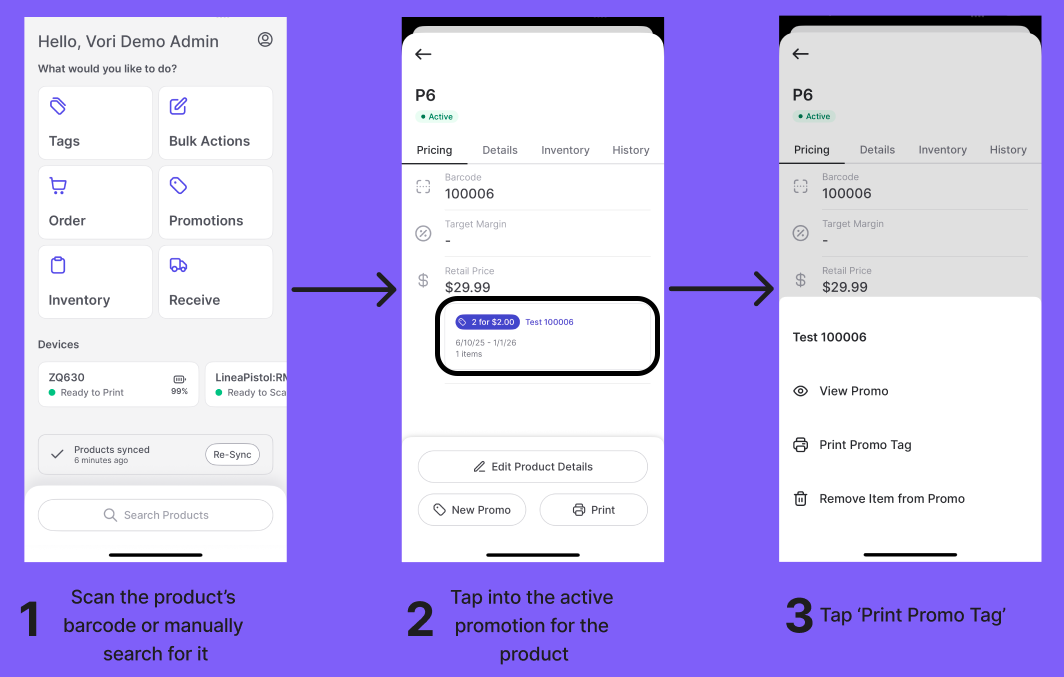
- 🔎 Search - Search for the product in the app by scanning its barcode or by using the search bar located at the bottom of the home screen to enter details manually.
- 👉 Tap the promotion - On the product's page, tap on the active promotion tile with the Pricing tab.
- 🖨️ Tap to print - Tap
Print Promo Tagon the prompt. Just make sure to load the promotional label roll into the printer first.
Additional resources
- For directions on how to load and print promotional labels into the label printer, click here.
- For directions on how to create a promotion on the Vori OS app, click here.