![vori-logo-black-horizontal-01 (1).png]](https://help.vori.com/hs-fs/hubfs/vori-logo-black-horizontal-01%20(1).png?height=42&name=vori-logo-black-horizontal-01%20(1).png)
Directions
- Go to cardpointe.com/account and log in to your merchant profile.
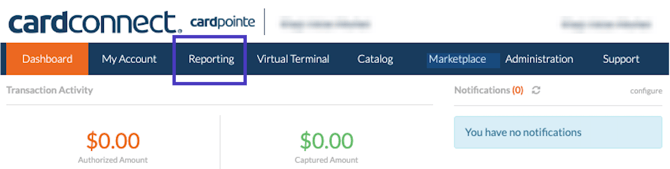
- Navigate to the Reporting tab in the top menu.
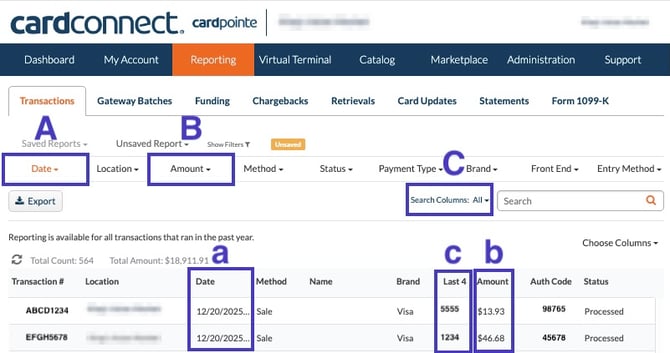
- Within the Transactions tab of Reporting, use the available filters to search for the charge in question. Suggested filters include:
- Date: Filter down transactions to the date of the charge.
- Date:Filter down transactions by the amount of the charge.
- Last 4: Click into the Search Columns button and select the Last 4 filter to filter down transactions by the last 4 digits of the card.
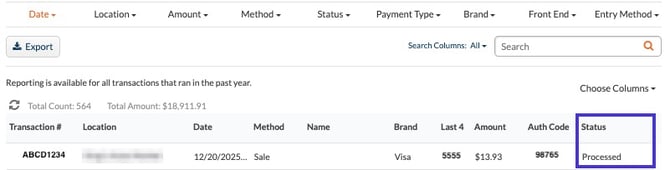
- Once the transaction is located, confirm whether it was charged by checking the Status of the transaction on the far right of the row.
- Authorized - The card issuer has approved the transaction and placed a hold on the funds. The transaction has not yet been finalized or settled.
- Batched - The transaction has been included in a batch that has been submitted for settlement. Funds will be deposited according to your processor’s funding schedule.
- Captured - The authorized transaction has been finalized and sent for settlement. This status typically means the transaction will move to funding.
- Declined - The card issuer declined the transaction. No funds were authorized. Common reasons include insufficient funds, incorrect card details, or issuer restrictions.
- Failed - The transaction could not be completed due to a system or communication error. No funds were authorized or captured.
- Format Error - The transaction was rejected due to invalid or improperly formatted data (such as missing or incorrect fields).
- Partially Refunded - A portion of the original transaction amount has been refunded to the customer. The remaining amount remains settled.
- Partially Voided - Part of the transaction amount was voided before settlement. Only the remaining amount will be processed.
- Processed - The transaction has been successfully completed and accepted by the processor. Funding status may depend on batching and settlement timing.
- Refunded - The full transaction amount has been returned to the customer after settlement.
- Rejected - The transaction was rejected by the processor or gateway before authorization. This can occur due to validation rules or risk checks.
- Token Decrypt Failed - The transaction could not be processed because the encrypted payment token could not be decrypted. No authorization occurred.
- Under Review - The transaction is being reviewed for potential risk or fraud. Processing is temporarily paused until the review is completed.
- Unknown - The transaction status could not be determined at this time. This may be due to a temporary system issue or delayed response.
- Verified - The card details were successfully verified (such as an address or card verification check), but no funds were authorized or captured.
- Voided -The transaction was canceled before settlement. Any authorized funds will be released back to the cardholder.