> ## Documentation Index
> Fetch the complete documentation index at: https://help.vori.com/llms.txt
> Use this file to discover all available pages before exploring further.
# How to remotely reboot an ESL access point through Vusion Manager
> This article explains how to use the remote reboot command with Vusion Manager to troubleshoot an AP experiencing communication issues.
**✏️** **Note -** If logging into Vusion Manager for the first time, click [here](/electronic-shelf-labels-esls/how-to-sign-into-vusion-manager-for-the-first-time) for directions on first time user registration.
### Remotely rebooting an AP (access point)
If an AP is offline, a remote reboot of the unit may be used to reset the unit's connection to the store's network:
**✏️** **Note -** **The remote reboot will not work if the AP has:**
* Lost power
* Become unplugged from the store's network
* The store's internet is down
If any of these apply, click here for troubleshooting steps.
1. On the Infrastructure tab of Vusion Manager, select the **`Reboot AP`** button on the row of the offline AP.
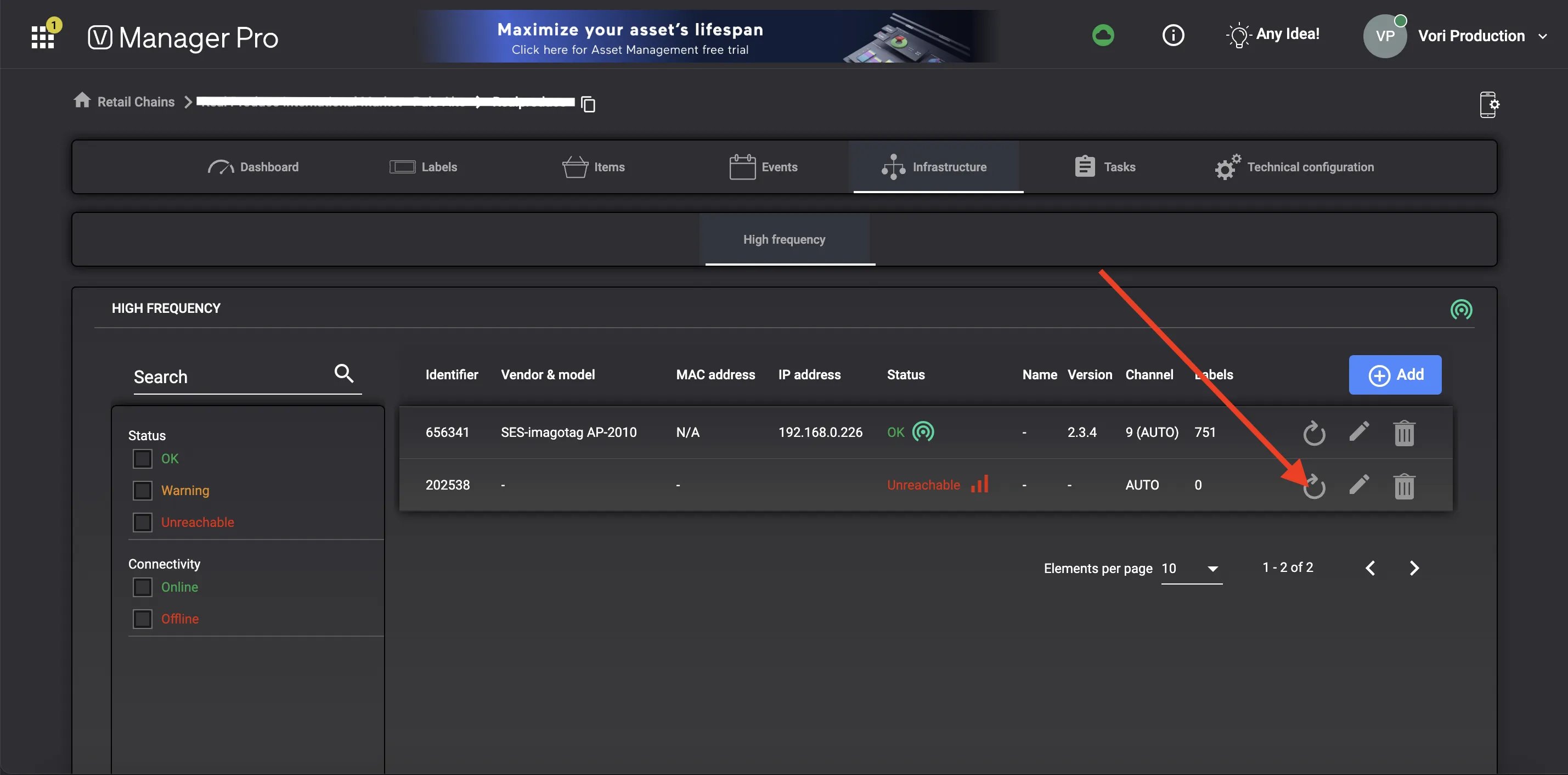 2. Select **`Confirm`** on the pop-up window.
 3. A green pop-up texts should appear at the bottom of the screen to confirm that a reboot command has been sent to the AP.
 4. If Vusion Manager is able to communicate with the AP, the unit should reboot within a few minutes.
**✏️** **Note -** If remotely rebooting the AP does not bring it back online, click here for directions on physical AP troubleshooting.
## Related topics
- [How to search, view, & troubleshoot ESLs using Vusion Manager](/electronic-shelf-labels-esls/how-to-search-view-and-troubleshoot-esls-using-vusion-manager.md)
- [How to register an access point to a store’s Vusion account](/electronic-shelf-labels-esls/how-to-register-an-access-point-to-a-store-s-vusion-account.md)
- [How to register a case of ESLs in the Vusion Link app](/electronic-shelf-labels-esls/how-to-register-a-case-of-esls-in-the-vusion-link-app.md)
4. If Vusion Manager is able to communicate with the AP, the unit should reboot within a few minutes.
**✏️** **Note -** If remotely rebooting the AP does not bring it back online, click here for directions on physical AP troubleshooting.
## Related topics
- [How to search, view, & troubleshoot ESLs using Vusion Manager](/electronic-shelf-labels-esls/how-to-search-view-and-troubleshoot-esls-using-vusion-manager.md)
- [How to register an access point to a store’s Vusion account](/electronic-shelf-labels-esls/how-to-register-an-access-point-to-a-store-s-vusion-account.md)
- [How to register a case of ESLs in the Vusion Link app](/electronic-shelf-labels-esls/how-to-register-a-case-of-esls-in-the-vusion-link-app.md)