> ## Documentation Index
> Fetch the complete documentation index at: https://help.vori.com/llms.txt
> Use this file to discover all available pages before exploring further.
# Create a Reusable Coupon QR Code
> Build a coupon QR code that isn't tied to one shopper's phone number, so any cashier can scan it at checkout for repeat use.
A [Custom Campaign coupon](/customer-marketing/campaigns-and-coupons/custom-campaign-messages-and-coupons) is normally texted to one shopper's phone for one-time use. Some offers don't work that way — they're tied to a physical card or membership that any qualifying shopper can present at checkout, not to an individual shopper's number. This guide shows you how to turn a campaign coupon into a single, reusable QR code that cashiers keep at the register and scan whenever a qualifying shopper comes in.
**✏️ Note:** This is different from a [loyalty sign-up QR code](/customer-marketing/best-practices/generate-a-qr-code-for-loyalty-sign-up), which shoppers scan themselves to join your loyalty program.
### When to use a reusable coupon QR code
Reach for this method for offers tied to a card or membership rather than a shopper's phone number, such as:
* A community give-back card for local schools or nonprofit partners (for example, $5 off a $50 purchase).
* A senior, military, or first responder discount card.
* A punch card or membership card that isn't linked to a shopper's loyalty profile.
### Create the campaign
1. From Vori Back Office, go to **Marketing** > **[Custom Campaigns](https://app.vori.com/retail/marketing/campaigns/custom-messages)** and click **New Message**.
2. Name the campaign **\[DO NOT DELETE OR PUBLISH]**. This campaign will never actually send, so the name warns you and your team not to touch it later.
3. Add the coupon for your offer. See [How to Add a Coupon to a Custom Campaign](/customer-marketing/campaigns-and-coupons/custom-campaign-messages-and-coupons#how-to-add-a-coupon-to-a-custom-campaign) for the coupon type that matches your discount.
4. In the **Message Template**, describe the offer and tell the cashier what to check for before scanning. For example: *"This coupon is for families with our give back card. They'll receive $5 off when they spend $50. Scan the QR code after the shopper shows their give back card."* This text prints alongside the QR code, so write it as an instruction to whoever is standing at the register.
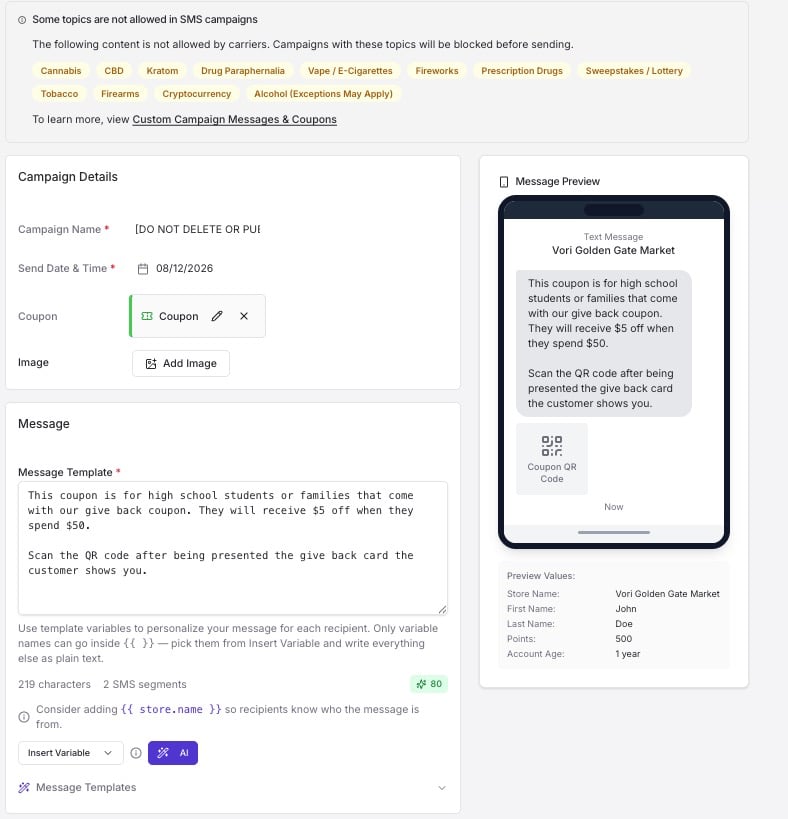 **⚠️ Caution:** Do not click **Publish**. Publishing sends the coupon to your entire audience immediately. Always leave this campaign as a draft.
### Save the campaign and send yourself a test
1. Click **Save** at the top right to save the campaign as a draft.
2. Enter your own phone number in the test message field and click **Send Test**.
**⚠️ Caution:** Do not click **Publish**. Publishing sends the coupon to your entire audience immediately. Always leave this campaign as a draft.
### Save the campaign and send yourself a test
1. Click **Save** at the top right to save the campaign as a draft.
2. Enter your own phone number in the test message field and click **Send Test**.
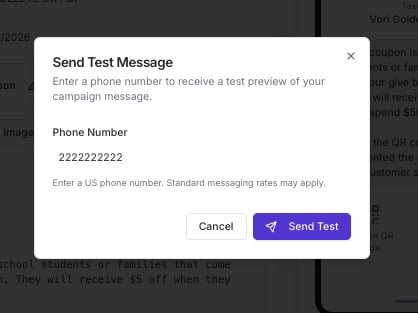 3. You'll receive a text message with the coupon details and a scannable QR code.
### Print and place the QR code
1. Take a screenshot of the QR code from the text message.
2. Print the screenshot.
3. Place the printed QR code at checkout so a cashier can scan it any time a qualifying shopper comes in.
**💡 Tip:** Test the QR code with the POS scanner before you put it out at checkout, to confirm the coupon applies correctly.
## Related topics
- [Generate a QR Code for Loyalty Sign-up](/customer-marketing/best-practices/generate-a-qr-code-for-loyalty-sign-up.md)
- [Redeem Campaign Coupons on the POS](/point-of-sale-pos/basic-cashier-functions/redeem-campaign-coupons-on-the-pos.md)
- [How to log into Vusion Link with a QR code generated from a different phone](/electronic-shelf-labels-esls/how-to-log-into-vusion-link-with-a-qr-code-generated-from-a-different-phone.md)
3. You'll receive a text message with the coupon details and a scannable QR code.
### Print and place the QR code
1. Take a screenshot of the QR code from the text message.
2. Print the screenshot.
3. Place the printed QR code at checkout so a cashier can scan it any time a qualifying shopper comes in.
**💡 Tip:** Test the QR code with the POS scanner before you put it out at checkout, to confirm the coupon applies correctly.
## Related topics
- [Generate a QR Code for Loyalty Sign-up](/customer-marketing/best-practices/generate-a-qr-code-for-loyalty-sign-up.md)
- [Redeem Campaign Coupons on the POS](/point-of-sale-pos/basic-cashier-functions/redeem-campaign-coupons-on-the-pos.md)
- [How to log into Vusion Link with a QR code generated from a different phone](/electronic-shelf-labels-esls/how-to-log-into-vusion-link-with-a-qr-code-generated-from-a-different-phone.md)