> ## Documentation Index
> Fetch the complete documentation index at: https://help.vori.com/llms.txt
> Use this file to discover all available pages before exploring further.
# Configure an Invoice Email Inbox for Automatic Cost Change Updates
> Learn how to set up a dedicated invoice email inbox to automatically forward cost change information to Vori.
### Gmail Forwarding Rules for the Invoice Inbox
1. Log in to the inbox that receives emailed copies of invoices.
2. Click the **Settings icon** ⚙️ > **See all settings**.
3. On the top navigation bar, click **Forwarding and POP/IMAP**.
4. In the "Forwarding menu," set up the forwarding inbox to **[invoices+StoreName@vori.com](mailto:invoices+StoreName@vori.com)**. (Enter your **Store Name**).
* *You may need to go through **Two-Factor Authentication** to complete some of these steps based on your inbox security setup.*
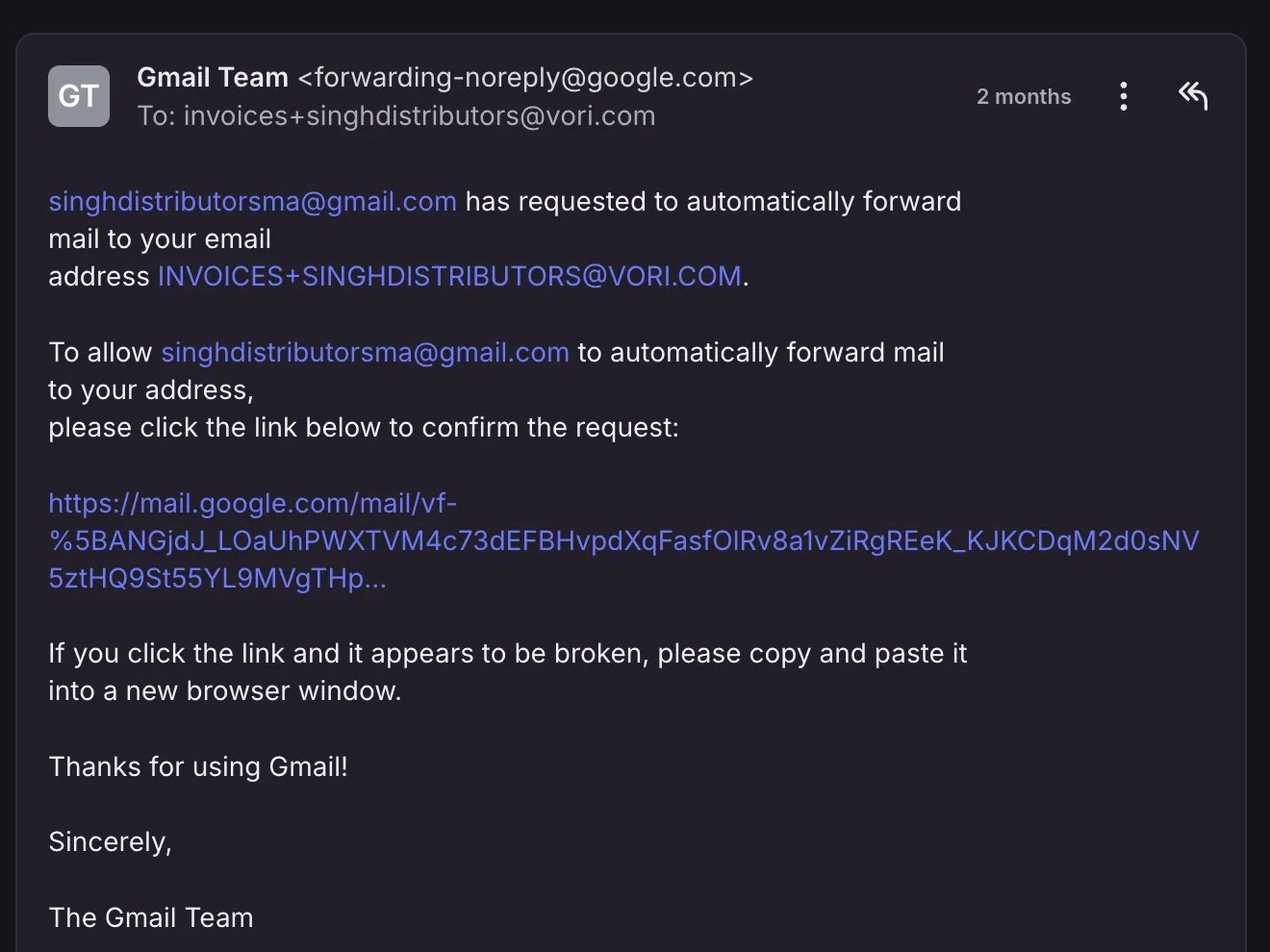
5. **Notify Vori** that you've set up the forwarding rule.
* Vori must confirm you want to receive forwarded messages from your specific inbox.
 ***
### Create a Filter to Forward Only Invoices
Once Vori has approved receiving mail from your inbox:
1. Go back to **Forwarding and POP/IMAP**.
2. Make sure to select **Forward a copy of incoming mail to [invoices+StoreName@vori.com](mailto:invoices+StoreName@vori.com)** and **keep Gmail's copy in the inbox**.
3. Tap **creating a filter!**
4. When the pop-up appears, add **invoice** as a search parameter and check the box for **has attachment** → then **Create filter**.
5. Check the box for **Forward it to:** and select the receiving address (**[invoices+StoreName@vori.com](mailto:invoices+StoreName@vori.com)**) > Click **Create Filter**.
6. **Notify Vori** once you've completed these steps. A Vori admin finishes the setup in your store's internal settings, and your invoices begin uploading into Vori automatically.
***
### Ask Your Vendors to Email Invoices (New System Onboarding)
To ensure Vori receives invoices automatically for cost change processing, you'll need to ask your vendors to email invoices to your designated invoice inbox.
Use the following template to make this request to your vendor contacts. Remember to replace the bracketed placeholders with your specific information.
### Vendor Invoice Email Request Template
**Subject:** Important Request: Updating Invoice Delivery for \[Retailer Name]
**Email Body:**
Hi **\[Vendor Name]**,
We are currently onboarding a new Point-of-Sale system and Back Office software, and want to make sure all of our data is accurate and up-to-date in the new system.
To help us with this transition, can you also please email copies of **all future invoices** to this dedicated email address: **\[invoice inbox email]**? That would be a huge help.
Thanks again for your support,
**\[store administrator]**\
**\[retailer name]**\
**\[phone number]**
***
### Handle Historical and Duplicate Invoices
#### Historical Invoices
Creating this filter will only affect **future invoices**; historical emails will not be forwarded.
* Retailers will need to **manually forward historical emailed invoices** for cost change processing.
#### Duplicate Invoices
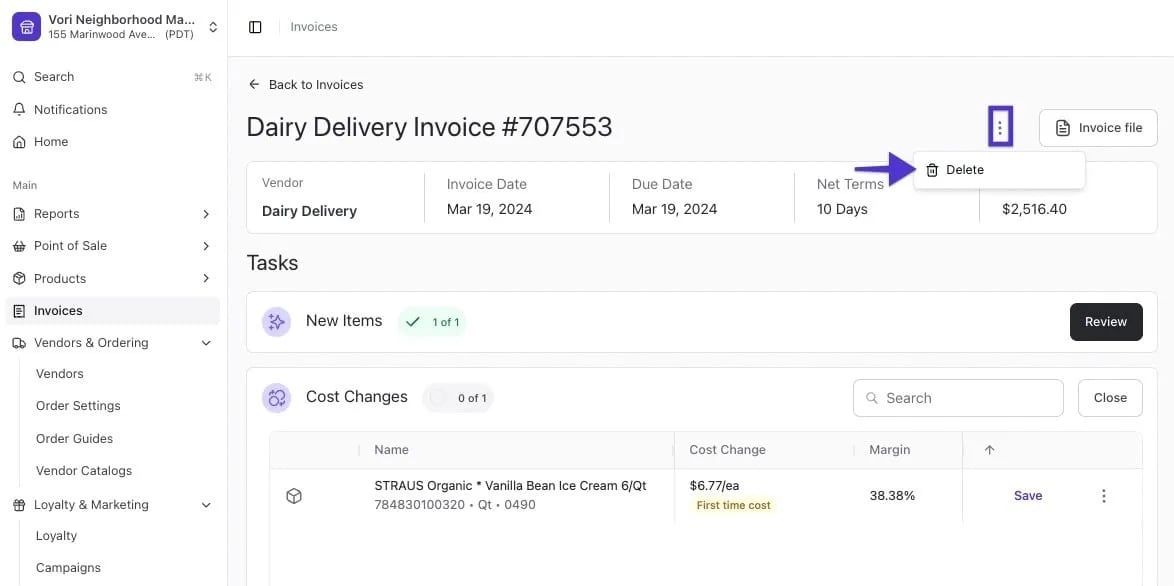
If you upload the same invoice (e.g., from both an email and a scanned upload), the system will not recognize it and will not delete it.
* You can easily delete the duplicate by selecting the **three dots** next to the invoice and choosing **delete**.
*
***
### Create a Filter to Forward Only Invoices
Once Vori has approved receiving mail from your inbox:
1. Go back to **Forwarding and POP/IMAP**.
2. Make sure to select **Forward a copy of incoming mail to [invoices+StoreName@vori.com](mailto:invoices+StoreName@vori.com)** and **keep Gmail's copy in the inbox**.
3. Tap **creating a filter!**
4. When the pop-up appears, add **invoice** as a search parameter and check the box for **has attachment** → then **Create filter**.
5. Check the box for **Forward it to:** and select the receiving address (**[invoices+StoreName@vori.com](mailto:invoices+StoreName@vori.com)**) > Click **Create Filter**.
6. **Notify Vori** once you've completed these steps. A Vori admin finishes the setup in your store's internal settings, and your invoices begin uploading into Vori automatically.
***
### Ask Your Vendors to Email Invoices (New System Onboarding)
To ensure Vori receives invoices automatically for cost change processing, you'll need to ask your vendors to email invoices to your designated invoice inbox.
Use the following template to make this request to your vendor contacts. Remember to replace the bracketed placeholders with your specific information.
### Vendor Invoice Email Request Template
**Subject:** Important Request: Updating Invoice Delivery for \[Retailer Name]
**Email Body:**
Hi **\[Vendor Name]**,
We are currently onboarding a new Point-of-Sale system and Back Office software, and want to make sure all of our data is accurate and up-to-date in the new system.
To help us with this transition, can you also please email copies of **all future invoices** to this dedicated email address: **\[invoice inbox email]**? That would be a huge help.
Thanks again for your support,
**\[store administrator]**\
**\[retailer name]**\
**\[phone number]**
***
### Handle Historical and Duplicate Invoices
#### Historical Invoices
Creating this filter will only affect **future invoices**; historical emails will not be forwarded.
* Retailers will need to **manually forward historical emailed invoices** for cost change processing.
#### Duplicate Invoices
If you upload the same invoice (e.g., from both an email and a scanned upload), the system will not recognize it and will not delete it.
* You can easily delete the duplicate by selecting the **three dots** next to the invoice and choosing **delete**.
* *
## Related topics
- [Preparing Your Store for Advanced Inventory Launch](/inventory-and-ordering/inventory/preparing-your-store-for-advanced-inventory-launch.md)
- [Upload Invoices to Vori](/invoicing-cost-changes-and-smart-pricing/invoice-upload/upload-invoices-to-vori.md)
- [Manage Your Vori Invoice Email Notifications](/cost-changes-and-smart-pricing/invoice-email-management/manage-your-vori-invoice-email-notifications.md)
*
## Related topics
- [Preparing Your Store for Advanced Inventory Launch](/inventory-and-ordering/inventory/preparing-your-store-for-advanced-inventory-launch.md)
- [Upload Invoices to Vori](/invoicing-cost-changes-and-smart-pricing/invoice-upload/upload-invoices-to-vori.md)
- [Manage Your Vori Invoice Email Notifications](/cost-changes-and-smart-pricing/invoice-email-management/manage-your-vori-invoice-email-notifications.md)