![vori-logo-black-horizontal-01 (1).png]](https://help.vori.com/hs-fs/hubfs/vori-logo-black-horizontal-01%20(1).png?height=42&name=vori-logo-black-horizontal-01%20(1).png)
While many stores use digital gift cards, paper gift certificates remain a staple for many local businesses. Vori makes it easy to track and redeem these manual payments directly on the Point of Sale (POS) system, ensuring your books stay balanced and your lines keep moving.
Table of Contents
What is a Gift Certificate?
In the Vori system, a Gift Certificate refers specifically to a manual, paper-based voucher issued by your store.
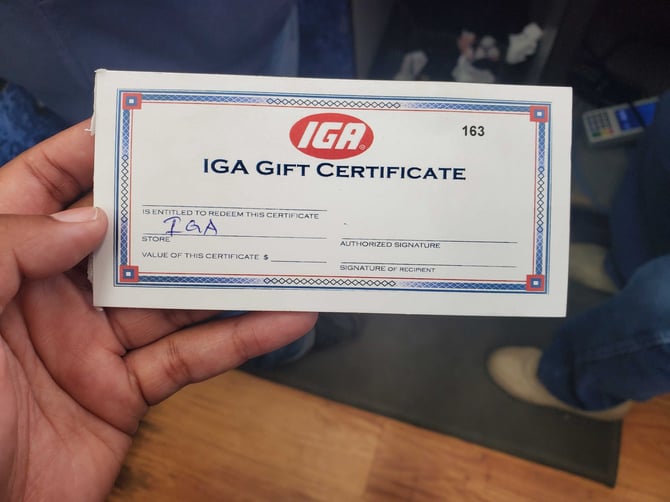
Unlike a plastic gift card with a barcode or magnetic stripe that you swipe, a gift certificate acts like cash but requires manual verification.
Verifying Paper Certificates
Because gift certificates are manual, protecting your store from fraud is critical. Before you process the payment on the POS, take a moment to inspect the physical document.
Ensure the certificate includes the following valid details:
-
Store Name: Verify it was issued by your specific store location.
-
Authorized Signature: Look for the manager or owner's signature in the "Authorized Signature" field.
-
Dollar Value: Ensure the written amount is clear and has not been altered.
🚨 Warning: Do not process a certificate if the writing appears altered, erased, or if the authorized signature is missing.
Process a Gift Certificate Transaction
Redeeming a paper certificate is fast and keeps your checkout flow smooth. Follow these steps when a shopper presents a certificate for payment.
-
Ring up the shopper's items in the cart as usual.
-
Tap Pay to reach the payment selection screen.
-
Tap Other on the payment method ribbon.
-
Select Gift Certificate from the options displayed.
-
Enter the exact value written on the paper certificate in the "Input specific amount" field.
-
Tap Confirm Amount.
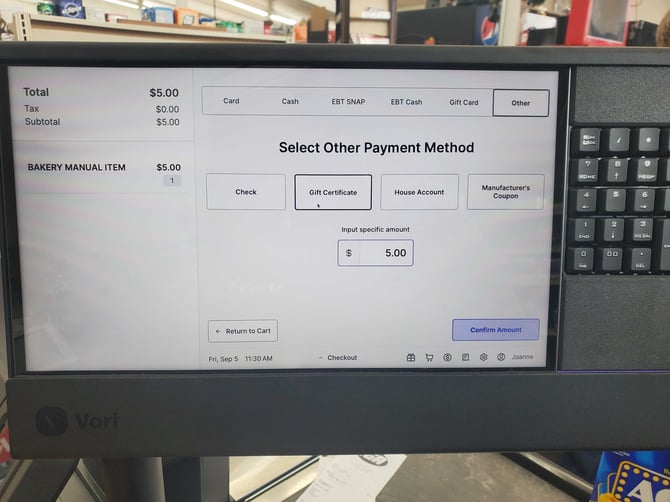
The POS will apply the amount to the total. If the certificate covers the full cost, the transaction will close. If there is a remaining balance, the shopper can pay the rest via other payment options.
💡 Tip: Once the transaction is complete, collect the physical certificate from the shopper. We recommend writing "REDEEMED" and the date across the front and keeping it in the register, to prevent reuse.
Troubleshooting
What if the purchase is less than the certificate value? If a shopper uses a $50 certificate for a $30 purchase, you will need to follow your specific store policy regarding the remaining $20. The POS allows you to accept the payment, but you must decide if you will issue the change in Cash or issue a new, smaller gift certificate for the difference.
What if the certificate is damaged? As long as the store name, authorized signature, and value are legible, you can accept it. If the critical information is unreadable, politely decline the payment to protect your store's margins.
Can I use the "Gift Card" button instead? No. The Gift Card button is used for Vori issued gift cards and integrated, plastic cards with magnetic stripes. Always use Gift Certificate (located under the Other menu) for paper vouchers to ensure your reporting remains accurate.